UWPSpy 1.5 has been released, enhancing the toolkit available to UWP (Universal Windows Platform) app developers. This utility, developed by the creator of Textify and 7+ Taskbar Tweaker, allows users to inspect and manipulate UWP-based applications effectively.
UWPSpy offers several practical features, enabling developers to visualize real-time changes in their projects. This functionality not only facilitates immediate feedback during the development process but also significantly optimizes workflow efficiency. Developers can modify UWP applications by repositioning UI elements and making various adjustments. While some technical knowledge is necessary to handle these modifications effectively, UWPSpy simplifies the process, easing potential concerns.
One of the standout features of UWPSpy is its capability to observe changes in real-time. This is particularly beneficial when designing user interfaces, as developers can see how adjustments impact the app's structure and performance instantaneously. When a user selects specific properties in the app's UI, the linked elements are highlighted, and any modifications made are reflected immediately.
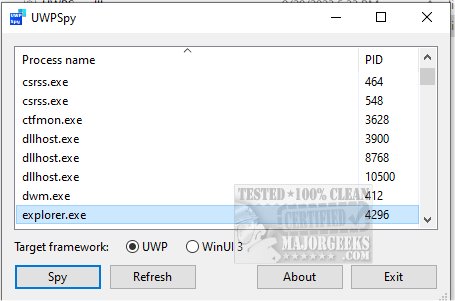
To utilize UWPSpy, users need to run the UWPSpy.exe file and select the target UWP or WinUI 3 application they wish to inspect. A window displaying the application's UI elements will open for each UI thread of the selected application. Users can close the spying window if needed, and it can be reopened by running UWPSpy.exe again and selecting the same application. To cease monitoring an application entirely, the user must terminate its process.
As a precaution, it is recommended to create a restore point before making any changes, just in case issues arise during the development process.
In conclusion, UWPSpy 1.5 is an essential tool for UWP app developers, offering a streamlined approach to app modification and real-time observation of changes. By enhancing the efficiency of development workflows, it allows developers to focus on innovation and creativity in their projects. Future updates may include even more features to support developers in their app-building endeavors, such as enhanced user interface tools or integration with other development environments, making UWPSpy an indispensable asset in the realm of UWP app development
UWPSpy offers several practical features, enabling developers to visualize real-time changes in their projects. This functionality not only facilitates immediate feedback during the development process but also significantly optimizes workflow efficiency. Developers can modify UWP applications by repositioning UI elements and making various adjustments. While some technical knowledge is necessary to handle these modifications effectively, UWPSpy simplifies the process, easing potential concerns.
One of the standout features of UWPSpy is its capability to observe changes in real-time. This is particularly beneficial when designing user interfaces, as developers can see how adjustments impact the app's structure and performance instantaneously. When a user selects specific properties in the app's UI, the linked elements are highlighted, and any modifications made are reflected immediately.
To utilize UWPSpy, users need to run the UWPSpy.exe file and select the target UWP or WinUI 3 application they wish to inspect. A window displaying the application's UI elements will open for each UI thread of the selected application. Users can close the spying window if needed, and it can be reopened by running UWPSpy.exe again and selecting the same application. To cease monitoring an application entirely, the user must terminate its process.
As a precaution, it is recommended to create a restore point before making any changes, just in case issues arise during the development process.
In conclusion, UWPSpy 1.5 is an essential tool for UWP app developers, offering a streamlined approach to app modification and real-time observation of changes. By enhancing the efficiency of development workflows, it allows developers to focus on innovation and creativity in their projects. Future updates may include even more features to support developers in their app-building endeavors, such as enhanced user interface tools or integration with other development environments, making UWPSpy an indispensable asset in the realm of UWP app development
UWPSpy 1.5 released
UWPSpy (brought to you by the developer of Textify and 7+ Taskbar Tweaker) provides a way to inspect and manipulate UWP-based apps.