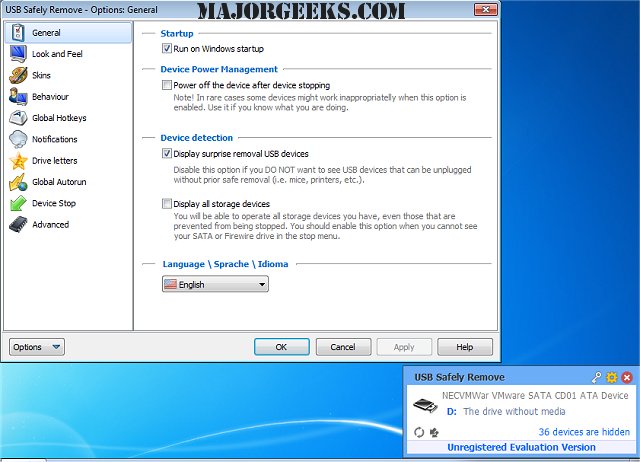
USB Safely Remove 7.3.1 has been released, offering users a superior alternative to the standard Windows safe removal tool. This software enhances the user experience by streamlining the process of safely disconnecting USB and eSATA devices, ultimately saving time and increasing productivity.
Key features of USB Safely Remove include the ability to identify devices quickly through a user-friendly menu that displays device icons and real names. Users can customize their experience by renaming devices and hiding those they rarely need to remove. The software also helps identify what is preventing a device from being safely removed, and allows for the removal process to be executed via hotkeys.
Additionally, USB Safely Remove extends the functionality of portable devices through features like autorun for programs upon connection or disconnection of devices, and command line support for safe removal. Unique capabilities include the option to hide drives from empty card-reader slots, power off devices in Windows Vista and 7, and individually eject memory cards from multi-slot readers.
In summary, USB Safely Remove 7.3.1 is not just a tool for safely removing hardware, but a comprehensive solution that enhances device management and user efficiency. It is particularly beneficial for users who frequently work with multiple USB devices and require a more intuitive and powerful interface.
As technology continues to evolve, users can expect further enhancements in device management tools that prioritize security, usability, and automation. Future updates may introduce even more advanced features, such as improved compatibility with the latest operating systems and enhanced troubleshooting capabilities for USB-related issues
Key features of USB Safely Remove include the ability to identify devices quickly through a user-friendly menu that displays device icons and real names. Users can customize their experience by renaming devices and hiding those they rarely need to remove. The software also helps identify what is preventing a device from being safely removed, and allows for the removal process to be executed via hotkeys.
Additionally, USB Safely Remove extends the functionality of portable devices through features like autorun for programs upon connection or disconnection of devices, and command line support for safe removal. Unique capabilities include the option to hide drives from empty card-reader slots, power off devices in Windows Vista and 7, and individually eject memory cards from multi-slot readers.
In summary, USB Safely Remove 7.3.1 is not just a tool for safely removing hardware, but a comprehensive solution that enhances device management and user efficiency. It is particularly beneficial for users who frequently work with multiple USB devices and require a more intuitive and powerful interface.
As technology continues to evolve, users can expect further enhancements in device management tools that prioritize security, usability, and automation. Future updates may introduce even more advanced features, such as improved compatibility with the latest operating systems and enhanced troubleshooting capabilities for USB-related issues
USB Safely Remove 7.3.1 released
USB Safely Remove is an enhanced and hassle-free replacement for Windows safe removal tool.