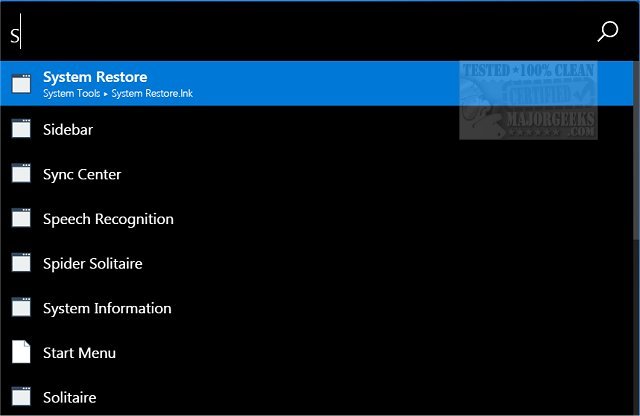
Ueli version 9.29.0 has been released, enhancing its functionality as an open-source systray application designed for launching programs and Windows tools through a straightforward search interface. The application operates quietly in the system tray, allowing users to access it by right-clicking the icon or by pressing Alt + Spacebar. Upon activation, a sleek black search bar appears, where users can type in their desired applications or tools, with results populating instantly as they type.
Ueli streamlines the user experience by providing an intuitive settings panel, accessible via right-clicking the icon. This panel allows for customization to better fit individual preferences, such as configuring mouse interactions, selecting application folders, setting autostart preferences, choosing search engines, and creating custom commands and hotkeys. For users seeking assistance, a Help tutorial is available on the developer's website, although the application itself is designed to be user-friendly and uncomplicated.
In addition to its core features, Ueli is continuously being updated, and the latest version may include bug fixes and performance improvements that enhance its overall utility. Users can look forward to future updates that may introduce new features or enhancements based on community feedback. For those interested in maximizing their productivity on Windows, Ueli stands out as an efficient tool for quick access to applications and tools, complementing other helpful guides on Windows usage and optimization
Ueli streamlines the user experience by providing an intuitive settings panel, accessible via right-clicking the icon. This panel allows for customization to better fit individual preferences, such as configuring mouse interactions, selecting application folders, setting autostart preferences, choosing search engines, and creating custom commands and hotkeys. For users seeking assistance, a Help tutorial is available on the developer's website, although the application itself is designed to be user-friendly and uncomplicated.
In addition to its core features, Ueli is continuously being updated, and the latest version may include bug fixes and performance improvements that enhance its overall utility. Users can look forward to future updates that may introduce new features or enhancements based on community feedback. For those interested in maximizing their productivity on Windows, Ueli stands out as an efficient tool for quick access to applications and tools, complementing other helpful guides on Windows usage and optimization
ueli 9.29.0 released
ueli is an open-source systray app that permits you to launch programs and Windows tools via a simple search interface.