uDiscMounter has released versions 25.1 and 24.9, enhancing its functionality for managing CD and DVD image files. This versatile software supports various formats, including ISO, BIN, IMG, and many others, allowing users to create a virtual drive on their computers. This feature enables effortless access to disc images as if they were physical discs.
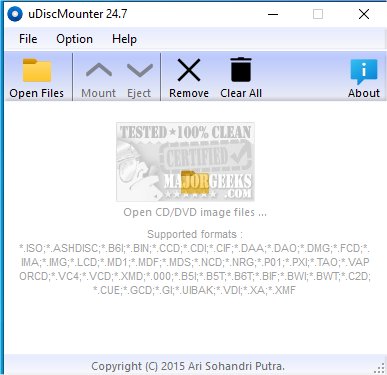
The application is designed with user experience in mind, boasting a clean and intuitive graphical interface. Users can quickly mount one or multiple image files with just a few clicks, which creates a virtual drive for easy browsing of the image contents through Windows Explorer. The main window provides a comprehensive list of supported formats, catering to users who need flexibility in handling different image types.
Beyond basic mounting capabilities, uDiscMounter offers additional features to enhance the exploration of mounted images. Users can navigate through files and folders seamlessly, simplifying data viewing and extraction. The software’s efficient design allows for minimal system resource usage, making it suitable for both novice and experienced users.
To mount an image, users simply click a designated button to load the disc image into a virtual drive. Once mounted, the contents can be accessed like any other file on the local system, facilitating operations such as file copying or application execution directly from the image. When done, ejecting the image removes it from the virtual drive without any physical interaction required.
uDiscMounter supports a wide range of image formats beyond the common ones, including B6I, CCD, CDI, CIF, DAA, DMG, LCD, NRG, XMD, B5T, BIF, BWI, BWT, C2D, CUE, GCD, VDI, XA, and XMF, among others.
In conclusion, uDiscMounter is an efficient tool for virtual disk management, allowing users to easily create, mount, and unmount virtual discs while maintaining a user-friendly approach. This application streamlines the process of organizing virtual storage solutions, making it accessible to all users regardless of their technical expertise.
With the continual development of such software, users can expect further enhancements and additional features that will simplify even more the management of virtual disks and improve overall productivity
The application is designed with user experience in mind, boasting a clean and intuitive graphical interface. Users can quickly mount one or multiple image files with just a few clicks, which creates a virtual drive for easy browsing of the image contents through Windows Explorer. The main window provides a comprehensive list of supported formats, catering to users who need flexibility in handling different image types.
Beyond basic mounting capabilities, uDiscMounter offers additional features to enhance the exploration of mounted images. Users can navigate through files and folders seamlessly, simplifying data viewing and extraction. The software’s efficient design allows for minimal system resource usage, making it suitable for both novice and experienced users.
To mount an image, users simply click a designated button to load the disc image into a virtual drive. Once mounted, the contents can be accessed like any other file on the local system, facilitating operations such as file copying or application execution directly from the image. When done, ejecting the image removes it from the virtual drive without any physical interaction required.
uDiscMounter supports a wide range of image formats beyond the common ones, including B6I, CCD, CDI, CIF, DAA, DMG, LCD, NRG, XMD, B5T, BIF, BWI, BWT, C2D, CUE, GCD, VDI, XA, and XMF, among others.
In conclusion, uDiscMounter is an efficient tool for virtual disk management, allowing users to easily create, mount, and unmount virtual discs while maintaining a user-friendly approach. This application streamlines the process of organizing virtual storage solutions, making it accessible to all users regardless of their technical expertise.
With the continual development of such software, users can expect further enhancements and additional features that will simplify even more the management of virtual disks and improve overall productivity
uDiscMounter 25.1 / 24.9 released
uDiscMounter allows you to mount various CD and DVD image file formats, including ISO, BIN, IMG, and more.