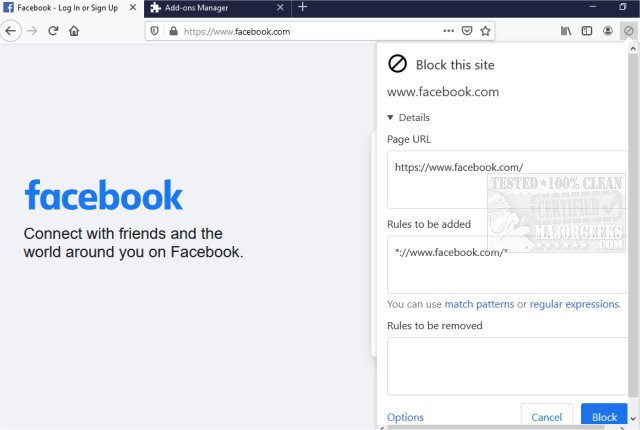
The recently released version 10.0.1 of uBlacklist for Chrome and Firefox offers users the ability to filter out unwanted websites from Google search results effectively. This browser extension allows users to create specific rules for blocking sites by using match patterns or regular expressions, making it easy to tailor search results according to personal preferences. Users can add sites quickly through a toolbar icon, and the extension ensures that the filtering applies to specific addresses, allowing for a focused search experience on related topics.
In addition to its blocking features, uBlacklist also provides functionality for syncing blacklists across devices using Google Drive and offers the option to subscribe to public blacklists curated by other users. This makes it a valuable tool for researchers or anyone looking to avoid distracting or irrelevant search results, thus enhancing productivity.
Beyond uBlacklist, users can explore additional features and tips to further improve their browsing experience, such as optimizing Chrome's settings with specific flags, managing browser history privacy, and restoring browser performance to its original state.
Overall, uBlacklist serves as a powerful tool for refining search results and streamlining online research, catering to those who seek a more personalized and efficient way to navigate the web. As the internet continues to evolve, tools like uBlacklist will remain essential for users aiming to control their online experience effectively
In addition to its blocking features, uBlacklist also provides functionality for syncing blacklists across devices using Google Drive and offers the option to subscribe to public blacklists curated by other users. This makes it a valuable tool for researchers or anyone looking to avoid distracting or irrelevant search results, thus enhancing productivity.
Beyond uBlacklist, users can explore additional features and tips to further improve their browsing experience, such as optimizing Chrome's settings with specific flags, managing browser history privacy, and restoring browser performance to its original state.
Overall, uBlacklist serves as a powerful tool for refining search results and streamlining online research, catering to those who seek a more personalized and efficient way to navigate the web. As the internet continues to evolve, tools like uBlacklist will remain essential for users aiming to control their online experience effectively
uBlacklist for Chrome and Firefox 10.0.1 released
uBlacklist for Chrome and Firefox removes specific sites from showing up in Google search.
uBlacklist for Chrome and Firefox 10.0.1 released @ MajorGeeks