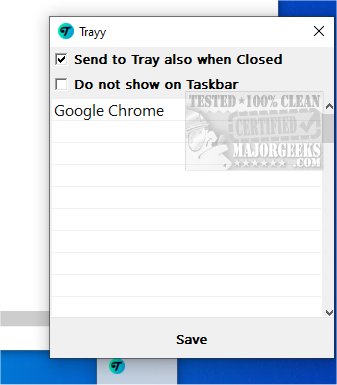
Trayy 3.0 has been released as an Open Source tool aimed at improving the system tray experience by allowing users to integrate web applications, shortcuts, and various utilities directly into the tray. This integration provides quick access to frequently used tools and resources, thereby streamlining workflows and boosting productivity. Trayy draws inspiration from RBTray, a similar productivity tool, with a particular focus on supporting Progressive Web Apps (PWAs). Its minimalistic interface helps reduce desktop clutter and promotes a more organized workspace.
Key Features of Trayy:
- Send to Tray: Allows users to minimize favorite applications to the system tray, promoting a cleaner workspace.
- Hide and Seek Champion: Users can completely hide applications from the taskbar, keeping the desktop tidy.
- App Support: Compatible with PWAs and many applications that traditionally lack system tray support, such as Thunderbird.
- Windows Compatibility: Tested on Windows 10 and 11, with support for toast notifications.
- Lightweight and Portable: Trayy is designed to be efficient and easy to use, requiring minimal resources.
By facilitating easy access to frequently used applications, Trayy helps users maintain focus and efficiency, ensuring an uninterrupted workflow. Its support for PWAs allows users to maximize the benefits of browser-based tools, further enhancing productivity. To begin using Trayy, users can refer to the "Getting Started" section, which provides straightforward instructions.
In Summary: Trayy is a valuable tool for anyone looking to optimize their workspace and minimize distractions. Its effective system tray management features make it an excellent choice for enhancing productivity.
Extended Insights:
As the digital workspace continues to evolve, tools like Trayy are becoming increasingly vital for users seeking to streamline their operations. With the rise of web-based applications and remote work, integrating such tools into the system tray can greatly enhance efficiency. Future updates could expand Trayy's capabilities by integrating features like customizable notifications, enhanced user personalization, or improved compatibility with additional operating systems. The focus on lightweight, portable applications is particularly relevant in today's mobile-first world, where users require flexibility without sacrificing performance. Overall, Trayy not only meets current needs but also positions itself as a forward-thinking solution in the realm of productivity tools
Key Features of Trayy:
- Send to Tray: Allows users to minimize favorite applications to the system tray, promoting a cleaner workspace.
- Hide and Seek Champion: Users can completely hide applications from the taskbar, keeping the desktop tidy.
- App Support: Compatible with PWAs and many applications that traditionally lack system tray support, such as Thunderbird.
- Windows Compatibility: Tested on Windows 10 and 11, with support for toast notifications.
- Lightweight and Portable: Trayy is designed to be efficient and easy to use, requiring minimal resources.
By facilitating easy access to frequently used applications, Trayy helps users maintain focus and efficiency, ensuring an uninterrupted workflow. Its support for PWAs allows users to maximize the benefits of browser-based tools, further enhancing productivity. To begin using Trayy, users can refer to the "Getting Started" section, which provides straightforward instructions.
In Summary: Trayy is a valuable tool for anyone looking to optimize their workspace and minimize distractions. Its effective system tray management features make it an excellent choice for enhancing productivity.
Extended Insights:
As the digital workspace continues to evolve, tools like Trayy are becoming increasingly vital for users seeking to streamline their operations. With the rise of web-based applications and remote work, integrating such tools into the system tray can greatly enhance efficiency. Future updates could expand Trayy's capabilities by integrating features like customizable notifications, enhanced user personalization, or improved compatibility with additional operating systems. The focus on lightweight, portable applications is particularly relevant in today's mobile-first world, where users require flexibility without sacrificing performance. Overall, Trayy not only meets current needs but also positions itself as a forward-thinking solution in the realm of productivity tools
Trayy 3.0 released
Trayy is an Open Source tool designed to enhance the systray experience by enabling you to integrate web applications, shortcuts, and various utilities directly into the tray.