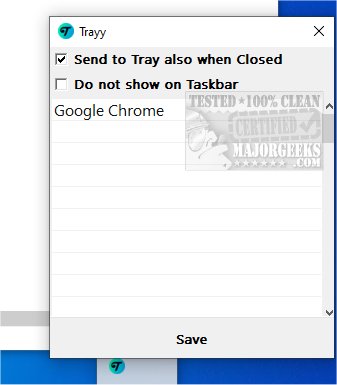
Trayy 2.4 has been released, introducing an open-source tool aimed at improving the system tray experience by allowing users to integrate web applications, shortcuts, and various utilities into the tray. By doing this, Trayy provides quick and convenient access to frequently used tools, making workflows more streamlined and enhancing overall productivity.
Trayy is inspired by another productivity application, RBTray, and focuses primarily on supporting Progressive Web Apps (PWAs). Its minimalistic interface helps reduce desktop clutter, fostering a more organized workspace. Key features of Trayy include:
- Send to Tray: Users can minimize their favorite apps to the system tray, maintaining a tidy desktop.
- Hide Applications: The tool allows complete hiding of applications from the taskbar, further decluttering the workspace.
- App Support: It is particularly effective for PWAs and other applications that lack native system tray support, such as Thunderbird.
- Windows Compatibility: Trayy has been tested on Windows 10 and 11 and supports toast notifications.
- Portability: The application is lightweight and fully portable, making it easy to use on various systems.
By facilitating easy access to frequently used applications, Trayy helps users maintain focus and efficiency, ensuring uninterrupted workflows. The integration of PWAs allows users to harness the capabilities of modern browser-based tools, enhancing productivity further.
To begin using Trayy, users can refer to the Getting Started section for straightforward guidance. The app has received positive feedback, with many praising its effectiveness in system tray management and its ability to optimize workspaces while minimizing distractions.
In summary, Trayy is an innovative solution for enhancing productivity through efficient system tray management, and it is particularly beneficial for users who frequently utilize web applications. As remote work and digital tools continue to evolve, tools like Trayy play a crucial role in optimizing user experience and workflow.
Geek Verdict: Trayy is highly recommended for anyone looking to improve their workspace organization and focus on tasks with minimal distractions.
For users interested in additional productivity tools, similar applications include MajorGeeks Registry Tweaks, tips for customizing the Windows Start and Taskbar, and methods for changing text sizes in Windows 10 title bars
Trayy is inspired by another productivity application, RBTray, and focuses primarily on supporting Progressive Web Apps (PWAs). Its minimalistic interface helps reduce desktop clutter, fostering a more organized workspace. Key features of Trayy include:
- Send to Tray: Users can minimize their favorite apps to the system tray, maintaining a tidy desktop.
- Hide Applications: The tool allows complete hiding of applications from the taskbar, further decluttering the workspace.
- App Support: It is particularly effective for PWAs and other applications that lack native system tray support, such as Thunderbird.
- Windows Compatibility: Trayy has been tested on Windows 10 and 11 and supports toast notifications.
- Portability: The application is lightweight and fully portable, making it easy to use on various systems.
By facilitating easy access to frequently used applications, Trayy helps users maintain focus and efficiency, ensuring uninterrupted workflows. The integration of PWAs allows users to harness the capabilities of modern browser-based tools, enhancing productivity further.
To begin using Trayy, users can refer to the Getting Started section for straightforward guidance. The app has received positive feedback, with many praising its effectiveness in system tray management and its ability to optimize workspaces while minimizing distractions.
In summary, Trayy is an innovative solution for enhancing productivity through efficient system tray management, and it is particularly beneficial for users who frequently utilize web applications. As remote work and digital tools continue to evolve, tools like Trayy play a crucial role in optimizing user experience and workflow.
Geek Verdict: Trayy is highly recommended for anyone looking to improve their workspace organization and focus on tasks with minimal distractions.
For users interested in additional productivity tools, similar applications include MajorGeeks Registry Tweaks, tips for customizing the Windows Start and Taskbar, and methods for changing text sizes in Windows 10 title bars
Trayy 2.4 released
Trayy is an Open Source tool designed to enhance the systray experience by enabling you to integrate web applications, shortcuts, and various utilities directly into the tray.