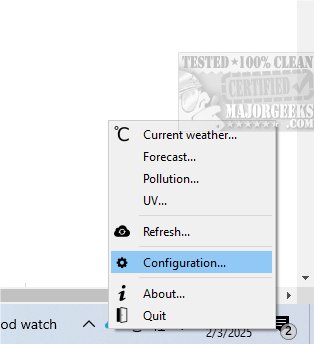
Tray Weather is a user-friendly application designed to deliver real-time weather updates for specific geographic locations. It operates from the system tray, displaying an icon that represents current weather conditions and temperature. Users can access detailed weather information and configuration options quickly through a tray menu, enhancing their experience and enabling timely updates on weather changes.
Setting Up & Utilizing Tray Weather
Users can automatically obtain their computer's location via http://ip-api.com/, or they can manually input their geographic coordinates by specifying latitude and longitude. The application sources its weather data from a reliable provider, and in case of a network error, the tray icon will show an error indication. After initial setup, hovering over the system tray icon reveals a tooltip with the current temperature and a brief weather description. Notably, during nighttime, the icon updates to reflect the current phase of the moon.
Additional Info & Comprehensive Reports
For more comprehensive weather insights, users can double-click the system tray icon, launching a detailed report that includes vital weather metrics such as temperature, cloud cover, humidity, atmospheric pressure, and wind speed. The main interface allows for interactive visualizations of local weather conditions, including temperature, rainfall, and wind speed on a customizable map. Users can select specific weather parameters to focus on and choose between two types of maps for enhanced visualization. This feature enables a deeper understanding of the weather data relevant to individual needs.
Geek Verdict
Tray Weather stands out as a valuable tool that provides essential weather insights tailored to user-selected locations. Its array of features, elegantly integrated into an intuitive interface, ensures that users remain well-informed about current weather conditions. Enjoy the convenience of staying connected to the ever-changing moods of nature with Tray Weather.
Extended Features and Future Developments
In addition to its current capabilities, future updates may include enhanced forecast features, allowing users to view extended weather predictions. Integrating alerts for severe weather conditions could also provide users with timely warnings, enhancing safety and preparedness. The application could benefit from incorporating user feedback to further refine its interface and functionality, ensuring that it meets the evolving needs of its audience. Additionally, support for more languages can broaden its accessibility to a global user base. As weather patterns become increasingly unpredictable, tools like Tray Weather will be essential for keeping users informed and prepared for various weather conditions
Setting Up & Utilizing Tray Weather
Users can automatically obtain their computer's location via http://ip-api.com/, or they can manually input their geographic coordinates by specifying latitude and longitude. The application sources its weather data from a reliable provider, and in case of a network error, the tray icon will show an error indication. After initial setup, hovering over the system tray icon reveals a tooltip with the current temperature and a brief weather description. Notably, during nighttime, the icon updates to reflect the current phase of the moon.
Additional Info & Comprehensive Reports
For more comprehensive weather insights, users can double-click the system tray icon, launching a detailed report that includes vital weather metrics such as temperature, cloud cover, humidity, atmospheric pressure, and wind speed. The main interface allows for interactive visualizations of local weather conditions, including temperature, rainfall, and wind speed on a customizable map. Users can select specific weather parameters to focus on and choose between two types of maps for enhanced visualization. This feature enables a deeper understanding of the weather data relevant to individual needs.
Geek Verdict
Tray Weather stands out as a valuable tool that provides essential weather insights tailored to user-selected locations. Its array of features, elegantly integrated into an intuitive interface, ensures that users remain well-informed about current weather conditions. Enjoy the convenience of staying connected to the ever-changing moods of nature with Tray Weather.
Extended Features and Future Developments
In addition to its current capabilities, future updates may include enhanced forecast features, allowing users to view extended weather predictions. Integrating alerts for severe weather conditions could also provide users with timely warnings, enhancing safety and preparedness. The application could benefit from incorporating user feedback to further refine its interface and functionality, ensuring that it meets the evolving needs of its audience. Additionally, support for more languages can broaden its accessibility to a global user base. As weather patterns become increasingly unpredictable, tools like Tray Weather will be essential for keeping users informed and prepared for various weather conditions
Tray Weather 1.37.2 released
Tray Weather is designed to provide real-time weather information for specific geographic locations in a small dialog and down in the systray.