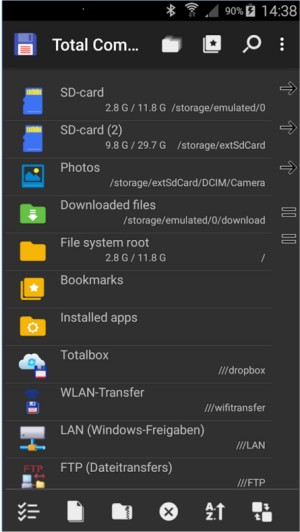
Total Commander has released its version 11.57 RC 5 and 11.56, continuing its legacy as an essential file manager for Windows and Android devices. Known for its practical and no-nonsense approach, Total Commander stands out from conventional file explorers, providing a dual-pane interface that allows for quick file management without the need to switch between windows. With support for various archive formats (including ZIP and RAR) and a built-in FTP client, it offers a comprehensive toolkit for users who want to maintain control over their file organization.
The software excels in features like the Multi-Rename Tool, which allows users to rename multiple files according to customizable patterns, making it ideal for organizing large directories. Additionally, it integrates seamlessly with plugins for enhanced functionality, such as cloud storage access and Android device browsing. For those who prefer navigating through keyboard shortcuts, Total Commander caters to that need, enabling faster file operations.
While Total Commander may not have the most modern user interface (UI), it compensates with stability and speed. Users can customize the interface with skins if they desire a fresher look. It may require a bit of a learning curve to become accustomed to its layout and shortcuts, but the efficiency gains are significant, especially for power users and system administrators.
In summary, Total Commander is an indispensable tool for anyone looking to improve their file management experience on Windows and Android. Its focus on utility over aesthetics makes it a preferred choice for those who value functionality. Even though the free version includes a minor inconvenience with a startup challenge question, it remains a tool that many users find essential for various tasks, from file organization to server management.
Extension:
As technology continues to evolve, Total Commander has maintained its relevance by consistently updating its features while keeping its core functionalities intact. The software is especially useful for workflows that involve repetitive tasks, such as developers who manage large quantities of files or system admins who perform regular backups.
Furthermore, with the rise of cloud computing, Total Commander’s ability to integrate with platforms like Dropbox and OneDrive means it can adapt to modern needs. This versatility makes it suitable for both personal use and professional environments, where efficient file handling can save significant time.
Looking ahead, users may benefit from future enhancements such as improved cloud service integrations or even AI-driven features to help organize files based on usage patterns. The community surrounding Total Commander is also vibrant, with many users contributing plugins that extend its capabilities, ensuring that it remains a powerful tool for file management in the years to come. Whether you're managing files on a local drive or syncing between devices, Total Commander is likely to continue being a go-to solution for many
The software excels in features like the Multi-Rename Tool, which allows users to rename multiple files according to customizable patterns, making it ideal for organizing large directories. Additionally, it integrates seamlessly with plugins for enhanced functionality, such as cloud storage access and Android device browsing. For those who prefer navigating through keyboard shortcuts, Total Commander caters to that need, enabling faster file operations.
While Total Commander may not have the most modern user interface (UI), it compensates with stability and speed. Users can customize the interface with skins if they desire a fresher look. It may require a bit of a learning curve to become accustomed to its layout and shortcuts, but the efficiency gains are significant, especially for power users and system administrators.
In summary, Total Commander is an indispensable tool for anyone looking to improve their file management experience on Windows and Android. Its focus on utility over aesthetics makes it a preferred choice for those who value functionality. Even though the free version includes a minor inconvenience with a startup challenge question, it remains a tool that many users find essential for various tasks, from file organization to server management.
Extension:
As technology continues to evolve, Total Commander has maintained its relevance by consistently updating its features while keeping its core functionalities intact. The software is especially useful for workflows that involve repetitive tasks, such as developers who manage large quantities of files or system admins who perform regular backups.
Furthermore, with the rise of cloud computing, Total Commander’s ability to integrate with platforms like Dropbox and OneDrive means it can adapt to modern needs. This versatility makes it suitable for both personal use and professional environments, where efficient file handling can save significant time.
Looking ahead, users may benefit from future enhancements such as improved cloud service integrations or even AI-driven features to help organize files based on usage patterns. The community surrounding Total Commander is also vibrant, with many users contributing plugins that extend its capabilities, ensuring that it remains a powerful tool for file management in the years to come. Whether you're managing files on a local drive or syncing between devices, Total Commander is likely to continue being a go-to solution for many
Total Commander 11.57 RC 5 / 11.56 released
Total Commander is an all-in-one file manager for your Windows and Android devices.