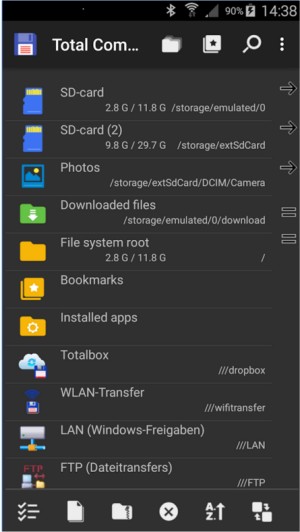
Total Commander has recently released Beta 2 of version 11.57 and version 11.56, solidifying its reputation as a powerful file manager for Windows and Android devices. Unlike the standard Windows Explorer, Total Commander offers a robust and efficient dual-pane interface that allows users to manage files seamlessly, making it a preferred choice for those who require more control over their file operations.
The software, which has been around since the '90s, is designed for users who prefer functionality over aesthetics. It features an array of tools including support for various archive formats (ZIP, RAR, 7Z, TAR, GZ), built-in FTP functionality, and a powerful multi-rename tool that allows for batch file operations with ease. Users can effortlessly rename multiple files, manage large backups, and search for files based on various criteria.
Total Commander excels in its ability to integrate with additional tools and plugins, enhancing its functionality without the need for external applications. The ability to connect to FTP servers and cloud services like Dropbox and OneDrive simplifies file management tasks for users. Moreover, for those who prefer keyboard shortcuts, Total Commander provides a fast, keyboard-driven experience that accelerates file operations.
While Total Commander boasts numerous strengths, such as its lightweight design and stability, it does have some drawbacks. Its user interface may seem outdated to some, and it requires a learning curve to become familiar with its layout and shortcuts. Additionally, it may not appeal to users who favor modern, flashy interfaces.
Overall, Total Commander is highly regarded for its utility, especially among power users, system administrators, and developers. It operates without ads and is resource-efficient, focusing purely on functionality. Despite its free version having a small challenge question at startup, many users find it a worthwhile tool that significantly enhances their file management experience. Whether for cleaning up old drives, managing servers, or simply navigating through files more effectively, Total Commander remains an indispensable tool for many users.
In addition to its existing features, future updates could include enhanced user interface options, more customizable themes, or integrated cloud storage solutions to further streamline the user experience. As technology evolves, continuing to adapt to user feedback and demands will ensure that Total Commander remains relevant and effective in the ever-changing landscape of file management
The software, which has been around since the '90s, is designed for users who prefer functionality over aesthetics. It features an array of tools including support for various archive formats (ZIP, RAR, 7Z, TAR, GZ), built-in FTP functionality, and a powerful multi-rename tool that allows for batch file operations with ease. Users can effortlessly rename multiple files, manage large backups, and search for files based on various criteria.
Total Commander excels in its ability to integrate with additional tools and plugins, enhancing its functionality without the need for external applications. The ability to connect to FTP servers and cloud services like Dropbox and OneDrive simplifies file management tasks for users. Moreover, for those who prefer keyboard shortcuts, Total Commander provides a fast, keyboard-driven experience that accelerates file operations.
While Total Commander boasts numerous strengths, such as its lightweight design and stability, it does have some drawbacks. Its user interface may seem outdated to some, and it requires a learning curve to become familiar with its layout and shortcuts. Additionally, it may not appeal to users who favor modern, flashy interfaces.
Overall, Total Commander is highly regarded for its utility, especially among power users, system administrators, and developers. It operates without ads and is resource-efficient, focusing purely on functionality. Despite its free version having a small challenge question at startup, many users find it a worthwhile tool that significantly enhances their file management experience. Whether for cleaning up old drives, managing servers, or simply navigating through files more effectively, Total Commander remains an indispensable tool for many users.
In addition to its existing features, future updates could include enhanced user interface options, more customizable themes, or integrated cloud storage solutions to further streamline the user experience. As technology evolves, continuing to adapt to user feedback and demands will ensure that Total Commander remains relevant and effective in the ever-changing landscape of file management
Total Commander 11.57 Beta 2 / 11.56 released
Total Commander is an all-in-one file manager for your Windows and Android devices.