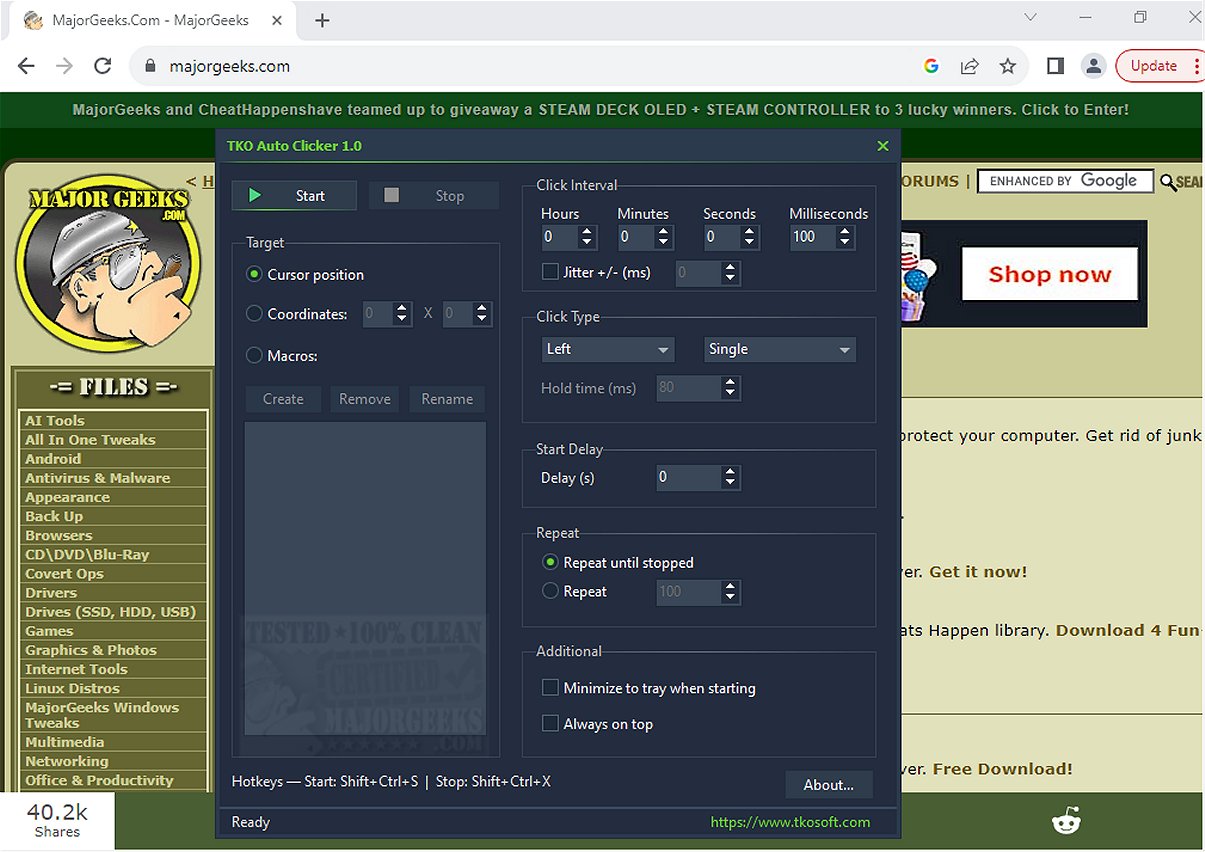
TKO Auto Clicker 2.1 is a powerful tool designed to automate repetitive mouse clicks, cursor movements, and recorded mouse macros, significantly improving efficiency for tasks that require frequent clicking or specific mouse actions. With its user-friendly interface, TKO Auto Clicker allows users to replicate left, right, and middle mouse button actions seamlessly.
Key Features of TKO Auto Clicker:
- Multiple Clicking Modes: Users can choose from single clicks, double clicks, and hold clicks.
- Customizable Click Intervals: The tool allows for precise adjustments to click intervals, down to the millisecond, accommodating varied user needs.
- Flexible Repetition Options: Users can set the auto-clicker to repeat indefinitely or limit the number of repetitions.
- Start Delay and Timing Jitter: A start delay can be incorporated before automation begins, and an optional jitter feature can be activated to create more natural clicking patterns.
- Cursor Positioning: Clicks can be executed either at the current cursor position or at fixed screen coordinates, making it particularly useful for gaming and applications requiring precise input.
- Mouse Macro Recorder: This feature enables users to record, save, rename, and playback complex sequences of mouse actions, allowing for more intricate automation than simple clicks.
- Global Hotkeys: Predefined keyboard shortcuts facilitate easy management of the auto-clicker without needing to switch back to the application window, enhancing usability during full-screen tasks.
Highlighted Feature: Cursor Positioning Flexibility
One of the most notable aspects of TKO Auto Clicker is its ability to execute clicks based on the cursor's current position or predetermined fixed coordinates. This versatility is invaluable for users engaged in gaming or software applications where precise clicking is essential.
Convenience and Efficiency
The global hotkeys feature is particularly beneficial, allowing users to start or stop the automation and record macros effortlessly, thereby maintaining focus during critical tasks.
Geek Verdict
TKO Auto Clicker is an essential tool for anyone looking to improve productivity by automating tedious mouse tasks. Say goodbye to the monotony of repetitive clicking and reclaim valuable time in your workflows. This software is perfect for both casual and professional users, whether in gaming or complex software environments.
Future Enhancements and Similar Tools
As TKO Auto Clicker continues to evolve, future updates may introduce even more customization options and advanced automation features. Additionally, users might explore similar tools for enhancing their mouse functionality, such as adjusting double-click settings or enabling mouse pointer trails.
In conclusion, TKO Auto Clicker not only simplifies repetitive tasks but also empowers users to optimize their workflows effectively. Embrace the automation revolution and let TKO Auto Clicker transform the way you work
Key Features of TKO Auto Clicker:
- Multiple Clicking Modes: Users can choose from single clicks, double clicks, and hold clicks.
- Customizable Click Intervals: The tool allows for precise adjustments to click intervals, down to the millisecond, accommodating varied user needs.
- Flexible Repetition Options: Users can set the auto-clicker to repeat indefinitely or limit the number of repetitions.
- Start Delay and Timing Jitter: A start delay can be incorporated before automation begins, and an optional jitter feature can be activated to create more natural clicking patterns.
- Cursor Positioning: Clicks can be executed either at the current cursor position or at fixed screen coordinates, making it particularly useful for gaming and applications requiring precise input.
- Mouse Macro Recorder: This feature enables users to record, save, rename, and playback complex sequences of mouse actions, allowing for more intricate automation than simple clicks.
- Global Hotkeys: Predefined keyboard shortcuts facilitate easy management of the auto-clicker without needing to switch back to the application window, enhancing usability during full-screen tasks.
Highlighted Feature: Cursor Positioning Flexibility
One of the most notable aspects of TKO Auto Clicker is its ability to execute clicks based on the cursor's current position or predetermined fixed coordinates. This versatility is invaluable for users engaged in gaming or software applications where precise clicking is essential.
Convenience and Efficiency
The global hotkeys feature is particularly beneficial, allowing users to start or stop the automation and record macros effortlessly, thereby maintaining focus during critical tasks.
Geek Verdict
TKO Auto Clicker is an essential tool for anyone looking to improve productivity by automating tedious mouse tasks. Say goodbye to the monotony of repetitive clicking and reclaim valuable time in your workflows. This software is perfect for both casual and professional users, whether in gaming or complex software environments.
Future Enhancements and Similar Tools
As TKO Auto Clicker continues to evolve, future updates may introduce even more customization options and advanced automation features. Additionally, users might explore similar tools for enhancing their mouse functionality, such as adjusting double-click settings or enabling mouse pointer trails.
In conclusion, TKO Auto Clicker not only simplifies repetitive tasks but also empowers users to optimize their workflows effectively. Embrace the automation revolution and let TKO Auto Clicker transform the way you work
TKO Auto Clicker 2.1 released
TKO Auto Clicker automates repetitive mouse clicks, cursor movements, and recorded mouse macros. This tool can enhance productivity by streamlining tasks that require frequent clicking or specific mouse actions.