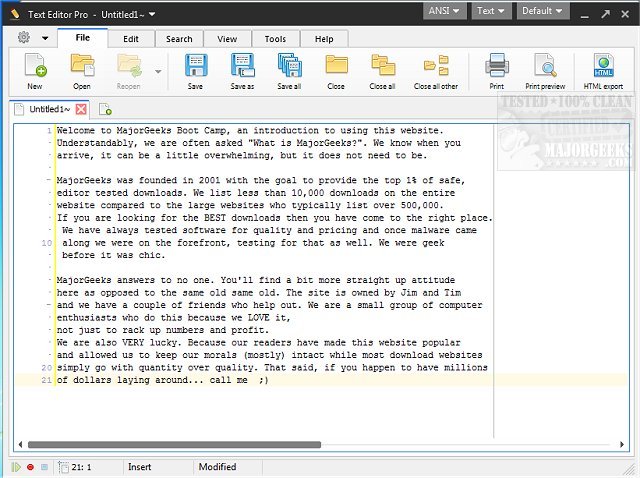
Text Editor Pro, formerly known as EditBone, has recently launched its version 36.2.1, solidifying its reputation as a robust text editing tool that caters to a variety of programming languages and scripts. This powerful software is equipped with features such as syntax highlighting, which facilitates easier coding and code review for languages including HTML, Python, and Ruby.
Key Features of Text Editor Pro
Text Editor Pro stands out with over 100 customization options and ready-made skins, allowing users to tailor the interface to their liking. It includes a Unicode character map and a numerical unit conversion tool, making it versatile for different coding tasks. The software also supports multiple directories and search results, enhancing user productivity.
User Experience and Flexibility
The dual-panel interface of Text Editor Pro offers exceptional flexibility, allowing users to choose between single, double, or triple-column layouts. This feature enables simultaneous work on various projects without feeling limited. The intuitive Directory function facilitates easy navigation and file management directly within the application. Furthermore, the Text Compare feature allows users to open two documents side by side, highlighting differences for easier tracking of changes.
Enhanced Coding Efficiency with Macros
One of the standout features of Text Editor Pro is its Macro functionality, which streamlines the coding process, particularly for repetitive tasks. Users can record actions and replay them with a simple hotkey, significantly reducing time spent on mundane tasks and enhancing overall efficiency.
The Verdict
Text Editor Pro emerges as an indispensable tool for both amateur and professional coders. Its extensive range of features, including advanced formatting options for JSON, SQL, and XML, sophisticated code folding capabilities, and an easy-to-use interface, positions it as a top-tier choice for anyone seeking an enhanced text editing experience.
Future Considerations
As software development continues to evolve, Text Editor Pro may consider integrating cloud-based functionalities for collaborative coding and storage solutions, as well as improved support for additional programming languages and frameworks. This could further expand its user base and enhance its utility in modern coding environments.
By continually updating its features and maintaining a user-centric approach, Text Editor Pro is poised to remain a leading choice for text editing in the years to come
Key Features of Text Editor Pro
Text Editor Pro stands out with over 100 customization options and ready-made skins, allowing users to tailor the interface to their liking. It includes a Unicode character map and a numerical unit conversion tool, making it versatile for different coding tasks. The software also supports multiple directories and search results, enhancing user productivity.
User Experience and Flexibility
The dual-panel interface of Text Editor Pro offers exceptional flexibility, allowing users to choose between single, double, or triple-column layouts. This feature enables simultaneous work on various projects without feeling limited. The intuitive Directory function facilitates easy navigation and file management directly within the application. Furthermore, the Text Compare feature allows users to open two documents side by side, highlighting differences for easier tracking of changes.
Enhanced Coding Efficiency with Macros
One of the standout features of Text Editor Pro is its Macro functionality, which streamlines the coding process, particularly for repetitive tasks. Users can record actions and replay them with a simple hotkey, significantly reducing time spent on mundane tasks and enhancing overall efficiency.
The Verdict
Text Editor Pro emerges as an indispensable tool for both amateur and professional coders. Its extensive range of features, including advanced formatting options for JSON, SQL, and XML, sophisticated code folding capabilities, and an easy-to-use interface, positions it as a top-tier choice for anyone seeking an enhanced text editing experience.
Future Considerations
As software development continues to evolve, Text Editor Pro may consider integrating cloud-based functionalities for collaborative coding and storage solutions, as well as improved support for additional programming languages and frameworks. This could further expand its user base and enhance its utility in modern coding environments.
By continually updating its features and maintaining a user-centric approach, Text Editor Pro is poised to remain a leading choice for text editing in the years to come
Text Editor Pro 36.2.1 released
Text Editor Pro (formerly EditBone) is a powerful text editing tool with syntax highlighting multiple languages and scripts.