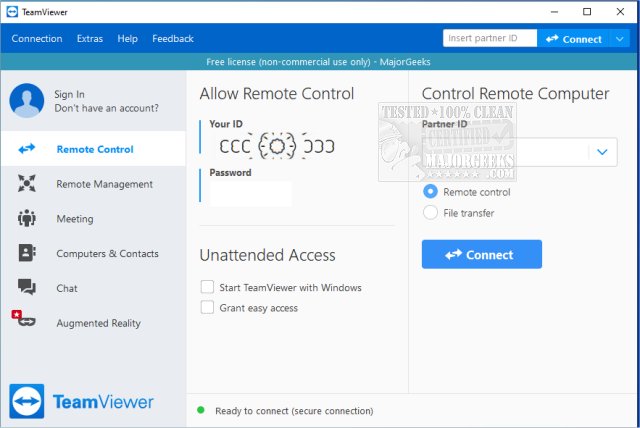
TeamViewer has recently released version 15.76.3, enhancing its reputation as a widely-used and user-friendly remote access program. Ideal for both individuals and small businesses, TeamViewer allows users to remotely access computers from various devices, including Windows, macOS, Linux, Android, and iOS. It can be installed or run as a portable application, making it accessible for a diverse audience. The software is particularly beneficial for those who find troubleshooting tech issues over the phone challenging, as it provides a straightforward way to connect and assist others.
One of TeamViewer's standout features is its ability to generate a unique 9-digit ID and a constantly changing password for each session, ensuring secure access. This makes it easy for even non-technical users to share their screen and receive help. The application allows users to control the remote computer, install applications, and resolve issues efficiently, making it a lifesaver for quick IT support.
TeamViewer is not only great for assisting friends with software installations or troubleshooting problems, but it also allows users to access their own home PCs while traveling. The application supports two-way communication, enabling users to share their desktops for presentations or collaborative projects.
Security is a key focus for TeamViewer, with all connections encrypted using AES (256-bit) technology. The program is known for its fast performance, minimal lag, and ability to function well even on slower internet connections. Users can choose to install the full version for additional features like unattended access or opt for the portable version for quick sessions without installation.
- No installation required for the portable version
- Supports file transfers, chat, and multi-monitor setups
- End-to-end encryption for secure connections
- Compatible with all major platforms
- Some advanced features require full installation
As technology continues to evolve, future updates may further enhance TeamViewer's capabilities, potentially introducing more features or improving existing ones, ensuring it remains relevant in an increasingly digital world
One of TeamViewer's standout features is its ability to generate a unique 9-digit ID and a constantly changing password for each session, ensuring secure access. This makes it easy for even non-technical users to share their screen and receive help. The application allows users to control the remote computer, install applications, and resolve issues efficiently, making it a lifesaver for quick IT support.
TeamViewer is not only great for assisting friends with software installations or troubleshooting problems, but it also allows users to access their own home PCs while traveling. The application supports two-way communication, enabling users to share their desktops for presentations or collaborative projects.
Security is a key focus for TeamViewer, with all connections encrypted using AES (256-bit) technology. The program is known for its fast performance, minimal lag, and ability to function well even on slower internet connections. Users can choose to install the full version for additional features like unattended access or opt for the portable version for quick sessions without installation.
Pros:
- Free for personal use- No installation required for the portable version
- Supports file transfers, chat, and multi-monitor setups
- End-to-end encryption for secure connections
- Compatible with all major platforms
Cons:
- Commercial use may trigger license pop-ups and restrictions- Some advanced features require full installation
Conclusion:
TeamViewer strikes an excellent balance between functionality and ease of use, making it a go-to tool for tech support and remote access. It is particularly valuable for those who frequently assist family and friends with technical issues, providing a reliable and efficient solution without the need for complex setups. Many users have integrated it into their daily routines, significantly reducing the need for in-person assistance. As remote work and help become more prevalent, TeamViewer remains a top choice in the realm of remote desktop applications.As technology continues to evolve, future updates may further enhance TeamViewer's capabilities, potentially introducing more features or improving existing ones, ensuring it remains relevant in an increasingly digital world
TeamViewer 15.76.3 released
TeamViewer is a popular, easy-to-use free remote access program to access or let someone remotely access your computer. It can be installed or run as portable. Video tutorial available.