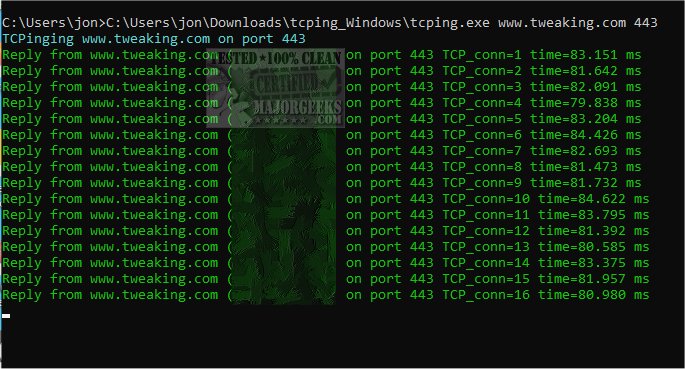
TCPING 2.8.0 has been released as a versatile cross-platform tool that mimics the functionality of the standard ping utility but focuses on TCP ports. It allows users to send TCP probes to specified IP addresses or hostnames, displaying the results clearly. The tool supports both IPv4 and IPv6 protocols, and it uniquely assigns different TCP sequence numbers to successful and unsuccessful probes, enabling users to easily identify failed attempts and track packet loss.
When ICMP is blocked, TCPING serves as a valuable alternative to traditional pinging methods, facilitating the monitoring of network connections, detecting packet loss, analyzing latency, and calculating minimum, average, and maximum latencies for network probes. Users can quickly access connection statistics by pressing the Enter key without interrupting the program's operation. If probe failures occur, TCPING offers an option to retry hostname resolution using the -r flag, which is particularly useful for testing DNS load balancing or Global Server Load Balancers (GSLB).
The program also tracks the longest downtimes and uptimes, providing essential data for assessing network performance and auditing Service Level Agreements (SLAs) with peers. For optimal usage, the developer recommends using Windows Terminal, which enhances the experience through proper colorization.
To use TCPING, simply copy the executable (tcping.exe) to your system's PATH, such as C:\Windows\System32, and run commands like:
- `tcping www.example.com 443`
- `tcping www.example.com 443 -r 10` (to enable retrying name resolution after failures).
For further assistance, a help section is available on the developer's repository.
In addition to its core functionalities, TCPING can be integrated into broader network management practices. Users can leverage its data to improve network configurations, enhance reliability during maintenance work, and ensure compliance with SLAs. As network demands continue to evolve, tools like TCPING remain essential for IT professionals seeking to maintain robust network performance and reliability.
Overall, TCPING 2.8.0 provides a comprehensive set of features for monitoring TCP connections, making it an indispensable tool for network administrators and IT specialists
When ICMP is blocked, TCPING serves as a valuable alternative to traditional pinging methods, facilitating the monitoring of network connections, detecting packet loss, analyzing latency, and calculating minimum, average, and maximum latencies for network probes. Users can quickly access connection statistics by pressing the Enter key without interrupting the program's operation. If probe failures occur, TCPING offers an option to retry hostname resolution using the -r flag, which is particularly useful for testing DNS load balancing or Global Server Load Balancers (GSLB).
The program also tracks the longest downtimes and uptimes, providing essential data for assessing network performance and auditing Service Level Agreements (SLAs) with peers. For optimal usage, the developer recommends using Windows Terminal, which enhances the experience through proper colorization.
To use TCPING, simply copy the executable (tcping.exe) to your system's PATH, such as C:\Windows\System32, and run commands like:
- `tcping www.example.com 443`
- `tcping www.example.com 443 -r 10` (to enable retrying name resolution after failures).
For further assistance, a help section is available on the developer's repository.
In addition to its core functionalities, TCPING can be integrated into broader network management practices. Users can leverage its data to improve network configurations, enhance reliability during maintenance work, and ensure compliance with SLAs. As network demands continue to evolve, tools like TCPING remain essential for IT professionals seeking to maintain robust network performance and reliability.
Overall, TCPING 2.8.0 provides a comprehensive set of features for monitoring TCP connections, making it an indispensable tool for network administrators and IT specialists
TCPING 2.8.0 released
TCPING is a cross-platform ping program for TCP ports inspired by Linux's ping utility.