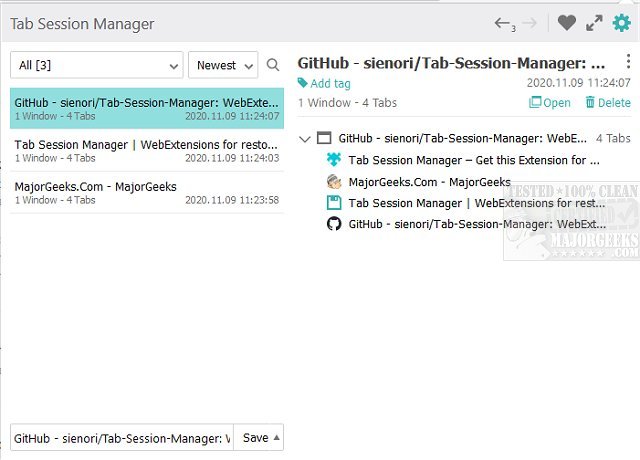
The Tab Session Manager, now updated to version 7.3.0, is a valuable extension for browsers like Chrome, Firefox, and Edge, specifically designed to save and restore the state of your windows and tabs. This tool addresses a common problem faced by users: the accidental closure of multiple tabs while working. In such situations, important work can be lost, which is where Tab Session Manager comes to the rescue.
This extension allows users to save the current state of opened tabs either manually or automatically, ensuring that your hard work remains accessible even after closing tabs or windows. It offers a range of customizable options, such as user-defined keyboard shortcuts, session exports for backups, and session prioritization. This makes it particularly beneficial for individuals who frequently juggle multiple tabs and need a reliable way to manage them without the fear of losing data.
Key features of Tab Session Manager include:
- The ability to save and restore both windows and tabs.
- Management of sessions with customizable names and tags.
- Autosave functionality when a window is closed or at regular intervals.
- Import and export options for easy session management.
- Compatibility with Chrome extensions and cloud sync capabilities.
In addition to these features, users can also find helpful resources related to tab management, like guides on muting tabs in all major browsers, restoring accidentally closed tabs, and re-enabling the warning for closing all tabs in Microsoft Edge.
Overall, Tab Session Manager is an essential tool for anyone who relies on multiple tabs for their work, providing peace of mind and enhanced productivity by safeguarding against accidental data loss. With its latest update, users can expect improved functionality and a more seamless browsing experience
This extension allows users to save the current state of opened tabs either manually or automatically, ensuring that your hard work remains accessible even after closing tabs or windows. It offers a range of customizable options, such as user-defined keyboard shortcuts, session exports for backups, and session prioritization. This makes it particularly beneficial for individuals who frequently juggle multiple tabs and need a reliable way to manage them without the fear of losing data.
Key features of Tab Session Manager include:
- The ability to save and restore both windows and tabs.
- Management of sessions with customizable names and tags.
- Autosave functionality when a window is closed or at regular intervals.
- Import and export options for easy session management.
- Compatibility with Chrome extensions and cloud sync capabilities.
In addition to these features, users can also find helpful resources related to tab management, like guides on muting tabs in all major browsers, restoring accidentally closed tabs, and re-enabling the warning for closing all tabs in Microsoft Edge.
Overall, Tab Session Manager is an essential tool for anyone who relies on multiple tabs for their work, providing peace of mind and enhanced productivity by safeguarding against accidental data loss. With its latest update, users can expect improved functionality and a more seamless browsing experience
Tab Session Manager for Chrome, Firefox, and Edge 7.3.0 released
Tab Session Manager for Chrome, Firefox, and Edge will save/restore the state of your windows and tabs.
Tab Session Manager for Chrome, Firefox, and Edge 7.3.0 released @ MajorGeeks