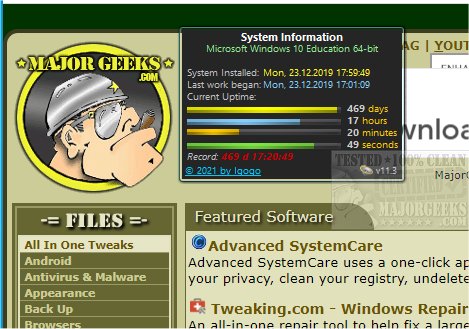
System Uptime Full Plus 13.0 has been released as a user-friendly gadget designed to provide detailed insights into your system's uptime, including critical information such as the operating system's installation time and the last boot time. This tool is particularly beneficial for IT professionals and users interested in monitoring their computer's operational duration without the hassle of manually extracting data from their Windows 10 machines.
To install System Uptime Full Plus, users might need additional software like Desktop Gadgets Revived, which enables compatibility with the gadget. The application operates efficiently with minimal impact on system resources while delivering comprehensive uptime information. In addition to uptime metrics, it also displays details about the OS platform and architecture.
The gadget offers three display modes—full, small, and wide—allowing users to choose their preferred viewing format. Customization options are also available, enabling users to alter background colors, titles, and various display units for a personalized experience.
Overall, System Uptime Full Plus serves as an effective solution for users seeking quick access to uptime data through a simple and informative interface. Alongside this gadget, users may find related resources helpful, such as guides on using PowerShell to shut down or restart their PC, various methods for restarting Windows 10 and 11, and tips for identifying computer hardware.
In summary, System Uptime Full Plus not only simplifies the process of monitoring system uptime but also enhances user experience with its customizable features and minimal resource usage. This makes it an essential tool for anyone looking to keep track of their computer's performance efficiently
To install System Uptime Full Plus, users might need additional software like Desktop Gadgets Revived, which enables compatibility with the gadget. The application operates efficiently with minimal impact on system resources while delivering comprehensive uptime information. In addition to uptime metrics, it also displays details about the OS platform and architecture.
The gadget offers three display modes—full, small, and wide—allowing users to choose their preferred viewing format. Customization options are also available, enabling users to alter background colors, titles, and various display units for a personalized experience.
Overall, System Uptime Full Plus serves as an effective solution for users seeking quick access to uptime data through a simple and informative interface. Alongside this gadget, users may find related resources helpful, such as guides on using PowerShell to shut down or restart their PC, various methods for restarting Windows 10 and 11, and tips for identifying computer hardware.
In summary, System Uptime Full Plus not only simplifies the process of monitoring system uptime but also enhances user experience with its customizable features and minimal resource usage. This makes it an essential tool for anyone looking to keep track of their computer's performance efficiently
System Uptime Full Plus 13.0 released
System Uptime Full Plus is a gadget that provides details about your system's uptime, including OS install time, last boot, and more.