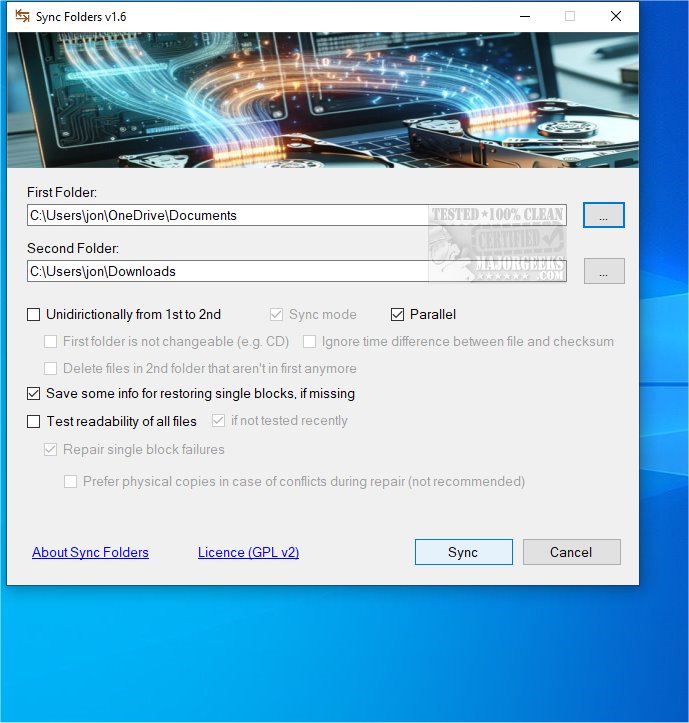
Sync Folders is a lightweight application specifically designed to streamline the synchronization, copying, and backup of files and folders on your local computer. Unlike cloud-based solutions like OneDrive, Sync Folders ensures that all your data remains within your local drives, providing you with complete control over your information.
Key Features
1. Local Operation: Sync Folders operates exclusively on local drives, ensuring your data is not transmitted to third-party servers, enhancing privacy and security.
2. User-Friendly Interface: The application boasts a minimalistic and intuitive interface that allows users to effortlessly define source and target directories. It also includes customizable settings for synchronization processes.
3. Backup Functionality: One of the standout features of Sync Folders is its ability to create hidden backup files during synchronization. This feature is crucial for restoring individual file blocks that may go missing due to corruption or loss. While users can opt to disable this feature for a more simplified process, keeping backups is strongly recommended to safeguard against unexpected data loss.
4. File Loss Recovery: In cases where the backup feature is not utilized, Sync Folders implements various strategies to recover files. It first searches for older versions of files within the specified directory. If unsuccessful, it attempts to salvage readable segments and fill in the gaps with empty data. Although this method does not guarantee complete restoration, it significantly minimizes the risk of total data loss.
Expert Opinion
Sync Folders is an exceptionally well-designed application that simplifies the synchronization of documents and files across various folders. Whether utilized on a single device or across multiple platforms, the tool ensures that updates made in one location are automatically reflected in all selected folders. Its straightforward configuration options for synchronization preferences and file management enhance both organization and accessibility of important documents.
In conclusion, Sync Folders transforms file management by providing a reliable and effective solution for keeping your data synchronized and secure. With its focus on local operations, user-friendly design, and robust backup and recovery features, it stands out as a valuable tool for anyone looking to maintain the integrity of their files.
System Requirements: Sync Folders requires Microsoft .NET framework, which the application will prompt you to install if it is not already present on your device.
Related Resources:
- How to Change Default Drag and Drop Action in Windows
- How to Reset and Clear Frequent Places and Recent Items in Windows 10
- How to Reset Folder View Settings in Windows 10 & 11
- How to Show Hidden Files, Folders, or Drives
Future Enhancements: Looking ahead, future updates could include cloud integration options for users who wish to synchronize their files across devices while maintaining local backups. Additionally, implementing advanced recovery algorithms could further enhance the application's data retrieval capabilities
Key Features
1. Local Operation: Sync Folders operates exclusively on local drives, ensuring your data is not transmitted to third-party servers, enhancing privacy and security.
2. User-Friendly Interface: The application boasts a minimalistic and intuitive interface that allows users to effortlessly define source and target directories. It also includes customizable settings for synchronization processes.
3. Backup Functionality: One of the standout features of Sync Folders is its ability to create hidden backup files during synchronization. This feature is crucial for restoring individual file blocks that may go missing due to corruption or loss. While users can opt to disable this feature for a more simplified process, keeping backups is strongly recommended to safeguard against unexpected data loss.
4. File Loss Recovery: In cases where the backup feature is not utilized, Sync Folders implements various strategies to recover files. It first searches for older versions of files within the specified directory. If unsuccessful, it attempts to salvage readable segments and fill in the gaps with empty data. Although this method does not guarantee complete restoration, it significantly minimizes the risk of total data loss.
Expert Opinion
Sync Folders is an exceptionally well-designed application that simplifies the synchronization of documents and files across various folders. Whether utilized on a single device or across multiple platforms, the tool ensures that updates made in one location are automatically reflected in all selected folders. Its straightforward configuration options for synchronization preferences and file management enhance both organization and accessibility of important documents.
In conclusion, Sync Folders transforms file management by providing a reliable and effective solution for keeping your data synchronized and secure. With its focus on local operations, user-friendly design, and robust backup and recovery features, it stands out as a valuable tool for anyone looking to maintain the integrity of their files.
System Requirements: Sync Folders requires Microsoft .NET framework, which the application will prompt you to install if it is not already present on your device.
Related Resources:
- How to Change Default Drag and Drop Action in Windows
- How to Reset and Clear Frequent Places and Recent Items in Windows 10
- How to Reset Folder View Settings in Windows 10 & 11
- How to Show Hidden Files, Folders, or Drives
Future Enhancements: Looking ahead, future updates could include cloud integration options for users who wish to synchronize their files across devices while maintaining local backups. Additionally, implementing advanced recovery algorithms could further enhance the application's data retrieval capabilities
Sync Folders 1.6.3.0 released
Sync Folders is a compact application designed to efficiently synchronize, copy, and back up files and folders on your local computer. It operates solely on your local drives, ensuring that your data remains within your control, unlike OneDrive, for instance.