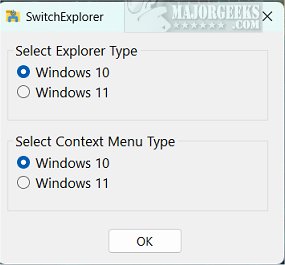
The recently released SwitchExplorer 2.2.0 is a user-friendly application designed to facilitate switching between the default File Explorer and context menu in Windows 11 and their Windows 10 counterparts. This tool caters to Windows 11 users who prefer the classic display features of Windows 10, allowing them to transition seamlessly without navigating complex settings or registry modifications.
SwitchExplorer operates as a zero-interface app, providing users with a simple notification indicating their shift between the two versions, thereby ensuring a hassle-free experience. The developer's goal was to create an application that modifies the necessary registry keys directly related to the ribbon File Explorer, which can be found in detail in the developer's repository.
This app is particularly advantageous for users who appreciate the traditional aesthetics of Windows 10 and wish to avoid the intricacies of manual registry editing. By streamlining this process, SwitchExplorer presents itself as a reliable solution for those seeking to enhance their Windows experience.
In addition to its core functionality, users interested in customizing their Windows experience may also explore related topics, such as enabling or disabling the full-screen start menu, customizing the start menu layout, managing the apps list, disabling Bing search, and even transforming the Windows 10 start menu to resemble that of Windows 7.
Overall, SwitchExplorer 2.2.0 is a valuable tool for those seeking to revert to familiar features while using the latest version of Windows, enhancing usability and satisfaction for traditionalists in the ever-evolving Windows ecosystem
SwitchExplorer operates as a zero-interface app, providing users with a simple notification indicating their shift between the two versions, thereby ensuring a hassle-free experience. The developer's goal was to create an application that modifies the necessary registry keys directly related to the ribbon File Explorer, which can be found in detail in the developer's repository.
This app is particularly advantageous for users who appreciate the traditional aesthetics of Windows 10 and wish to avoid the intricacies of manual registry editing. By streamlining this process, SwitchExplorer presents itself as a reliable solution for those seeking to enhance their Windows experience.
In addition to its core functionality, users interested in customizing their Windows experience may also explore related topics, such as enabling or disabling the full-screen start menu, customizing the start menu layout, managing the apps list, disabling Bing search, and even transforming the Windows 10 start menu to resemble that of Windows 7.
Overall, SwitchExplorer 2.2.0 is a valuable tool for those seeking to revert to familiar features while using the latest version of Windows, enhancing usability and satisfaction for traditionalists in the ever-evolving Windows ecosystem
SwitchExplorer 2.2.0 released
SwitchExplorer lets you switch between the default File Explorer and context menu in Windows 11 to the Windows 10 versions through a simple app.