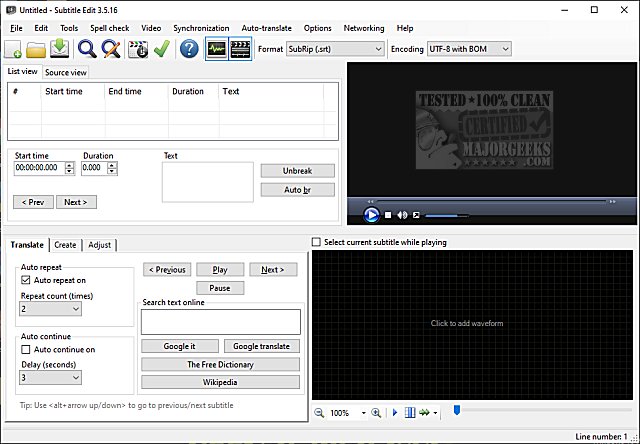
Subtitle Edit is a powerful, free, and portable subtitle editing software that stands out due to its professional-grade features. As of October 2023, the latest version, Subtitle Edit 5.4.0, introduces a variety of tools designed to enhance the user experience for anyone working with video subtitles.
- Subtitle Creation and Adjustment: Users can create, sync, translate, and adjust subtitle lines with ease.
- Format Conversion: The software supports over 280 subtitle formats including SubRip, MicroDVD, Advanced SubStation Alpha, and many more, allowing for seamless transitions between different formats.
- Audio Visualizer: A cool audio visualizer control displays waveform and spectrogram, making it easier to sync subtitles with audio.
- Versatile Video Player Support: Users can utilize DirectShow, VLC media player, or MPlayer for video playback.
- Automatic Translation: Integration with Google Translate enables auto translation of subtitles.
- DVD and Blu-ray Support: The program can rip subtitles from decrypted DVDs and supports import and OCR of VobSub and Blu-ray .sup files.
- Matroska and MP4 File Compatibility: Subtitle Edit can open subtitles embedded in Matroska and MP4/mv4 files, providing flexibility for different video formats.
- DVB and Teletext Subtitles: It also supports reading and OCR of DVB and teletext subtitles in Transport Stream files.
- Multi-language Support: The software can read and write UTF-8 and other Unicode files, accommodating various languages and encodings.
- Synchronization Features: Advanced sync options, including point synchronization and the ability to show texts earlier or later, enhance subtitle accuracy.
- Editing Tools: Features like merging/splitting subtitles, adjusting display times, a common errors wizard, and spell checking via Open Office dictionaries streamline the editing process.
- Creative Effects: Effects such as typewriter and karaoke add flair to the subtitles.
- Revision History: A history/undo manager keeps track of changes, allowing users to revert if necessary.
- Export Options: Users can export subtitles to various formats, including PNG images, Adobe Encore scripts, and plain text.
In addition to the existing features, future updates could enhance Subtitle Edit with:
1. Enhanced Collaboration Tools: Features for real-time collaboration among multiple users could facilitate teamwork for larger projects.
2. AI-Powered Suggestions: Utilizing AI to provide contextual suggestions for translations or subtitle corrections could significantly improve efficiency.
3. Mobile Version: A mobile-friendly version of Subtitle Edit would allow users to edit subtitles on-the-go, catering to a broader audience.
4. Improved User Interface: Continuous improvements to the user interface could make the software even more intuitive, especially for new users.
5. Cloud Integration: Allowing cloud storage options could enable users to save and access their projects from anywhere.
Subtitle Edit 5.4.0 is an impressive tool for anyone involved in video editing or subtitle creation, offering a comprehensive suite of features that combine functionality with user-friendly design. Whether you are a novice or a professional, Subtitle Edit provides the necessary tools to enhance your subtitle editing experience
Key Features of Subtitle Edit 5.4.0:
- Subtitle Creation and Adjustment: Users can create, sync, translate, and adjust subtitle lines with ease.
- Format Conversion: The software supports over 280 subtitle formats including SubRip, MicroDVD, Advanced SubStation Alpha, and many more, allowing for seamless transitions between different formats.
- Audio Visualizer: A cool audio visualizer control displays waveform and spectrogram, making it easier to sync subtitles with audio.
- Versatile Video Player Support: Users can utilize DirectShow, VLC media player, or MPlayer for video playback.
- Automatic Translation: Integration with Google Translate enables auto translation of subtitles.
- DVD and Blu-ray Support: The program can rip subtitles from decrypted DVDs and supports import and OCR of VobSub and Blu-ray .sup files.
- Matroska and MP4 File Compatibility: Subtitle Edit can open subtitles embedded in Matroska and MP4/mv4 files, providing flexibility for different video formats.
- DVB and Teletext Subtitles: It also supports reading and OCR of DVB and teletext subtitles in Transport Stream files.
- Multi-language Support: The software can read and write UTF-8 and other Unicode files, accommodating various languages and encodings.
- Synchronization Features: Advanced sync options, including point synchronization and the ability to show texts earlier or later, enhance subtitle accuracy.
- Editing Tools: Features like merging/splitting subtitles, adjusting display times, a common errors wizard, and spell checking via Open Office dictionaries streamline the editing process.
- Creative Effects: Effects such as typewriter and karaoke add flair to the subtitles.
- Revision History: A history/undo manager keeps track of changes, allowing users to revert if necessary.
- Export Options: Users can export subtitles to various formats, including PNG images, Adobe Encore scripts, and plain text.
Extension of Features:
In addition to the existing features, future updates could enhance Subtitle Edit with:
1. Enhanced Collaboration Tools: Features for real-time collaboration among multiple users could facilitate teamwork for larger projects.
2. AI-Powered Suggestions: Utilizing AI to provide contextual suggestions for translations or subtitle corrections could significantly improve efficiency.
3. Mobile Version: A mobile-friendly version of Subtitle Edit would allow users to edit subtitles on-the-go, catering to a broader audience.
4. Improved User Interface: Continuous improvements to the user interface could make the software even more intuitive, especially for new users.
5. Cloud Integration: Allowing cloud storage options could enable users to save and access their projects from anywhere.
Subtitle Edit 5.4.0 is an impressive tool for anyone involved in video editing or subtitle creation, offering a comprehensive suite of features that combine functionality with user-friendly design. Whether you are a novice or a professional, Subtitle Edit provides the necessary tools to enhance your subtitle editing experience
Subtitle Edit 5.4.0 released
Subtitle Edit is a free, portable editor for video subtitles.