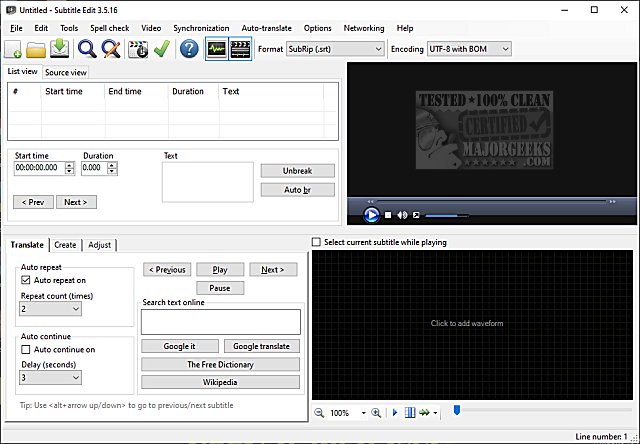
Subtitle Edit is a free, portable software designed for editing video subtitles, and the recent release of version 5.1.0 enhances its reputation as a powerful tool that rivals professional applications. Although there's a wealth of features to explore, users can quickly get started by checking out the feature list or trying the software online.
Key Features of Subtitle Edit:
- Subtitle Management: Create, adjust, sync, and translate subtitle lines seamlessly.
- Format Conversion: Convert between over 280 different subtitle formats, including SubRip, MicroDVD, and Advanced SubStation Alpha.
- Audio Visualizer: Utilize an audio visualizer that can display both waveform and spectrogram for better synchronization.
- Video Playback: Supports video playback through DirectShow, VLC, or MPlayer.
- Translation Capabilities: Auto-translate subtitles using Google Translate.
- Subtitle Extraction: Rip subtitles from decrypted DVDs and import VobSub sub/idx binary subtitles.
- OCR Support: Import and OCR Blu-ray .sup files and various embedded subtitles from formats like Matroska, mp4/mv4, and DivX/Avi.
- Comprehensive Encoding Support: Read and write UTF-8 and other Unicode files, ensuring compatibility with all languages.
- Sync and Adjustment Tools: Features for visual synchronization, display time adjustments, and a common errors wizard.
- Spell Checking and Translation: Built-in spell checking via Open Office dictionaries, with a Swedish to Danish translation feature.
- Creative Effects: Options for typewriter and karaoke effects.
- Version Control: History and undo manager for easy corrections.
- Export Options: Export subtitles to various formats including PNG images, Adobe Encore scripts, and plain text.
With its extensive features and user-friendly interface, Subtitle Edit 5.1.0 continues to be an invaluable resource for anyone involved in video editing or subtitle creation. Whether you're a hobbyist or a professional, this tool offers the capabilities needed to enhance your subtitle editing experience. The software's ongoing development suggests that users can expect even more features and improvements in future updates
Key Features of Subtitle Edit:
- Subtitle Management: Create, adjust, sync, and translate subtitle lines seamlessly.
- Format Conversion: Convert between over 280 different subtitle formats, including SubRip, MicroDVD, and Advanced SubStation Alpha.
- Audio Visualizer: Utilize an audio visualizer that can display both waveform and spectrogram for better synchronization.
- Video Playback: Supports video playback through DirectShow, VLC, or MPlayer.
- Translation Capabilities: Auto-translate subtitles using Google Translate.
- Subtitle Extraction: Rip subtitles from decrypted DVDs and import VobSub sub/idx binary subtitles.
- OCR Support: Import and OCR Blu-ray .sup files and various embedded subtitles from formats like Matroska, mp4/mv4, and DivX/Avi.
- Comprehensive Encoding Support: Read and write UTF-8 and other Unicode files, ensuring compatibility with all languages.
- Sync and Adjustment Tools: Features for visual synchronization, display time adjustments, and a common errors wizard.
- Spell Checking and Translation: Built-in spell checking via Open Office dictionaries, with a Swedish to Danish translation feature.
- Creative Effects: Options for typewriter and karaoke effects.
- Version Control: History and undo manager for easy corrections.
- Export Options: Export subtitles to various formats including PNG images, Adobe Encore scripts, and plain text.
With its extensive features and user-friendly interface, Subtitle Edit 5.1.0 continues to be an invaluable resource for anyone involved in video editing or subtitle creation. Whether you're a hobbyist or a professional, this tool offers the capabilities needed to enhance your subtitle editing experience. The software's ongoing development suggests that users can expect even more features and improvements in future updates
Subtitle Edit 5.1.0 released
Subtitle Edit is a free, portable editor for video subtitles.