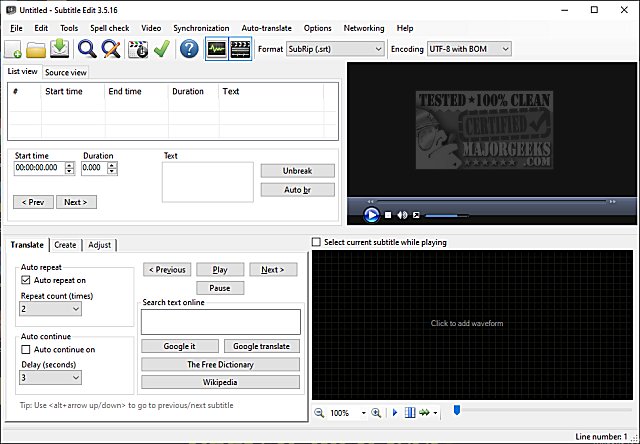
Subtitle Edit is a robust, free, and portable editor designed for video subtitles, which has recently been updated to version 4.0.15. Despite being a free tool, it boasts features that can rival those of professional subtitle editing software. Users interested in exploring its capabilities can refer to the extensive list of features, view screenshots, or test the software online.
Key Features of Subtitle Edit:
- Subtitle Creation and Management: Users can create, adjust, sync, and translate subtitle lines effortlessly.
- Format Conversion: It supports over 280 subtitle formats, including SubRip, MicroDVD, Advanced SubStation Alpha, and many others, making it easy to convert between different types.
- Audio Visualization: The software includes a powerful audio visualizer that can display waveforms and spectrograms, enhancing the editing experience.
- Media Player Compatibility: Subtitle Edit utilizes various media players like DirectShow, VLC, and MPlayer for video playback.
- Subtitle Synchronization: Users can visually sync and adjust subtitles, including start/end positions and speed.
- Translation Features: Automatic translation capabilities through Google Translate streamline the process of subtitle translation.
- Subtitle Extraction: The tool can rip subtitles from decrypted DVDs and import or OCR subtitles from various formats, including Blu-ray, VobSub, and embedded subtitles in video files.
- Text Handling: It supports UTF-8 and other Unicode files, ensuring compatibility with multiple languages and encodings.
- Error Correction and Spell Checking: A wizard for fixing common errors and spell-checking features using Open Office dictionaries help maintain subtitle quality.
- Editing Functions: The software allows merging/splitting subtitles, adjusting display time, and removing text for hearing-impaired users.
- Export Options: Users can export subtitles to various formats, including PNG images, Adobe Encore scripts, and plain text.
Conclusion:
With its extensive range of features and user-friendly interface, Subtitle Edit 4.0.15 is an ideal choice for anyone looking to create, edit, or manage video subtitles. Whether for personal use or professional projects, this tool offers everything needed to ensure high-quality subtitle production. As the software continues to evolve, users can anticipate even more enhancements and features in future releases
Key Features of Subtitle Edit:
- Subtitle Creation and Management: Users can create, adjust, sync, and translate subtitle lines effortlessly.
- Format Conversion: It supports over 280 subtitle formats, including SubRip, MicroDVD, Advanced SubStation Alpha, and many others, making it easy to convert between different types.
- Audio Visualization: The software includes a powerful audio visualizer that can display waveforms and spectrograms, enhancing the editing experience.
- Media Player Compatibility: Subtitle Edit utilizes various media players like DirectShow, VLC, and MPlayer for video playback.
- Subtitle Synchronization: Users can visually sync and adjust subtitles, including start/end positions and speed.
- Translation Features: Automatic translation capabilities through Google Translate streamline the process of subtitle translation.
- Subtitle Extraction: The tool can rip subtitles from decrypted DVDs and import or OCR subtitles from various formats, including Blu-ray, VobSub, and embedded subtitles in video files.
- Text Handling: It supports UTF-8 and other Unicode files, ensuring compatibility with multiple languages and encodings.
- Error Correction and Spell Checking: A wizard for fixing common errors and spell-checking features using Open Office dictionaries help maintain subtitle quality.
- Editing Functions: The software allows merging/splitting subtitles, adjusting display time, and removing text for hearing-impaired users.
- Export Options: Users can export subtitles to various formats, including PNG images, Adobe Encore scripts, and plain text.
Conclusion:
With its extensive range of features and user-friendly interface, Subtitle Edit 4.0.15 is an ideal choice for anyone looking to create, edit, or manage video subtitles. Whether for personal use or professional projects, this tool offers everything needed to ensure high-quality subtitle production. As the software continues to evolve, users can anticipate even more enhancements and features in future releases
Subtitle Edit 4.0.15 released
Subtitle Edit is a free, portable editor for video subtitles.