Stretchly version 1.22.1 has been released, enhancing its functionality as an Open Source application designed to encourage users to take regular breaks from their computers. In our increasingly digital lives, it's easy to forget about the importance of taking breaks to rest our eyes and stretch, which is precisely the issue that Stretchly aims to address. The app conveniently resides in the system tray, providing timely reminders to step away from the screen.
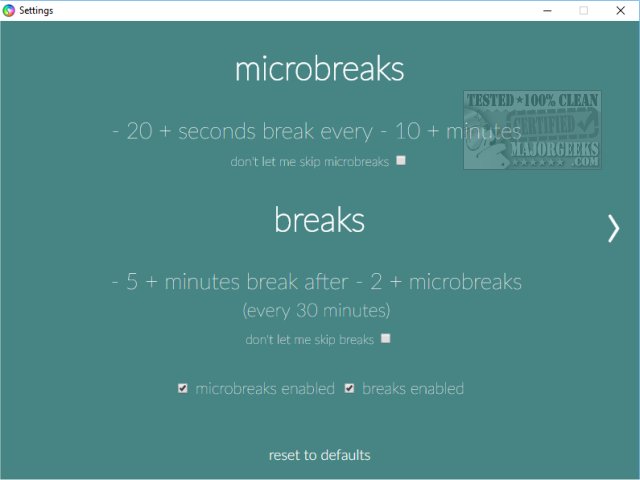
Users can access a variety of options by right-clicking on the Stretchly icon, including quick links to About, Skip to the next break, Pause, Reset breaks, Settings, Start at login, and Quit. Notably, the "Your Stretchly" feature is currently inactive. The first area to explore is the Settings menu, where users can customize the timing and frequency of their breaks. By default, Stretchly is set to remind users to take a microbreak every 10 minutes for 20 seconds and a longer break of 5 minutes after completing two microbreaks. These timings are adjustable, allowing users to tailor their break schedule according to their preferences.
Beyond scheduling, users can also personalize their experience by selecting audio cues and color schemes. Additional features include options to display breaks in full screen, offer break ideas, and provide notifications before breaks commence. Users also have the flexibility to skip breaks when the reminder pops up.
Stretchly stands out as one of the more effective ergonomics applications available, offering extensive customization options and thoughtful features like break ideas that enhance its usability. The app not only promotes healthier screen habits but also integrates seamlessly into users' daily routines.
As technology continues to evolve, further updates could include more interactive features, such as gamification elements to encourage users to take breaks or community sharing options for break ideas. Additionally, integrating AI could personalize recommendations based on individual usage patterns, making Stretchly even more effective in promoting user well-being
Users can access a variety of options by right-clicking on the Stretchly icon, including quick links to About, Skip to the next break, Pause, Reset breaks, Settings, Start at login, and Quit. Notably, the "Your Stretchly" feature is currently inactive. The first area to explore is the Settings menu, where users can customize the timing and frequency of their breaks. By default, Stretchly is set to remind users to take a microbreak every 10 minutes for 20 seconds and a longer break of 5 minutes after completing two microbreaks. These timings are adjustable, allowing users to tailor their break schedule according to their preferences.
Beyond scheduling, users can also personalize their experience by selecting audio cues and color schemes. Additional features include options to display breaks in full screen, offer break ideas, and provide notifications before breaks commence. Users also have the flexibility to skip breaks when the reminder pops up.
Stretchly stands out as one of the more effective ergonomics applications available, offering extensive customization options and thoughtful features like break ideas that enhance its usability. The app not only promotes healthier screen habits but also integrates seamlessly into users' daily routines.
As technology continues to evolve, further updates could include more interactive features, such as gamification elements to encourage users to take breaks or community sharing options for break ideas. Additionally, integrating AI could personalize recommendations based on individual usage patterns, making Stretchly even more effective in promoting user well-being
Stretchly 1.22.1 released
Stretchly is an Open Source app that reminds you to take a break from your computer.