Stop Surprise Restarts: New Windows Update Changes Give You Actual Control
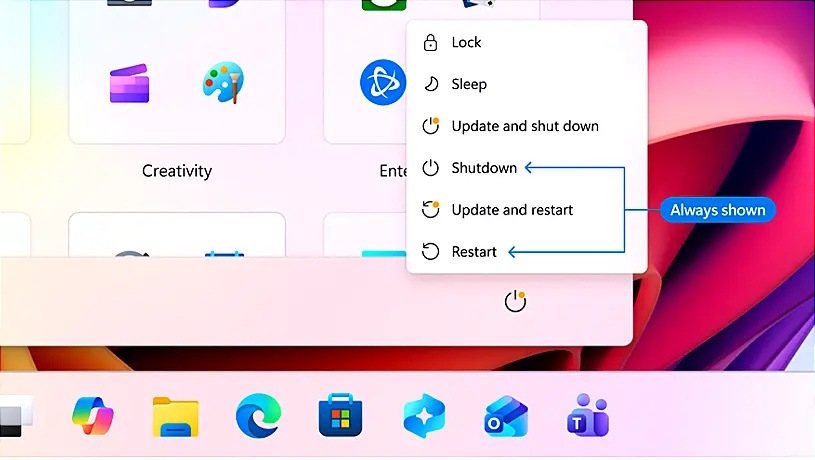
Microsoft is rolling out Windows Update changes that finally give users direct control over patch timing, including indefinite pause extensions and the option to skip setup updates until after reaching the desktop. The power menu now cleanly separates standard restart and shutdown buttons from update-specific actions, stopping those frustrating surprise installations right after you click to turn off your PC. Driver patches will display clear hardware categories instead of vague titles, while background downloads are being coordinated into a single monthly reboot cycle to cut down on constant interruptions. Faster download sizes and automatic failure recovery round out the updates, aiming to keep systems secure without constantly demanding user attention or breaking workflow.
Stop Surprise Restarts: New Windows Update Changes Give You Actual Control @ NT Compatible
Stop Surprise Restarts: New Windows Update Changes Give You Actual Control
Microsoft is introducing significant changes to Windows Update that provide users with greater control over patch timings, including the ability to pause updates indefinitely and skip setup updates until after reaching the desktop. The power menu has been updated to clearly separate standard shutdown options from update-specific actions, preventing unexpected installations when turning off the PC. Additionally, driver patches will now have clearer labels indicating their hardware categories, and updates will be coordinated into a single monthly reboot cycle to minimize interruptions. These improvements aim to enhance user experience, reduce frustrations related to update management, and ensure systems remain secure without constant disruptions