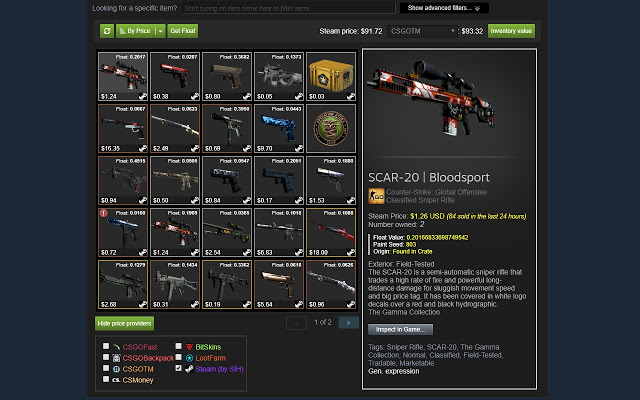
Steam Inventory Helper (SIH) is a browser extension designed for Chrome and Edge that enhances the Steam market and inventory management experience. This tool acts as a personal assistant, aimed at simplifying the processes of trading skins, managing inventories, and monitoring marketplace deals.
Why You Need Steam Inventory Helper
Navigating the Steam inventory system can be cumbersome, especially for active traders. SIH addresses this by automating repetitive tasks, such as bulk selling items and quickly listing them on the Steam Market. It also includes valuable features like price comparison tools and enhancements for trade offers.
Key features of Steam Inventory Helper include:
- Price Insights: Instantly view market prices and trends to facilitate informed trading decisions.
- Enhanced Trading Tools: Easily send and manage trade offers with advanced filtering and automation options.
- Bulk Actions: Save time by selecting multiple items for quick listing.
- Market History Tracking: Analyze buying and selling patterns to refine trading strategies.
- Security Features: Protect against phishing scams and unauthorized changes by tracking trade offers.
Getting Started
To use SIH, simply download the extension from the Chrome Web Store and follow the setup instructions. Users are encouraged to customize their settings based on their trading goals, whether for profit or inventory organization.
Important Features at a Glance
- Display item prices directly within the Steam inventory.
- Quick sell items in bulk with auto-accept and price adjustment features.
- One-click purchasing for items on the listing page.
- Desktop notifications for new trade offers.
- Price checking in the trade offer window via mouse-over.
- Total trade offer value calculated directly in the trade offer window.
- Filtering capabilities for "My sell listings".
- Convenient purchasing of Steam trading cards from the in-game cards page.
- Automatic ignoring or blocking of friend requests from users below a certain Steam level.
The Catch
Despite its benefits, some users have expressed privacy concerns regarding the extension’s access to their Steam accounts. It is crucial to be cautious with permissions and refrain from sharing sensitive information.
Geek Verdict
For those serious about Steam trading or simply looking to streamline inventory management, Steam Inventory Helper is a practical and powerful tool. Its user-friendly nature makes it accessible, but users should remain vigilant about their security settings.
Further Resources
- How to Disable Steam Popups & Notifications
- How to Hide Your Gameplay Activity in Steam Profile and Chat
- How to Categorize Your Steam Games With Collections
- How to Create a Shortcut to Steam Games on the Desktop or Taskbar
- How to Fix 'Update Queued' in Steam
Extension and Future Developments
As of the latest version 2.11.6, Steam Inventory Helper continues to evolve, potentially incorporating new features based on user feedback and market trends. Users can look forward to enhanced functionalities that further streamline their trading experience
Why You Need Steam Inventory Helper
Navigating the Steam inventory system can be cumbersome, especially for active traders. SIH addresses this by automating repetitive tasks, such as bulk selling items and quickly listing them on the Steam Market. It also includes valuable features like price comparison tools and enhancements for trade offers.
Key features of Steam Inventory Helper include:
- Price Insights: Instantly view market prices and trends to facilitate informed trading decisions.
- Enhanced Trading Tools: Easily send and manage trade offers with advanced filtering and automation options.
- Bulk Actions: Save time by selecting multiple items for quick listing.
- Market History Tracking: Analyze buying and selling patterns to refine trading strategies.
- Security Features: Protect against phishing scams and unauthorized changes by tracking trade offers.
Getting Started
To use SIH, simply download the extension from the Chrome Web Store and follow the setup instructions. Users are encouraged to customize their settings based on their trading goals, whether for profit or inventory organization.
Important Features at a Glance
- Display item prices directly within the Steam inventory.
- Quick sell items in bulk with auto-accept and price adjustment features.
- One-click purchasing for items on the listing page.
- Desktop notifications for new trade offers.
- Price checking in the trade offer window via mouse-over.
- Total trade offer value calculated directly in the trade offer window.
- Filtering capabilities for "My sell listings".
- Convenient purchasing of Steam trading cards from the in-game cards page.
- Automatic ignoring or blocking of friend requests from users below a certain Steam level.
The Catch
Despite its benefits, some users have expressed privacy concerns regarding the extension’s access to their Steam accounts. It is crucial to be cautious with permissions and refrain from sharing sensitive information.
Geek Verdict
For those serious about Steam trading or simply looking to streamline inventory management, Steam Inventory Helper is a practical and powerful tool. Its user-friendly nature makes it accessible, but users should remain vigilant about their security settings.
Further Resources
- How to Disable Steam Popups & Notifications
- How to Hide Your Gameplay Activity in Steam Profile and Chat
- How to Categorize Your Steam Games With Collections
- How to Create a Shortcut to Steam Games on the Desktop or Taskbar
- How to Fix 'Update Queued' in Steam
Extension and Future Developments
As of the latest version 2.11.6, Steam Inventory Helper continues to evolve, potentially incorporating new features based on user feedback and market trends. Users can look forward to enhanced functionalities that further streamline their trading experience
Steam Inventory Helper 2.11.6 released
Steam Inventory Helper is a browser addon for Chrome and Edge it is meant to help improve your Steam market and inventory experience.