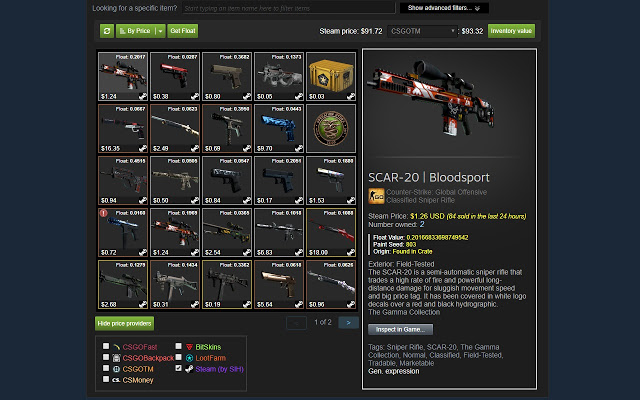
Steam Inventory Helper (SIH) version 2.11.2 has been released as a browser extension for Chrome and Edge, aimed at enhancing the Steam marketplace and inventory experience. This tool functions as a personal assistant, streamlining various aspects of managing Steam inventories and trading activities. SIH automates repetitive tasks such as quick-selling items and bulk listing them on the Steam Market, significantly reducing the time users spend on these activities.
Key features of Steam Inventory Helper include:
- Price Insights: Instantly view market prices to identify trends for informed trading.
- Enhanced Trading Tools: Manage trade offers seamlessly with advanced filters and automation options.
- Bulk Actions: Select and list multiple items quickly, saving valuable time.
- Market History Tracking: Analyze buying and selling patterns to refine trading strategies.
- Security Features: Protect against phishing scams and unauthorized changes by tracking trade offers.
Users can easily get started by downloading the extension from the Chrome Web Store and customizing settings according to their trading objectives, whether it be flipping for profit or organizing their inventory.
Notable functionalities include:
- Displaying item prices in the Steam inventory.
- Auto-accepting trade offers and adjusting prices automatically.
- Quick-buy options for listings.
- Desktop notifications for new trade offers.
- Direct item price checks in trade offer windows.
- Calculation of total trade offer values.
- Filtering capabilities for sell listings.
- Purchasing Steam trading cards directly from in-game pages.
- Options to ignore/block friend requests from users below a certain Steam level.
However, some users have expressed privacy concerns regarding the extension's access to their Steam accounts. It’s crucial for users to understand the permissions required by SIH and to avoid sharing sensitive information.
In summary, if you're heavily involved in Steam trading or wish to simplify inventory management, Steam Inventory Helper is a practical and powerful tool that is easy to use, provided users remain vigilant about security settings.
Additionally, users looking to enhance their experience can explore related guides, such as disabling Steam popups, hiding gameplay activity, categorizing games with collections, creating shortcuts for quick access, and troubleshooting common issues like 'Update Queued' errors
Key features of Steam Inventory Helper include:
- Price Insights: Instantly view market prices to identify trends for informed trading.
- Enhanced Trading Tools: Manage trade offers seamlessly with advanced filters and automation options.
- Bulk Actions: Select and list multiple items quickly, saving valuable time.
- Market History Tracking: Analyze buying and selling patterns to refine trading strategies.
- Security Features: Protect against phishing scams and unauthorized changes by tracking trade offers.
Users can easily get started by downloading the extension from the Chrome Web Store and customizing settings according to their trading objectives, whether it be flipping for profit or organizing their inventory.
Notable functionalities include:
- Displaying item prices in the Steam inventory.
- Auto-accepting trade offers and adjusting prices automatically.
- Quick-buy options for listings.
- Desktop notifications for new trade offers.
- Direct item price checks in trade offer windows.
- Calculation of total trade offer values.
- Filtering capabilities for sell listings.
- Purchasing Steam trading cards directly from in-game pages.
- Options to ignore/block friend requests from users below a certain Steam level.
However, some users have expressed privacy concerns regarding the extension's access to their Steam accounts. It’s crucial for users to understand the permissions required by SIH and to avoid sharing sensitive information.
In summary, if you're heavily involved in Steam trading or wish to simplify inventory management, Steam Inventory Helper is a practical and powerful tool that is easy to use, provided users remain vigilant about security settings.
Additionally, users looking to enhance their experience can explore related guides, such as disabling Steam popups, hiding gameplay activity, categorizing games with collections, creating shortcuts for quick access, and troubleshooting common issues like 'Update Queued' errors
Steam Inventory Helper 2.11.2 released
Steam Inventory Helper is a browser addon for Chrome and Edge it is meant to help improve your Steam market and inventory experience.