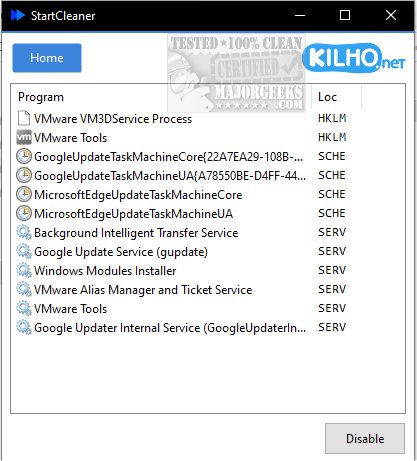
StartCleaner 1.1.1 has been released, introducing a powerful tool for managing programs that automatically launch during startup. With a user-friendly interface, StartCleaner allows users to easily review, enable, or disable startup applications, which can lead to improved boot times and overall system performance. The software streamlines the startup process, ensuring that devices operate efficiently from the moment they are powered on.
The application offers a comprehensive solution for handling startup processes, providing unified control over startup folders. Users can easily add, remove, or disable programs that launch at startup. Additionally, StartCleaner grants access to the task scheduler, allowing users to configure when and how specific tasks are executed. It also includes system service management, enabling users to control which services run during startup, further enhancing speed and efficiency.
Using StartCleaner is straightforward. Users can disable a startup item simply by selecting it and clicking the "Disable" button. This quick process is complemented by the recommendation to maintain a current restore point to address any potential issues. A unique feature of StartCleaner is its ability to disable settings rather than permanently delete them, offering a safe and reversible way to customize user experiences. This allows users to experiment with different configurations without the risk of losing essential settings.
With StartCleaner, users can unlock their devices' full potential, personalizing and enhancing their startup experience for a potentially smoother and faster boot process tailored to their needs.
In addition to its core functionality, StartCleaner is an excellent resource for those looking to optimize their system's performance. Users can also explore related topics, such as managing startup apps in Windows, assessing the startup impact of applications, and running Microsoft Store or other apps at startup. By utilizing StartCleaner, users gain greater control over their startup settings, leading to an improved and more efficient computing experience
The application offers a comprehensive solution for handling startup processes, providing unified control over startup folders. Users can easily add, remove, or disable programs that launch at startup. Additionally, StartCleaner grants access to the task scheduler, allowing users to configure when and how specific tasks are executed. It also includes system service management, enabling users to control which services run during startup, further enhancing speed and efficiency.
Using StartCleaner is straightforward. Users can disable a startup item simply by selecting it and clicking the "Disable" button. This quick process is complemented by the recommendation to maintain a current restore point to address any potential issues. A unique feature of StartCleaner is its ability to disable settings rather than permanently delete them, offering a safe and reversible way to customize user experiences. This allows users to experiment with different configurations without the risk of losing essential settings.
With StartCleaner, users can unlock their devices' full potential, personalizing and enhancing their startup experience for a potentially smoother and faster boot process tailored to their needs.
In addition to its core functionality, StartCleaner is an excellent resource for those looking to optimize their system's performance. Users can also explore related topics, such as managing startup apps in Windows, assessing the startup impact of applications, and running Microsoft Store or other apps at startup. By utilizing StartCleaner, users gain greater control over their startup settings, leading to an improved and more efficient computing experience
StartCleaner 1.1.1 released
StartCleaner helps you effectively manage the programs that launch automatically on startup.