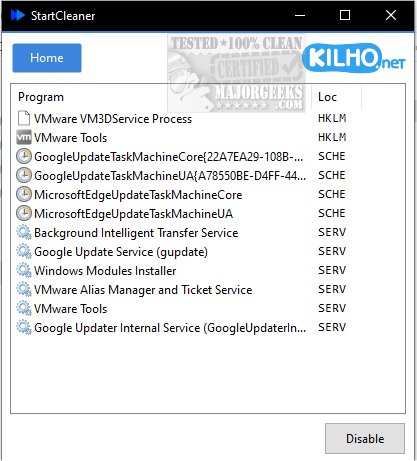
StartCleaner is a powerful tool designed to help users effectively manage the programs that automatically launch during system startup. With the latest version 1.0.9, StartCleaner continues to offer a user-friendly interface that simplifies the process of reviewing, enabling, or disabling startup applications. This can lead to improved boot times and overall system performance, allowing your device to run smoothly from the moment it is powered up.
Streamlined Startup Management
StartCleaner provides a cohesive solution for managing startup processes, offering unified control over startup folders. Users can easily add, remove, or disable applications that initiate at startup, tailoring the experience to their preferences. The software also grants access to the task scheduler, empowering users to configure the timing and conditions for specific tasks to execute during startup. Additionally, StartCleaner includes system service management features, enabling users to select which services run at startup, further optimizing speed and efficiency.
Easy-to-Use Features
To disable a startup item, simply select the desired program and click the "Disable" button—it's that straightforward. StartCleaner encourages users to maintain a current restore point prior to making changes, ensuring a safety net in case any issues arise. A unique aspect of StartCleaner is its ability to disable settings instead of permanently deleting them, allowing users to experiment with different configurations without the risk of losing critical settings. This reversible feature fosters confidence in customizing the startup experience, whether the goal is to enhance performance or streamline functionality.
Geek Verdict
Unlock the full potential of your device with StartCleaner. The software not only allows for personalized startup experiences but also promotes a potentially faster boot process tailored to your needs. With StartCleaner, users can take charge of their systems with ease and confidence, knowing they can revert any changes if needed.
Additional Resources
For those interested in further optimizing their startup experience, similar resources include:
- How to Manage Startup Apps in Windows
- How to See the Startup Impact of Apps in Windows
- How to Run Microsoft Store and Other Apps at Startup in Windows
Overall, StartCleaner 1.0.9 remains an essential tool for anyone looking to improve their computing experience through effective startup management
Streamlined Startup Management
StartCleaner provides a cohesive solution for managing startup processes, offering unified control over startup folders. Users can easily add, remove, or disable applications that initiate at startup, tailoring the experience to their preferences. The software also grants access to the task scheduler, empowering users to configure the timing and conditions for specific tasks to execute during startup. Additionally, StartCleaner includes system service management features, enabling users to select which services run at startup, further optimizing speed and efficiency.
Easy-to-Use Features
To disable a startup item, simply select the desired program and click the "Disable" button—it's that straightforward. StartCleaner encourages users to maintain a current restore point prior to making changes, ensuring a safety net in case any issues arise. A unique aspect of StartCleaner is its ability to disable settings instead of permanently deleting them, allowing users to experiment with different configurations without the risk of losing critical settings. This reversible feature fosters confidence in customizing the startup experience, whether the goal is to enhance performance or streamline functionality.
Geek Verdict
Unlock the full potential of your device with StartCleaner. The software not only allows for personalized startup experiences but also promotes a potentially faster boot process tailored to your needs. With StartCleaner, users can take charge of their systems with ease and confidence, knowing they can revert any changes if needed.
Additional Resources
For those interested in further optimizing their startup experience, similar resources include:
- How to Manage Startup Apps in Windows
- How to See the Startup Impact of Apps in Windows
- How to Run Microsoft Store and Other Apps at Startup in Windows
Overall, StartCleaner 1.0.9 remains an essential tool for anyone looking to improve their computing experience through effective startup management
StartCleaner 1.0.9 released
StartCleaner helps you effectively manage the programs that launch automatically on startup.