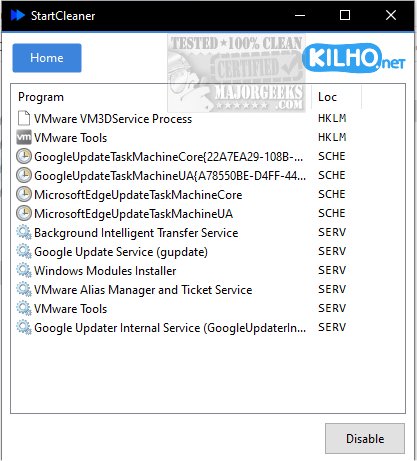
StartCleaner 1.0.8 has been released, designed to help users manage the programs that launch automatically during startup, thereby potentially enhancing boot times and overall system performance. With its intuitive interface, StartCleaner makes it easy to review, enable, or disable startup applications, ensuring that devices run smoothly from the moment they are powered on.
Key Features of StartCleaner:
- Unified Startup Control: Users can manage startup folders efficiently, allowing for the addition, removal, or disabling of applications that start with the computer.
- Task Scheduler Access: StartCleaner provides access to the task scheduler, enabling users to configure the timing and conditions for executing specific tasks upon startup.
- Service Management: The application allows control over which services run at startup, further optimizing performance.
Using StartCleaner is straightforward; users can disable unwanted startup items quickly by selecting them and clicking the "Disable" button. It is recommended to maintain a current system restore point to avoid potential issues during modifications.
A unique feature of StartCleaner is its reversible approach to changes. Instead of permanently deleting settings, users can disable them, allowing for experimentation without the risk of losing important configurations. This empowers users to customize their startup experience while maintaining the option to restore any disabled settings.
In conclusion, StartCleaner provides an effective solution for users looking to optimize their system's startup process. By personalizing startup applications and services, users can unlock their devices' full potential, leading to a faster and more efficient boot experience.
Geek Verdict: StartCleaner is a valuable tool for anyone seeking to enhance their computer's performance and streamline its startup process.
For further reading, similar guides include how to manage startup apps in Windows, see the startup impact of apps, and how to run Microsoft Store and other apps at startup
Key Features of StartCleaner:
- Unified Startup Control: Users can manage startup folders efficiently, allowing for the addition, removal, or disabling of applications that start with the computer.
- Task Scheduler Access: StartCleaner provides access to the task scheduler, enabling users to configure the timing and conditions for executing specific tasks upon startup.
- Service Management: The application allows control over which services run at startup, further optimizing performance.
Using StartCleaner is straightforward; users can disable unwanted startup items quickly by selecting them and clicking the "Disable" button. It is recommended to maintain a current system restore point to avoid potential issues during modifications.
A unique feature of StartCleaner is its reversible approach to changes. Instead of permanently deleting settings, users can disable them, allowing for experimentation without the risk of losing important configurations. This empowers users to customize their startup experience while maintaining the option to restore any disabled settings.
In conclusion, StartCleaner provides an effective solution for users looking to optimize their system's startup process. By personalizing startup applications and services, users can unlock their devices' full potential, leading to a faster and more efficient boot experience.
Geek Verdict: StartCleaner is a valuable tool for anyone seeking to enhance their computer's performance and streamline its startup process.
For further reading, similar guides include how to manage startup apps in Windows, see the startup impact of apps, and how to run Microsoft Store and other apps at startup
StartCleaner 1.0.8 released
StartCleaner helps you effectively manage the programs that launch automatically on startup.