The Spoof Geolocation for Chrome extension, version 0.3.2, has been released, allowing users to manipulate their browser's geolocation data by setting custom latitude and longitude values. This tool enables users to fake their geographical location, even when the device's native location services are disabled or unavailable. The extension employs a polyfill method to ensure functionality if the navigator.geolocation object is missing.
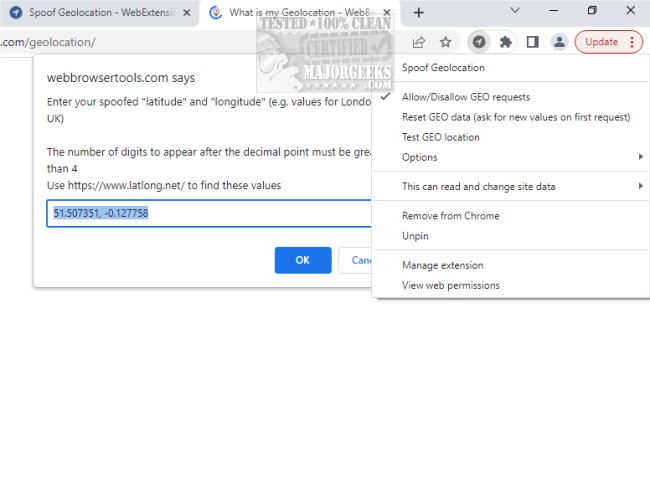
Setting up Spoof Geolocation is straightforward, requiring no extensive configuration. Users only need to grant permission for location access once per webpage. The extension facilitates easy adjustments of latitude and longitude via a right-click context menu. Additionally, users can block location requests, with the toolbar color changing to indicate when a webpage is being fed false location information.
One of the key features of Spoof Geolocation is the ability to customize location data, even in the absence of a GPS-enabled device. Users can spoof permissions for geo access, create randomized geolocation data, and alter the accuracy of the coordinates. The tool also remembers the last used coordinates for convenience.
To test the extension, users can visit the website https://webbrowsertools.com/geolocation/ where they can input their desired latitude and longitude. The extension will utilize these coordinates for all subsequent requests. If users wish to block geolocation access, they can easily do so through the context menu. Refreshing the page will show the effects of any changes made.
To obtain recommended latitude and longitude values, users are advised to check their browser's proxy settings at https://webbrowsertools.com/ip-address/ and convert the resulting location into coordinates using https://www.latlong.net/. The extension effectively overrides certain JavaScript methods related to geolocation, including navigator.geolocation.getCurrentPosition, navigator.geolocation.watchPosition, and navigator.permissions.query.
As the digital landscape continues to evolve, tools like Spoof Geolocation for Chrome empower users with enhanced privacy and control over their online presence. The ability to manage geolocation data can be particularly beneficial for individuals concerned about tracking or data collection in various web applications. With the ongoing advancements in privacy-focused technologies, users can expect to see more tools that facilitate secure and anonymous browsing experiences
Setting up Spoof Geolocation is straightforward, requiring no extensive configuration. Users only need to grant permission for location access once per webpage. The extension facilitates easy adjustments of latitude and longitude via a right-click context menu. Additionally, users can block location requests, with the toolbar color changing to indicate when a webpage is being fed false location information.
One of the key features of Spoof Geolocation is the ability to customize location data, even in the absence of a GPS-enabled device. Users can spoof permissions for geo access, create randomized geolocation data, and alter the accuracy of the coordinates. The tool also remembers the last used coordinates for convenience.
To test the extension, users can visit the website https://webbrowsertools.com/geolocation/ where they can input their desired latitude and longitude. The extension will utilize these coordinates for all subsequent requests. If users wish to block geolocation access, they can easily do so through the context menu. Refreshing the page will show the effects of any changes made.
To obtain recommended latitude and longitude values, users are advised to check their browser's proxy settings at https://webbrowsertools.com/ip-address/ and convert the resulting location into coordinates using https://www.latlong.net/. The extension effectively overrides certain JavaScript methods related to geolocation, including navigator.geolocation.getCurrentPosition, navigator.geolocation.watchPosition, and navigator.permissions.query.
As the digital landscape continues to evolve, tools like Spoof Geolocation for Chrome empower users with enhanced privacy and control over their online presence. The ability to manage geolocation data can be particularly beneficial for individuals concerned about tracking or data collection in various web applications. With the ongoing advancements in privacy-focused technologies, users can expect to see more tools that facilitate secure and anonymous browsing experiences
Spoof Geolocation for Chrome 0.3.2 released
Spoof Geolocation for Chrome allows you to change your browser's latitude and longitude values to a specified location.