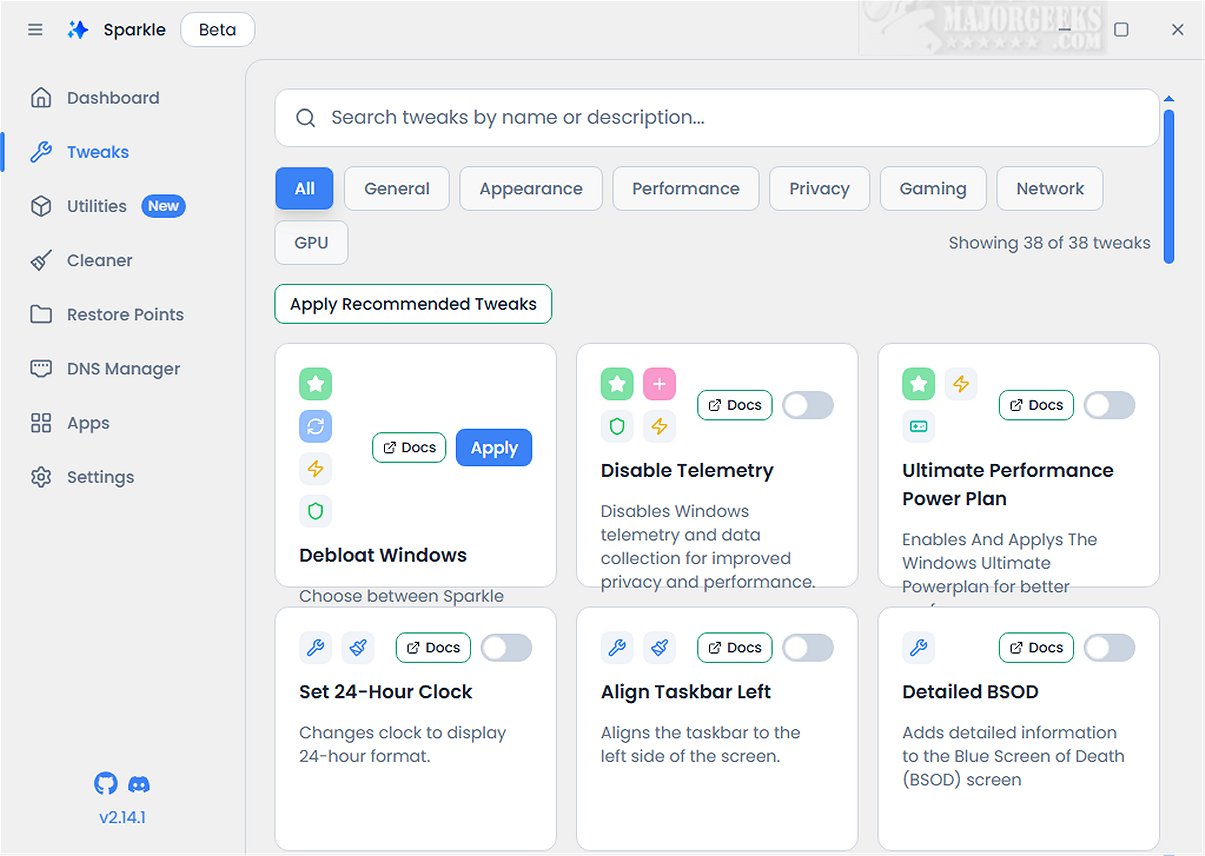
Sparkle is a powerful application for Windows that aims to boost system performance by eliminating unnecessary Microsoft bloatware and allowing for various customization tweaks.
Key Features of Sparkle:
With Sparkle, users can disable telemetry features that monitor user activity, deactivate Copilot for a more streamlined workflow, and apply specialized NVIDIA optimizations to enhance gaming performance. Additionally, it provides the option to easily uninstall OneDrive, giving users greater control over their applications.
App Installer Integration:
A notable feature of Sparkle is its integration with robust app installers, including built-in Winget and Chocolatey. This integration offers users quick access to the latest software updates, ensuring that their toolkit remains current without the need for cumbersome manual downloads.
User-Friendly Interface:
Sparkle features an intuitive interface, highlighted by a dedicated Utilities page. This page allows users to perform essential tasks, such as running Disk Cleanup to free up space, accessing detailed system information for performance monitoring, and quickly restarting graphics drivers to resolve display issues.
Creating a Restore Point:
Before using Sparkle, it's recommended to create a system restore point. This feature, which Sparkle can initiate, provides a safeguard in case any problems arise during or after the application’s use. Having a current backup is also advisable for added security.
Geek Verdict:
In conclusion, Sparkle offers a holistic solution that combines multiple essential features into a cohesive experience. With its user-friendly Winget App Installer, versatile Chocolatey App Installer, effective Windows Debloat Tool, efficient temporary file cleaner, and dynamic DNS Changer, Sparkle is poised as the ultimate tool for optimizing and personalizing the Windows experience.
Future Development:
As Sparkle continues to evolve, future updates may include enhanced customization options, additional app integrations, and more advanced optimization tools tailored for specific user needs. The development team is likely to focus on user feedback to further enhance functionality and usability, ensuring that Sparkle remains a top choice for Windows users seeking performance improvements and customization. Additional features like support for more third-party applications and improved analytics for system performance could also be on the horizon, making Sparkle an even more indispensable tool for Windows optimization
Key Features of Sparkle:
With Sparkle, users can disable telemetry features that monitor user activity, deactivate Copilot for a more streamlined workflow, and apply specialized NVIDIA optimizations to enhance gaming performance. Additionally, it provides the option to easily uninstall OneDrive, giving users greater control over their applications.
App Installer Integration:
A notable feature of Sparkle is its integration with robust app installers, including built-in Winget and Chocolatey. This integration offers users quick access to the latest software updates, ensuring that their toolkit remains current without the need for cumbersome manual downloads.
User-Friendly Interface:
Sparkle features an intuitive interface, highlighted by a dedicated Utilities page. This page allows users to perform essential tasks, such as running Disk Cleanup to free up space, accessing detailed system information for performance monitoring, and quickly restarting graphics drivers to resolve display issues.
Creating a Restore Point:
Before using Sparkle, it's recommended to create a system restore point. This feature, which Sparkle can initiate, provides a safeguard in case any problems arise during or after the application’s use. Having a current backup is also advisable for added security.
Geek Verdict:
In conclusion, Sparkle offers a holistic solution that combines multiple essential features into a cohesive experience. With its user-friendly Winget App Installer, versatile Chocolatey App Installer, effective Windows Debloat Tool, efficient temporary file cleaner, and dynamic DNS Changer, Sparkle is poised as the ultimate tool for optimizing and personalizing the Windows experience.
Future Development:
As Sparkle continues to evolve, future updates may include enhanced customization options, additional app integrations, and more advanced optimization tools tailored for specific user needs. The development team is likely to focus on user feedback to further enhance functionality and usability, ensuring that Sparkle remains a top choice for Windows users seeking performance improvements and customization. Additional features like support for more third-party applications and improved analytics for system performance could also be on the horizon, making Sparkle an even more indispensable tool for Windows optimization
Sparkle 2.19.0 Beta released
Sparkle is a versatile Windows application designed to enhance your system's performance by effectively removing unnecessary Microsoft bloatware and applying various customization tweaks.