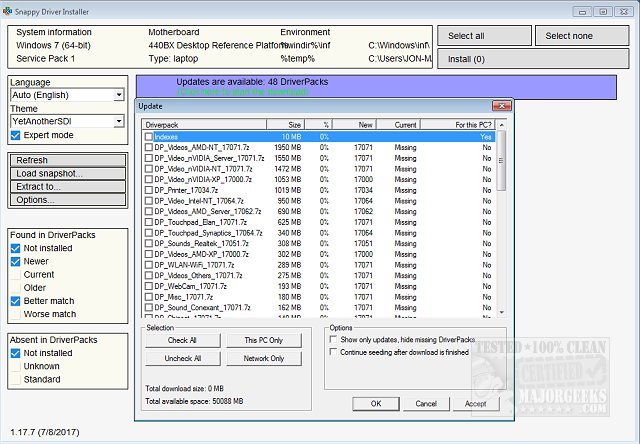
The Snappy Driver Installer (SDI) has just released version 1.26.0 (R2601), a powerful driver updater tool tailored for tech enthusiasts and professionals. This utility is particularly valuable for those who frequently work on PCs, as it simplifies the process of managing and installing drivers, especially after fresh installations of Windows.
Why Choose Snappy Driver Installer?
SDI is designed for efficiency and flexibility, making it an ideal choice for both individual users and those needing to update multiple systems. Here are some standout features:
- Offline Functionality: Users can download extensive driver packs for offline use, a crucial advantage when dealing with systems lacking network drivers.
- Portability: The tool can be run directly from a USB stick or external drive without installation, allowing for easy deployment across multiple machines.
- Bulk Updates: Users can choose to update several drivers simultaneously or prioritize critical updates, depending on their needs.
- Open Source: SDI is completely free and open-source, providing a no-strings-attached experience without ads or paid upgrades.
- Safety Features: It creates system restore points before making changes, ensuring users can easily revert to previous configurations if necessary.
Advanced Features
1. Driver Discovery Engine: This feature employs advanced algorithms to find the most suitable drivers for various Windows versions, including legacy systems like Windows XP.
2. Snapshot Functionality: Users can capture snapshots of their current driver configurations, facilitating easy restoration or replication on other systems.
3. Customizable Options: SDI allows users to customize its appearance and functionality, supporting multiple languages to cater to a global audience.
4. Unattended Installations: For those who want to automate the process, SDI offers an unattended installation feature, streamlining driver updates.
5. Duplicate and Invalid Driver Detection: This function keeps systems organized by identifying and removing redundant or incorrect driver files.
Target Audience
While Snappy Driver Installer is a powerhouse tool, it is not designed for novice users. Its interface may appear daunting to casual PC owners, but for hobbyists, repair technicians, and IT professionals, its straightforward approach and robust functionality are invaluable.
Conclusion
In summary, Snappy Driver Installer is a no-frills, highly effective tool for managing drivers. Its combination of offline capabilities, a comprehensive driver library, and essential safety features make it a must-have for anyone serious about system maintenance and performance optimization. If you prioritize functionality over aesthetics, SDI is definitely worth downloading.
Further Exploration
For those looking to enhance their understanding of driver management, consider exploring related topics such as how to download the latest drivers for Windows, the differences between Windows DCH drivers, and methods for backing up and restoring drivers
Why Choose Snappy Driver Installer?
SDI is designed for efficiency and flexibility, making it an ideal choice for both individual users and those needing to update multiple systems. Here are some standout features:
- Offline Functionality: Users can download extensive driver packs for offline use, a crucial advantage when dealing with systems lacking network drivers.
- Portability: The tool can be run directly from a USB stick or external drive without installation, allowing for easy deployment across multiple machines.
- Bulk Updates: Users can choose to update several drivers simultaneously or prioritize critical updates, depending on their needs.
- Open Source: SDI is completely free and open-source, providing a no-strings-attached experience without ads or paid upgrades.
- Safety Features: It creates system restore points before making changes, ensuring users can easily revert to previous configurations if necessary.
Advanced Features
1. Driver Discovery Engine: This feature employs advanced algorithms to find the most suitable drivers for various Windows versions, including legacy systems like Windows XP.
2. Snapshot Functionality: Users can capture snapshots of their current driver configurations, facilitating easy restoration or replication on other systems.
3. Customizable Options: SDI allows users to customize its appearance and functionality, supporting multiple languages to cater to a global audience.
4. Unattended Installations: For those who want to automate the process, SDI offers an unattended installation feature, streamlining driver updates.
5. Duplicate and Invalid Driver Detection: This function keeps systems organized by identifying and removing redundant or incorrect driver files.
Target Audience
While Snappy Driver Installer is a powerhouse tool, it is not designed for novice users. Its interface may appear daunting to casual PC owners, but for hobbyists, repair technicians, and IT professionals, its straightforward approach and robust functionality are invaluable.
Conclusion
In summary, Snappy Driver Installer is a no-frills, highly effective tool for managing drivers. Its combination of offline capabilities, a comprehensive driver library, and essential safety features make it a must-have for anyone serious about system maintenance and performance optimization. If you prioritize functionality over aesthetics, SDI is definitely worth downloading.
Further Exploration
For those looking to enhance their understanding of driver management, consider exploring related topics such as how to download the latest drivers for Windows, the differences between Windows DCH drivers, and methods for backing up and restoring drivers
Snappy Driver Installer 1.26.0 (R2601) released
Snappy Driver Installer is a driver updater geared toward geeks and techs alike. Video tutorial available.
Snappy Driver Installer 1.26.0 (R2601) released @ MajorGeeks