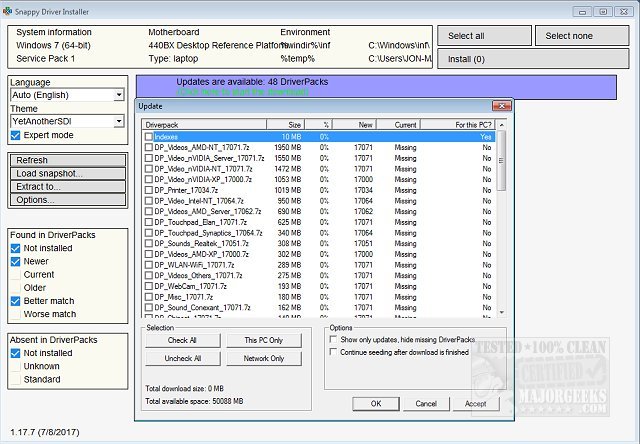
Snappy Driver Installer (SDI) has released version 1.26.0 (R2600), a powerful and free driver updater tool designed for tech enthusiasts and professionals. It offers a no-frills, efficient way to manage and install drivers, especially useful for those who frequently work with PCs and encounter issues with missing or outdated drivers.
Why Snappy Driver Installer Stands Out:
- Offline Capability: Users can download extensive driver packs in advance, allowing installation on systems without internet access—ideal for troubleshooting after a Windows installation.
- Portable Utility: SDI is portable, enabling users to carry it on a USB drive and use it on any compatible system without installation.
- Bulk Updates: It allows for easy updates of multiple drivers simultaneously or selectively, providing flexibility based on user needs.
- No Ads or Premium Versions: SDI is completely free and open-source, devoid of any upselling or hidden costs.
- Safety Measures: The tool creates system restore points before changes, ensuring users can revert back if needed.
Key Features:
1. Driver Discovery Engine: Utilizes advanced algorithms to find the best matching drivers across various Windows versions, including older ones like Windows XP.
2. Snapshot Wizard: Users can save driver configurations and replicate them, beneficial for technicians managing multiple systems.
3. Customizable Options: Users can apply themes and filter options, with support for 27 languages.
4. Unattended Installation: Automates the driver installation process, allowing users to sit back while SDI does the work.
5. Duplicate and Invalid Driver Detection: Helps maintain system cleanliness by identifying and managing driver conflicts.
Target Audience:
SDI is tailored for tech-savvy individuals, such as PC hobbyists, repair technicians, and IT professionals who favor a straightforward approach to driver management. While it may not cater to casual users due to its utilitarian interface, those who invest time to learn its functionalities will find it invaluable.
Final Verdict:
Snappy Driver Installer is a robust solution for those who prioritize efficiency and functionality over aesthetics. Its offline capabilities, extensive driver database, and user-friendly features make it a must-have tool for anyone serious about maintaining their hardware's performance and compatibility.
In conclusion, if you appreciate a lean, effective tool that delivers on its promises without unnecessary embellishments, downloading Snappy Driver Installer is highly recommended. With its latest update, the tool continues to be a staple for tech enthusiasts looking to streamline their driver management process
Why Snappy Driver Installer Stands Out:
- Offline Capability: Users can download extensive driver packs in advance, allowing installation on systems without internet access—ideal for troubleshooting after a Windows installation.
- Portable Utility: SDI is portable, enabling users to carry it on a USB drive and use it on any compatible system without installation.
- Bulk Updates: It allows for easy updates of multiple drivers simultaneously or selectively, providing flexibility based on user needs.
- No Ads or Premium Versions: SDI is completely free and open-source, devoid of any upselling or hidden costs.
- Safety Measures: The tool creates system restore points before changes, ensuring users can revert back if needed.
Key Features:
1. Driver Discovery Engine: Utilizes advanced algorithms to find the best matching drivers across various Windows versions, including older ones like Windows XP.
2. Snapshot Wizard: Users can save driver configurations and replicate them, beneficial for technicians managing multiple systems.
3. Customizable Options: Users can apply themes and filter options, with support for 27 languages.
4. Unattended Installation: Automates the driver installation process, allowing users to sit back while SDI does the work.
5. Duplicate and Invalid Driver Detection: Helps maintain system cleanliness by identifying and managing driver conflicts.
Target Audience:
SDI is tailored for tech-savvy individuals, such as PC hobbyists, repair technicians, and IT professionals who favor a straightforward approach to driver management. While it may not cater to casual users due to its utilitarian interface, those who invest time to learn its functionalities will find it invaluable.
Final Verdict:
Snappy Driver Installer is a robust solution for those who prioritize efficiency and functionality over aesthetics. Its offline capabilities, extensive driver database, and user-friendly features make it a must-have tool for anyone serious about maintaining their hardware's performance and compatibility.
In conclusion, if you appreciate a lean, effective tool that delivers on its promises without unnecessary embellishments, downloading Snappy Driver Installer is highly recommended. With its latest update, the tool continues to be a staple for tech enthusiasts looking to streamline their driver management process
Snappy Driver Installer 1.26.0 (R2600) released
Snappy Driver Installer is a driver updater geared toward geeks and techs alike. Video tutorial available.
Snappy Driver Installer 1.26.0 (R2600) released @ MajorGeeks