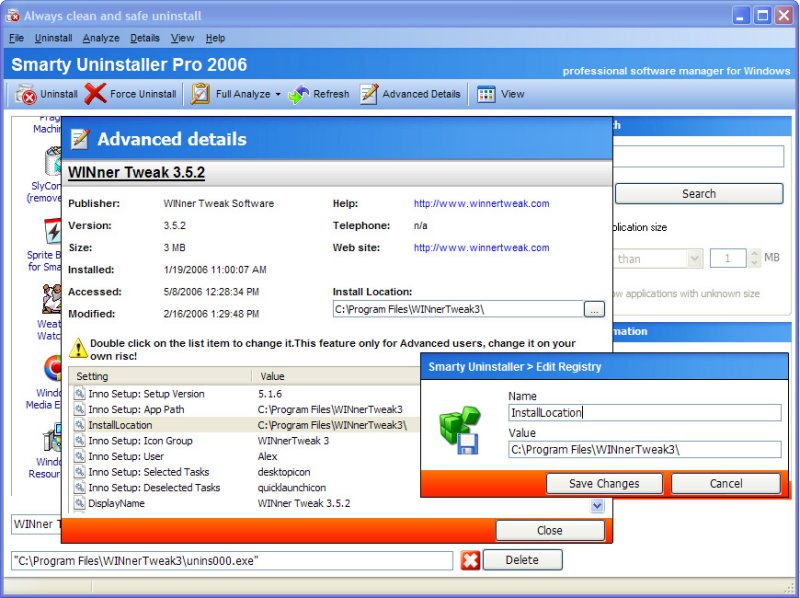
Smarty Uninstaller 4.92.0 has been released, offering users a highly efficient tool for completely removing installed programs from their systems. The software features a user-friendly interface that simplifies the uninstallation process, addressing a common problem where Windows applications can leave residual files, registry entries, and shortcuts behind. Unlike many traditional uninstallers, Smarty Uninstaller ensures thorough removal of all components associated with an application.
Key features include:
- Complete Removal: Uninstalls applications while eliminating all related files, shortcuts, and registry entries.
- User-Friendly Interface: Designed for comfort and ease of use, allowing users to navigate the software effortlessly.
- Speed and Reliability: Offers a faster and more dependable alternative to the standard Windows Add/Remove Programs feature.
- Smart Protection: Safeguards critical system components to prevent accidental deletions of essential files.
- Drag-and-Drop Functionality: Users can easily uninstall applications by dragging their icons onto the Smarty Uninstaller icon or through context menu commands.
- Queue Management: Allows users to create a queue to analyze or uninstall multiple applications simultaneously.
- Smarty Analyzer: This tool scans for leftover traces of uninstalled applications, ensuring a thorough cleaning process.
- Force Uninstallation: Capable of removing applications with broken uninstallers, ensuring complete uninstallation.
- Invalid Installation Detection: Automatically identifies invalid installations and suggests ways to rectify them.
- Detailed Application Information: Provides insights into the application's name, version, size, and installation location.
- Reporting Features: Users can create and print comprehensive reports about installed applications in HTML format.
- Backup Capability: Users can back up their system directly through the software.
- Helpful Support: Offers useful tips and comprehensive help documentation for enhanced usability.
- Multilingual Support: Available in multiple languages to cater to a diverse user base.
- Quick Search Function: Enables rapid location of specific applications.
In summary, Smarty Uninstaller 4.92.0 stands out as a robust solution for anyone looking to manage their installed applications effectively. Its comprehensive features not only simplify the uninstallation process but also provide added functionality for maintaining system integrity. As software continues to evolve, tools like Smarty Uninstaller will remain essential for users seeking to streamline their PC maintenance and ensure optimal performance
Key features include:
- Complete Removal: Uninstalls applications while eliminating all related files, shortcuts, and registry entries.
- User-Friendly Interface: Designed for comfort and ease of use, allowing users to navigate the software effortlessly.
- Speed and Reliability: Offers a faster and more dependable alternative to the standard Windows Add/Remove Programs feature.
- Smart Protection: Safeguards critical system components to prevent accidental deletions of essential files.
- Drag-and-Drop Functionality: Users can easily uninstall applications by dragging their icons onto the Smarty Uninstaller icon or through context menu commands.
- Queue Management: Allows users to create a queue to analyze or uninstall multiple applications simultaneously.
- Smarty Analyzer: This tool scans for leftover traces of uninstalled applications, ensuring a thorough cleaning process.
- Force Uninstallation: Capable of removing applications with broken uninstallers, ensuring complete uninstallation.
- Invalid Installation Detection: Automatically identifies invalid installations and suggests ways to rectify them.
- Detailed Application Information: Provides insights into the application's name, version, size, and installation location.
- Reporting Features: Users can create and print comprehensive reports about installed applications in HTML format.
- Backup Capability: Users can back up their system directly through the software.
- Helpful Support: Offers useful tips and comprehensive help documentation for enhanced usability.
- Multilingual Support: Available in multiple languages to cater to a diverse user base.
- Quick Search Function: Enables rapid location of specific applications.
In summary, Smarty Uninstaller 4.92.0 stands out as a robust solution for anyone looking to manage their installed applications effectively. Its comprehensive features not only simplify the uninstallation process but also provide added functionality for maintaining system integrity. As software continues to evolve, tools like Smarty Uninstaller will remain essential for users seeking to streamline their PC maintenance and ensure optimal performance
Smarty Uninstaller 4.92.0 released
Smarty Uninstaller has a very easy-to-use interface that will make completely removing installed programs from your system easy.