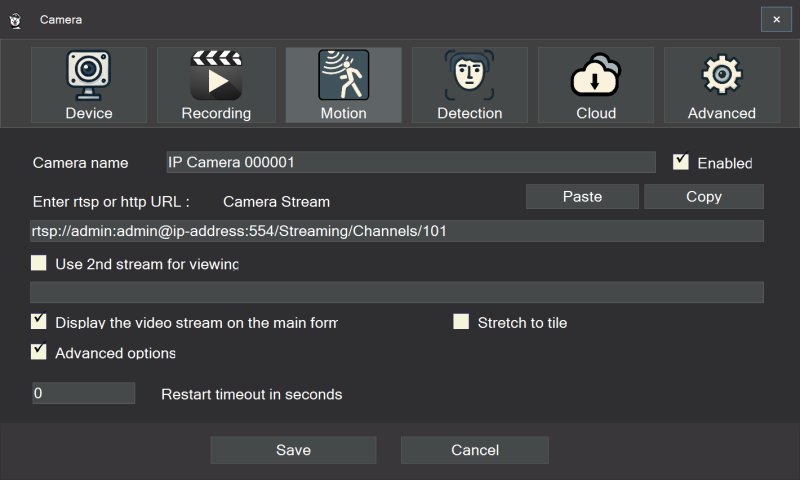
SmartVision is an advanced video management software (VMS) tailored for Windows, designed to enhance security through efficient video surveillance. It connects seamlessly to IP cameras, providing high-quality recording capabilities alongside intelligent analytics powered by artificial intelligence. This software stands out in the surveillance landscape by integrating features such as object, sound, face, and license plate detection, all while optimizing CPU usage through GPU acceleration.
Key Features and Functionalities
SmartVision effectively turns a PC running Windows 10 or 11 into a sophisticated security hub. It supports a variety of IP cameras using RTSP or HTTP protocols and utilizes ONVIF auto-discovery for quick setup. Its functionalities allow for continuous MP4 recording utilizing H.264 or H.265 codecs, ensuring efficient storage management. The software goes beyond basic video surveillance, incorporating intelligent motion and object detection, fire and smoke detection, and automatic license plate recognition, along with detailed event logs.
SmartVision also excels in audio surveillance, offering advanced sound analysis capabilities. It can detect over 500 sound types, including alarms and distress signals, and features continuous audio monitoring. Furthermore, its automatic speech recognition function converts spoken language into searchable text, making it particularly valuable for applications like patient monitoring and childcare.
Scalability and Stability
Built with resilience in mind, SmartVision is designed to handle network disruptions and camera disconnections. It can automatically reconnect and balance loads, ensuring uninterrupted recording. The interface supports up to 16 cameras, and its multi-server architecture allows for scalability, making it suitable for both personal and enterprise-level deployments.
Additionally, SmartVision offers an optional cloud backup feature, allowing users to store selected recordings off-site for added security. The cloud integration is customizable, enabling users to choose which footage to upload, thus managing bandwidth and storage costs effectively.
Pricing Model
SmartVision operates on a hybrid pricing model, offering a free version with essential features for basic surveillance needs. This includes live viewing, local recording, and basic motion detection. For those requiring more robust capabilities, a paid version is available that unlocks advanced analytics, cloud storage options, and enterprise-level features.
Pros and Cons
Pros:
- Comprehensive feature set with robust analytics.
- Efficient GPU acceleration for smooth performance.
- Reliable handling of unstable camera and network conditions.
- Advanced audio and speech detection capabilities.
- Flexible pricing model catering to various needs.
Cons:
- More complex than standard surveillance software, requiring a learning curve.
- Exclusively available for Windows; no Linux support.
- Potential additional hardware costs to optimize performance.
Conclusion
In summary, SmartVision 6.6 is a powerful surveillance solution that provides significant insights through its AI-driven features and strong stability. It is particularly suitable for users who require detailed analytics and data management rather than just basic live feeds. For those seeking a comprehensive security solution, SmartVision is worth considering. However, users looking for straightforward setups may find it more complex than necessary. For support, users can access resources such as the MajorGeeks forums for troubleshooting and community advice.
As security technology continues to evolve, SmartVision's capabilities position it as a frontrunner in the domain of video surveillance, making it an attractive option for both residential and commercial users looking to enhance their security infrastructure
Key Features and Functionalities
SmartVision effectively turns a PC running Windows 10 or 11 into a sophisticated security hub. It supports a variety of IP cameras using RTSP or HTTP protocols and utilizes ONVIF auto-discovery for quick setup. Its functionalities allow for continuous MP4 recording utilizing H.264 or H.265 codecs, ensuring efficient storage management. The software goes beyond basic video surveillance, incorporating intelligent motion and object detection, fire and smoke detection, and automatic license plate recognition, along with detailed event logs.
SmartVision also excels in audio surveillance, offering advanced sound analysis capabilities. It can detect over 500 sound types, including alarms and distress signals, and features continuous audio monitoring. Furthermore, its automatic speech recognition function converts spoken language into searchable text, making it particularly valuable for applications like patient monitoring and childcare.
Scalability and Stability
Built with resilience in mind, SmartVision is designed to handle network disruptions and camera disconnections. It can automatically reconnect and balance loads, ensuring uninterrupted recording. The interface supports up to 16 cameras, and its multi-server architecture allows for scalability, making it suitable for both personal and enterprise-level deployments.
Additionally, SmartVision offers an optional cloud backup feature, allowing users to store selected recordings off-site for added security. The cloud integration is customizable, enabling users to choose which footage to upload, thus managing bandwidth and storage costs effectively.
Pricing Model
SmartVision operates on a hybrid pricing model, offering a free version with essential features for basic surveillance needs. This includes live viewing, local recording, and basic motion detection. For those requiring more robust capabilities, a paid version is available that unlocks advanced analytics, cloud storage options, and enterprise-level features.
Pros and Cons
Pros:
- Comprehensive feature set with robust analytics.
- Efficient GPU acceleration for smooth performance.
- Reliable handling of unstable camera and network conditions.
- Advanced audio and speech detection capabilities.
- Flexible pricing model catering to various needs.
Cons:
- More complex than standard surveillance software, requiring a learning curve.
- Exclusively available for Windows; no Linux support.
- Potential additional hardware costs to optimize performance.
Conclusion
In summary, SmartVision 6.6 is a powerful surveillance solution that provides significant insights through its AI-driven features and strong stability. It is particularly suitable for users who require detailed analytics and data management rather than just basic live feeds. For those seeking a comprehensive security solution, SmartVision is worth considering. However, users looking for straightforward setups may find it more complex than necessary. For support, users can access resources such as the MajorGeeks forums for troubleshooting and community advice.
As security technology continues to evolve, SmartVision's capabilities position it as a frontrunner in the domain of video surveillance, making it an attractive option for both residential and commercial users looking to enhance their security infrastructure
SmartVision 6.6 released
SmartVision is powerful video surveillance software for Windows that connects to IP cameras, records high-quality video, and adds intelligent detection and analytics to your security setup.