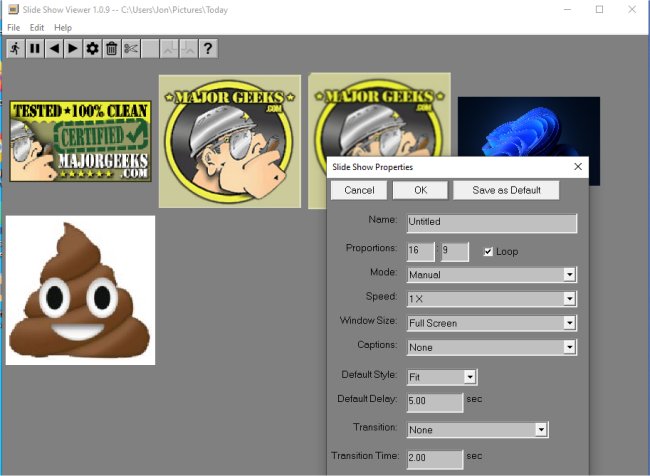
Slide Show Viewer is a versatile application designed for displaying TIFF and JPEG image files in a customizable slide show format. The app allows users to create slide shows by organizing images within a dedicated folder, which includes both the image files and an index file named 'index.ssi' that contains the settings for the slide show.
The index file plays a crucial role in determining the sequence of the slides and the display characteristics for each image. Users can enjoy features such as panning and zooming to enhance their viewing experience. Additionally, Slide Show Viewer offers the flexibility to configure slide transitions, allowing for automatic progression at set intervals or manual navigation through the images.
For those who wish to present their images differently, the app supports the creation of multiple index files for the same image folder, enabling various displays of the same content. The slide shows are color managed according to the profiles embedded in the image files as well as the selected monitor profile, ensuring high-quality visuals.
An in-app Help File is available to assist users in maximizing the app's features. Slide Show Viewer serves as a great alternative to the default image viewing options, making it easier to rediscover and enjoy forgotten images stored away on devices.
Enhancements and Future Updates:
Moving forward, additional updates could include expanded file format support beyond JPEG and TIFF, integration with cloud storage for easy access to images, and enhanced editing features for customizing the index files. User feedback could also lead to the development of collaborative slide show options, allowing multiple users to contribute images and settings to a shared presentation. These enhancements would further solidify Slide Show Viewer as a leading tool for creating engaging and personalized slide shows
The index file plays a crucial role in determining the sequence of the slides and the display characteristics for each image. Users can enjoy features such as panning and zooming to enhance their viewing experience. Additionally, Slide Show Viewer offers the flexibility to configure slide transitions, allowing for automatic progression at set intervals or manual navigation through the images.
For those who wish to present their images differently, the app supports the creation of multiple index files for the same image folder, enabling various displays of the same content. The slide shows are color managed according to the profiles embedded in the image files as well as the selected monitor profile, ensuring high-quality visuals.
An in-app Help File is available to assist users in maximizing the app's features. Slide Show Viewer serves as a great alternative to the default image viewing options, making it easier to rediscover and enjoy forgotten images stored away on devices.
Enhancements and Future Updates:
Moving forward, additional updates could include expanded file format support beyond JPEG and TIFF, integration with cloud storage for easy access to images, and enhanced editing features for customizing the index files. User feedback could also lead to the development of collaborative slide show options, allowing multiple users to contribute images and settings to a shared presentation. These enhancements would further solidify Slide Show Viewer as a leading tool for creating engaging and personalized slide shows
Slide Show Viewer 1.0.21 released
Slide Show Viewer is a customizable app that can display TIFF or JPEG files as a slide show.