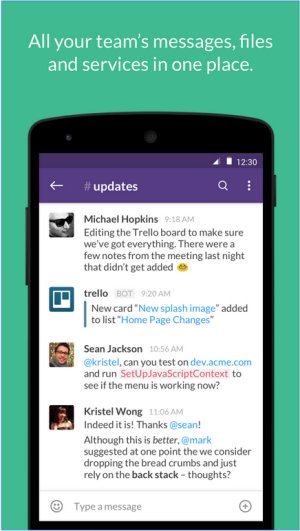
Slack has recently released version 4.50.136, enhancing its capabilities as a comprehensive team communication tool. This platform centralizes all team communications with real-time messaging, file sharing, and both group and one-on-one conversations, reducing the reliance on traditional email.
Overview of Slack’s Features:
Slack provides a user-friendly interface that promotes efficient collaboration through various functionalities. Key features include:
- Channels and Direct Messaging: Teams can organize discussions by specific projects, topics, or departments, helping to maintain focus and reduce clutter.
- File Sharing: Users can easily upload and share files, documents, and links within conversations.
- Integrations: Slack supports connections with numerous productivity tools like Google Drive, Trello, Zoom, Asana, and GitHub, allowing for streamlined workflows and task automation.
- Searchable History: Users can quickly locate past messages and files for reference.
- Automation and Bots: Slackbot can help automate tasks and manage reminders.
- Voice and Video Calls: Team members can communicate in real-time without needing to switch applications.
Pricing Structure:
Slack offers a free plan that includes a limited message history of 90 days and access to 10 integrations, making it accessible for small teams. For those requiring more robust features, paid plans such as the Pro plan provide unlimited message history and advanced integrations, while Business+ and Enterprise Grid plans cater to larger organizations with heightened security and administrative controls.
Comparative Analysis:
When compared to competitors like Microsoft Teams and Google Chat, Slack is noted for its intuitive design and adaptability suited for diverse workflows. It is particularly beneficial for remote teams where organized communication is paramount. However, limitations in the free plan and the potential costs of paid subscriptions may pose challenges for expanding teams.
Pros and Cons:
- Pros:
- User-friendly interface
- Extensive third-party integrations
- Organized conversation channels
- Multi-device compatibility
- Searchable message history (in paid plans)
- Cons:
- Free plan restricts message history to 90 days
- Potential distractions from excessive notifications
- Costs can accumulate for larger teams using paid plans
Conclusion:
Overall, Slack remains a top choice for enhancing team communication and productivity. Its extensive features, robust integration capabilities, and seamless user experience make it suitable for various organizational sizes. However, users should be mindful of notification settings to optimize their experience. As remote work continues to rise, tools like Slack will be indispensable for fostering collaboration and streamlining communication across teams. Future updates may further refine its functionalities, ensuring it stays relevant in a rapidly evolving digital workspace
Overview of Slack’s Features:
Slack provides a user-friendly interface that promotes efficient collaboration through various functionalities. Key features include:
- Channels and Direct Messaging: Teams can organize discussions by specific projects, topics, or departments, helping to maintain focus and reduce clutter.
- File Sharing: Users can easily upload and share files, documents, and links within conversations.
- Integrations: Slack supports connections with numerous productivity tools like Google Drive, Trello, Zoom, Asana, and GitHub, allowing for streamlined workflows and task automation.
- Searchable History: Users can quickly locate past messages and files for reference.
- Automation and Bots: Slackbot can help automate tasks and manage reminders.
- Voice and Video Calls: Team members can communicate in real-time without needing to switch applications.
Pricing Structure:
Slack offers a free plan that includes a limited message history of 90 days and access to 10 integrations, making it accessible for small teams. For those requiring more robust features, paid plans such as the Pro plan provide unlimited message history and advanced integrations, while Business+ and Enterprise Grid plans cater to larger organizations with heightened security and administrative controls.
Comparative Analysis:
When compared to competitors like Microsoft Teams and Google Chat, Slack is noted for its intuitive design and adaptability suited for diverse workflows. It is particularly beneficial for remote teams where organized communication is paramount. However, limitations in the free plan and the potential costs of paid subscriptions may pose challenges for expanding teams.
Pros and Cons:
- Pros:
- User-friendly interface
- Extensive third-party integrations
- Organized conversation channels
- Multi-device compatibility
- Searchable message history (in paid plans)
- Cons:
- Free plan restricts message history to 90 days
- Potential distractions from excessive notifications
- Costs can accumulate for larger teams using paid plans
Conclusion:
Overall, Slack remains a top choice for enhancing team communication and productivity. Its extensive features, robust integration capabilities, and seamless user experience make it suitable for various organizational sizes. However, users should be mindful of notification settings to optimize their experience. As remote work continues to rise, tools like Slack will be indispensable for fostering collaboration and streamlining communication across teams. Future updates may further refine its functionalities, ensuring it stays relevant in a rapidly evolving digital workspace
Slack 4.50.136 released
Slack puts all your team communications in one place wherever you go with real-time messaging, file sharing, and one-to-one and group conversations.