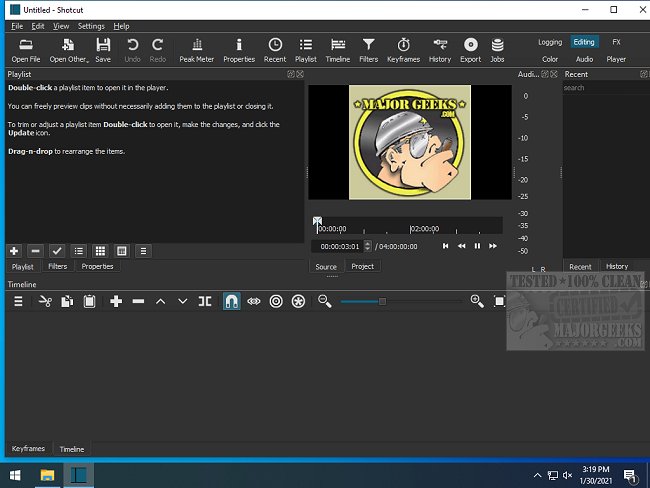
Shotcut, an open-source and cross-platform video editor, has released version 26.2.26, continuing to offer users a powerful, free alternative to paid video editing software. This software is designed for those who want to edit and convert video files without hidden fees or watermarks.
Why Shotcut Stands Out
Unlike many video editing tools that focus on flashy features and templates, Shotcut prioritizes raw editing capabilities. Its integration with FFmpeg allows it to support a wide variety of video formats, from standard MP4 to high-resolution 4K. The intuitive drag-and-drop timeline simplifies the editing process, allowing users to focus on crafting their videos.
Shotcut offers essential tools such as filters, transitions, keyframe animations, and chroma key for those looking to do green screen work. Audio editing is equally robust, with features including EQ, compression, and real-time scopes. The software also leverages GPU acceleration for smoother previews and quicker exports, particularly beneficial for handling large 4K files, though users may encounter some quirks.
Use Cases for Shotcut
Shotcut is ideal for anyone looking to edit personal or professional videos, whether it’s transforming family memories from a birthday party into a cohesive video, creating vlogs, or compiling gaming highlights. Users can easily add transitions, overlay text for captions, include background music, and utilize slow-motion effects for dramatic moments.
Key Features of Shotcut:
- Multi-format timeline for mixing different resolutions and frame rates
- Screen, webcam, and audio capture capabilities (Linux only)
- Playback support for various network streams
- JACK Transport Sync for audio-video synchronization
- Comprehensive media management options
- MLT XML integration for project management
- Customizable user interface with flexible dockable panels
- Encoding and transcoding with multiple format support
- Capture and streaming from various sources
Pros and Cons
Pros:
- Completely free and open-source with no hidden fees
- Extensive format compatibility
- Advanced features like keyframing and GPU acceleration
- Available on Windows, Mac, and Linux
Cons:
- User interface may seem outdated compared to premium options
- Steeper learning curve for beginners
- Interface can become disorganized with excessive item movement
- Lacks a built-in asset library for music and effects
Geek Verdict
Shotcut is not designed to be a one-size-fits-all solution but provides a competent editing suite for users willing to invest time in learning its functionalities. Whether for family videos or budding YouTube careers, Shotcut empowers creators with the freedom to edit without financial constraints. While it may have some rough edges, it proves to be a powerful tool in the hands of dedicated editors.
Future Extensions
As Shotcut continues to evolve, potential improvements could include a more modern user interface, enhanced onboarding tutorials for beginners, and the introduction of a built-in asset library for easier access to music and effects. These additions would further enhance the user experience and broaden Shotcut's appeal to a wider audience, making it a go-to choice for both novice and experienced video editors alike
Why Shotcut Stands Out
Unlike many video editing tools that focus on flashy features and templates, Shotcut prioritizes raw editing capabilities. Its integration with FFmpeg allows it to support a wide variety of video formats, from standard MP4 to high-resolution 4K. The intuitive drag-and-drop timeline simplifies the editing process, allowing users to focus on crafting their videos.
Shotcut offers essential tools such as filters, transitions, keyframe animations, and chroma key for those looking to do green screen work. Audio editing is equally robust, with features including EQ, compression, and real-time scopes. The software also leverages GPU acceleration for smoother previews and quicker exports, particularly beneficial for handling large 4K files, though users may encounter some quirks.
Use Cases for Shotcut
Shotcut is ideal for anyone looking to edit personal or professional videos, whether it’s transforming family memories from a birthday party into a cohesive video, creating vlogs, or compiling gaming highlights. Users can easily add transitions, overlay text for captions, include background music, and utilize slow-motion effects for dramatic moments.
Key Features of Shotcut:
- Multi-format timeline for mixing different resolutions and frame rates
- Screen, webcam, and audio capture capabilities (Linux only)
- Playback support for various network streams
- JACK Transport Sync for audio-video synchronization
- Comprehensive media management options
- MLT XML integration for project management
- Customizable user interface with flexible dockable panels
- Encoding and transcoding with multiple format support
- Capture and streaming from various sources
Pros and Cons
Pros:
- Completely free and open-source with no hidden fees
- Extensive format compatibility
- Advanced features like keyframing and GPU acceleration
- Available on Windows, Mac, and Linux
Cons:
- User interface may seem outdated compared to premium options
- Steeper learning curve for beginners
- Interface can become disorganized with excessive item movement
- Lacks a built-in asset library for music and effects
Geek Verdict
Shotcut is not designed to be a one-size-fits-all solution but provides a competent editing suite for users willing to invest time in learning its functionalities. Whether for family videos or budding YouTube careers, Shotcut empowers creators with the freedom to edit without financial constraints. While it may have some rough edges, it proves to be a powerful tool in the hands of dedicated editors.
Future Extensions
As Shotcut continues to evolve, potential improvements could include a more modern user interface, enhanced onboarding tutorials for beginners, and the introduction of a built-in asset library for easier access to music and effects. These additions would further enhance the user experience and broaden Shotcut's appeal to a wider audience, making it a go-to choice for both novice and experienced video editors alike
Shotcut 26.2.26 released
Shotcut is an Open Source, cross-platform video editor capable of converting and editing video files in various formats.