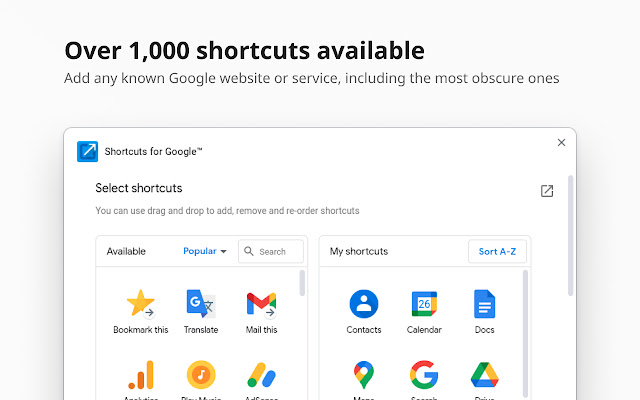
The recently released version 31.2.0 of the Chrome extension "Shortcuts for Google" provides users with a convenient way to access over 1000 Google services through a compact popup next to their address bar. This extension enables quick access to popular platforms like Gmail, Google Drive, Google Keep, Google Maps, and Google Calendar with just two clicks.
Key features of Shortcuts for Google include:
- A vast library of more than 1000 continuously updated Google shortcuts.
- The option to select from three different icon sizes (16, 32, and 64 pixels) for a personalized interface.
- The ability to create custom URL buttons, allowing users to link to other websites like Facebook.
- Functionality to rename services for easier identification.
- Integration features such as "Gmail this!", "Map this!", and "Bookmark this!" for enhanced productivity.
To further explore the capabilities of Google services, users may also find related resources such as guides on signing into Google Sites without Chrome, downloading Google account information, locating public restrooms via Google Maps, and protecting Google search history with passwords.
In addition to these features, the extension could benefit from user feedback mechanisms to suggest new shortcuts or services, ensuring it remains updated with the latest Google offerings. Future releases might also consider integrating more personalized features, such as user preferences for frequently accessed services or an AI-driven suggestion tool for optimizing workflow
Key features of Shortcuts for Google include:
- A vast library of more than 1000 continuously updated Google shortcuts.
- The option to select from three different icon sizes (16, 32, and 64 pixels) for a personalized interface.
- The ability to create custom URL buttons, allowing users to link to other websites like Facebook.
- Functionality to rename services for easier identification.
- Integration features such as "Gmail this!", "Map this!", and "Bookmark this!" for enhanced productivity.
To further explore the capabilities of Google services, users may also find related resources such as guides on signing into Google Sites without Chrome, downloading Google account information, locating public restrooms via Google Maps, and protecting Google search history with passwords.
In addition to these features, the extension could benefit from user feedback mechanisms to suggest new shortcuts or services, ensuring it remains updated with the latest Google offerings. Future releases might also consider integrating more personalized features, such as user preferences for frequently accessed services or an AI-driven suggestion tool for optimizing workflow
Shortcuts for Google 31.2.0 released
Shortcuts for Google is a Chrome extension that allows you to choose from 1000+ Google shortcuts to show up as buttons in a space-saving popup.