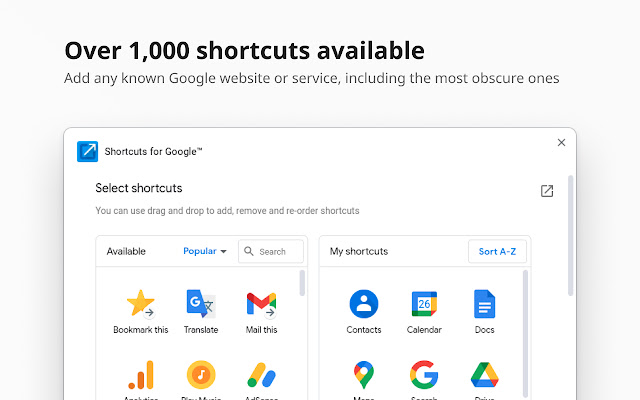
The recently released version 30.7.3 of the Chrome extension "Shortcuts for Google" offers users an efficient way to access over 1000 Google services through a compact popup interface. This extension places buttons for various Google services, such as Gmail, Google Drive, Google Keep, Google Maps, and Google Calendar, conveniently next to the browser's address bar, allowing users to reach their desired services in just two clicks.
Key features of Shortcuts for Google include:
- A vast selection of more than 1000 continuously updated Google shortcuts.
- Support for three different icon sizes: 16px, 32px, and 64px.
- The ability to add custom URL buttons, enabling links to other websites like Facebook.
- Options to rename services according to user preferences.
- Integration features such as "Gmail this!", "Map this!", and "Bookmark this!" for enhanced functionality.
In addition to its primary features, the extension is designed to improve user productivity by streamlining access to frequently used Google services.
For users looking to enhance their experience with Google products, Shortcuts for Google provides a user-friendly solution that can save time and improve workflow. With continuous updates and an array of customization options, this extension is a valuable tool for anyone who relies heavily on Google services.
Moreover, users can explore related topics such as signing into Google Sites without Chrome, downloading Gmail accounts, locating public restrooms via Google Maps, and securing Google search history with password protection, further demonstrating the versatility and utility of Google’s ecosystem
Key features of Shortcuts for Google include:
- A vast selection of more than 1000 continuously updated Google shortcuts.
- Support for three different icon sizes: 16px, 32px, and 64px.
- The ability to add custom URL buttons, enabling links to other websites like Facebook.
- Options to rename services according to user preferences.
- Integration features such as "Gmail this!", "Map this!", and "Bookmark this!" for enhanced functionality.
In addition to its primary features, the extension is designed to improve user productivity by streamlining access to frequently used Google services.
For users looking to enhance their experience with Google products, Shortcuts for Google provides a user-friendly solution that can save time and improve workflow. With continuous updates and an array of customization options, this extension is a valuable tool for anyone who relies heavily on Google services.
Moreover, users can explore related topics such as signing into Google Sites without Chrome, downloading Gmail accounts, locating public restrooms via Google Maps, and securing Google search history with password protection, further demonstrating the versatility and utility of Google’s ecosystem
Shortcuts for Google 30.7.3 released
Shortcuts for Google is a Chrome extension that allows you to choose from 1000+ Google shortcuts to show up as buttons in a space-saving popup.