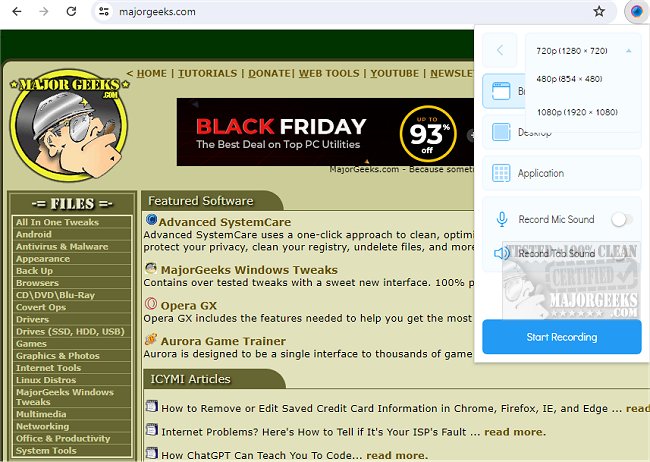
Scrnli - Screenshot and Screen Recorder Tool has released version 4.3.7, enhancing its capabilities as a versatile Chrome extension for users who need to capture and share visual content efficiently. This tool not only allows users to take screenshots and record their screens but also offers robust editing features, making it easy to create diverse types of content.
With Scrnli, users can record their screens in various formats, enabling seamless sharing and collaboration with colleagues, family, or friends. The extension supports recording from both the display monitor and webcam, allowing for a personalized touch in video content. Additionally, it provides a built-in link for online video file conversions, which facilitates the playback of recorded videos across multiple devices by changing their formats.
Capturing images is straightforward, as users can select between full-page or partial captures with just one click. The editing options allow for customization—text can be added, and shapes such as lines and arrows can be drawn to enhance clarity in communication. The user-friendly interface ensures that sharing files is instantaneous, either through links or by saving them directly to devices. Users also have the option to print their captures for physical distribution.
To utilize the Scrnli tool, users simply need to click the extension icon and choose their desired capture option. This intuitive design streamlines the process, allowing for quick access to necessary features, thus making it a favorite among users looking to convey information efficiently without lengthy explanations.
As a comprehensive solution for content creation, Scrnli stands out by combining screenshot and screen recording functionalities with file conversion and editing capabilities. This makes it an essential tool for anyone looking to enhance their digital communication, whether for professional or personal use.
Future updates could potentially include enhanced collaborative features, integration with more applications for seamless sharing, and advanced editing tools to further enrich user experience. Overall, Scrnli is poised to remain a go-to resource for those seeking to elevate their digital content creation
With Scrnli, users can record their screens in various formats, enabling seamless sharing and collaboration with colleagues, family, or friends. The extension supports recording from both the display monitor and webcam, allowing for a personalized touch in video content. Additionally, it provides a built-in link for online video file conversions, which facilitates the playback of recorded videos across multiple devices by changing their formats.
Capturing images is straightforward, as users can select between full-page or partial captures with just one click. The editing options allow for customization—text can be added, and shapes such as lines and arrows can be drawn to enhance clarity in communication. The user-friendly interface ensures that sharing files is instantaneous, either through links or by saving them directly to devices. Users also have the option to print their captures for physical distribution.
To utilize the Scrnli tool, users simply need to click the extension icon and choose their desired capture option. This intuitive design streamlines the process, allowing for quick access to necessary features, thus making it a favorite among users looking to convey information efficiently without lengthy explanations.
As a comprehensive solution for content creation, Scrnli stands out by combining screenshot and screen recording functionalities with file conversion and editing capabilities. This makes it an essential tool for anyone looking to enhance their digital communication, whether for professional or personal use.
Future updates could potentially include enhanced collaborative features, integration with more applications for seamless sharing, and advanced editing tools to further enrich user experience. Overall, Scrnli is poised to remain a go-to resource for those seeking to elevate their digital content creation
Scrnli - Screenshot and Screen Recorder Tool 4.3.7 released
Scrnli - Screenshot & Screen Recorder Tool lets you take screenshots or screen recordings, edit, download, and share through a free, easy-to-use Chrome extension.
Scrnli - Screenshot and Screen Recorder Tool 4.3.7 released @ MajorGeeks