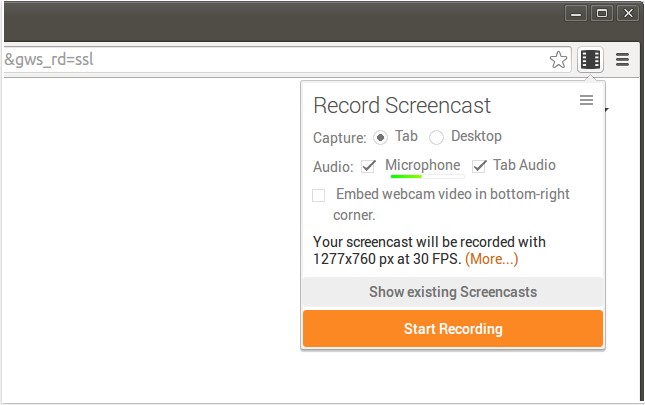
A new version of Screencastify for Chrome, version 4.22.2, has been released. This powerful tool allows users to record their entire screen activity, including audio, making it ideal for creating YouTube tutorials, presentations, and other content. The recordings are saved in WebM/vp8 format with Ogg Vorbis audio, ensuring high-quality output.
Screencastify offers multiple saving options, allowing users to save recordings directly to their local storage, upload them to YouTube, or save them to Google Drive with just a click. The application is designed to work seamlessly with Chromebooks and Chromeboxes, as it does not require any external software such as Java or Flash.
Key features of Screencastify include:
1. Google Drive Integration: Users can store recordings directly in Google Drive for easy access from any device, which is especially useful for those with limited local storage on Chromebooks.
2. Easy Sharing: Sharing recordings is straightforward; users can upload to YouTube with a simple click and receive a shareable link. If the recording is already on Google Drive, it can be published on YouTube directly from there.
3. Webcam Feed Option: Users can enhance their recordings by adding a webcam feed, allowing them to create a more personal connection with their audience.
4. Keyboard Shortcuts: The tool supports customizable keyboard shortcuts, enabling users to start recording quickly with a single keystroke.
Furthermore, Screencastify is user-friendly and caters to various needs, from educational purposes to professional presentations. As technology continues to evolve, tools like Screencastify play a crucial role in facilitating content creation and enhancing communication across various platforms.
For those interested in optimizing their browsing experience, there are also tips available on how to manage browser tab sounds in Chrome, Firefox, and Edge, as well as solutions for common video playback issues in these browsers
Screencastify offers multiple saving options, allowing users to save recordings directly to their local storage, upload them to YouTube, or save them to Google Drive with just a click. The application is designed to work seamlessly with Chromebooks and Chromeboxes, as it does not require any external software such as Java or Flash.
Key features of Screencastify include:
1. Google Drive Integration: Users can store recordings directly in Google Drive for easy access from any device, which is especially useful for those with limited local storage on Chromebooks.
2. Easy Sharing: Sharing recordings is straightforward; users can upload to YouTube with a simple click and receive a shareable link. If the recording is already on Google Drive, it can be published on YouTube directly from there.
3. Webcam Feed Option: Users can enhance their recordings by adding a webcam feed, allowing them to create a more personal connection with their audience.
4. Keyboard Shortcuts: The tool supports customizable keyboard shortcuts, enabling users to start recording quickly with a single keystroke.
Furthermore, Screencastify is user-friendly and caters to various needs, from educational purposes to professional presentations. As technology continues to evolve, tools like Screencastify play a crucial role in facilitating content creation and enhancing communication across various platforms.
For those interested in optimizing their browsing experience, there are also tips available on how to manage browser tab sounds in Chrome, Firefox, and Edge, as well as solutions for common video playback issues in these browsers
Screencastify for Chrome 4.22.2 released
Screencastify for Chrome will record all your screen activity including audio making it perfect for YouTube tutorials, presentations and more.