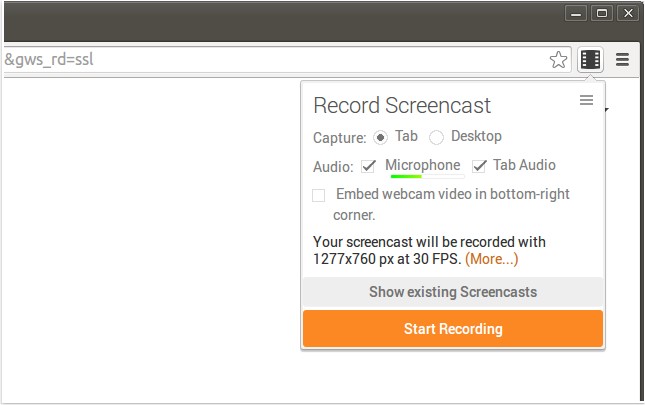
Screencastify for Chrome has released version 4.22.0, enhancing its capabilities as a screen recording tool. This extension allows users to capture their entire screen activity along with audio, making it ideal for creating YouTube tutorials, presentations, and more. The recorded videos are saved in WebM/vp8 format with Ogg Vorbis audio, offering quality playback.
The extension features seamless integration with Google Drive, enabling users to store recordings in the cloud for easy access from any device, which is particularly beneficial for those using Chromebooks with limited local storage. Users can also choose to save their recordings directly to their local disk. Sharing recordings is made straightforward; users can upload videos to YouTube with a single click and receive a shareable link instantly. For files already on Google Drive, uploading to YouTube can occur directly through Google's infrastructure, ensuring efficiency.
Additionally, Screencastify allows users to enhance their recordings by adding a webcam feed, providing a more personal touch. The tool also supports customizable keyboard shortcuts for starting recordings quickly, streamlining the user experience.
In summary, Screencastify for Chrome is a user-friendly tool that simplifies screen recording and sharing, making it suitable for educators, content creators, and professionals alike. With its ongoing updates and features, it continues to adapt to the needs of its users, ensuring effective communication through video. Future updates may include additional editing tools, improved video compression options, or integration with other platforms for an even more versatile user experience
The extension features seamless integration with Google Drive, enabling users to store recordings in the cloud for easy access from any device, which is particularly beneficial for those using Chromebooks with limited local storage. Users can also choose to save their recordings directly to their local disk. Sharing recordings is made straightforward; users can upload videos to YouTube with a single click and receive a shareable link instantly. For files already on Google Drive, uploading to YouTube can occur directly through Google's infrastructure, ensuring efficiency.
Additionally, Screencastify allows users to enhance their recordings by adding a webcam feed, providing a more personal touch. The tool also supports customizable keyboard shortcuts for starting recordings quickly, streamlining the user experience.
In summary, Screencastify for Chrome is a user-friendly tool that simplifies screen recording and sharing, making it suitable for educators, content creators, and professionals alike. With its ongoing updates and features, it continues to adapt to the needs of its users, ensuring effective communication through video. Future updates may include additional editing tools, improved video compression options, or integration with other platforms for an even more versatile user experience
Screencastify for Chrome 4.22.0 released
Screencastify for Chrome will record all your screen activity including audio making it perfect for YouTube tutorials, presentations and more.