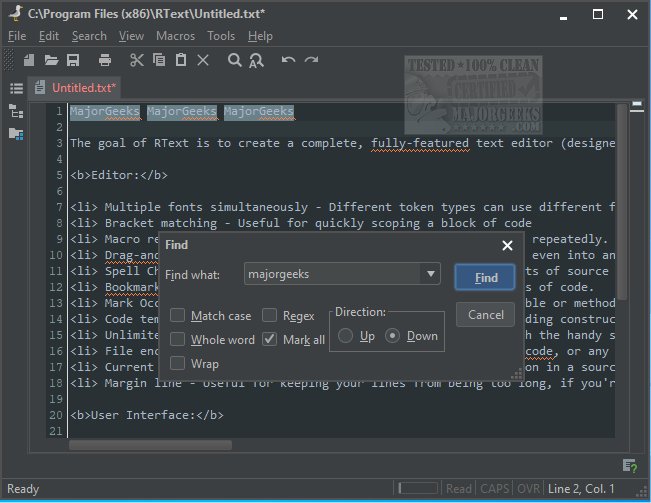
RText version 6.1.0 has been released with an aim to provide a comprehensive and versatile text editor primarily tailored for programmers, though suitable for general use as well, across all platforms. Initially envisioned as a simple clone of Windows Notepad, RText has significantly evolved, incorporating a wide array of features to enhance the coding experience.
Key features of RText include:
- Multiple Fonts: Users can apply different fonts and styles to various token types.
- Bracket Matching: This assists in quickly identifying code blocks.
- Macro Record/Playback: Automate repetitive tasks to save time.
- Drag-and-Drop Functionality: Users can easily reposition code within documents or transfer it to different applications.
- Spell Checking: Supports spell checking for both plain text and code comments.
- Bookmarking: Allows for easy navigation to important sections of code.
- Variable/Method Marking: Users can track the scope and usage of variables or methods effortlessly.
- Code Templates: Shortcut keys for common coding constructs streamline the coding process.
- Unlimited Undo/Redo: Provides peace of mind with smart error recovery features.
- File Encoding Support: Users can edit and save in various encodings, including ASCII and Unicode.
- Highlighting and Margins: Enhances visibility of current lines and keeps code tidy.
In terms of user interface, RText offers:
- File Management: Users can drag and drop files to open them, and edit multiple documents using either a tabbed interface or traditional MDI.
- Advanced Find/Replace: Supports full regular expressions and can search and replace across files.
- External Tool Integration: Users can run compilers and other tools directly from RText.
- Task List: Highlights TODO items in comments for better task management.
- Printing Features: Includes print preview and direct printing capabilities.
- Auto-reload Functionality: Automatically updates files modified externally.
- Customizable Shortcuts and UI: Users can personalize keyboard shortcuts and the overall appearance of the editor.
- Comprehensive Documentation: Comes with detailed help resources.
- Cross-Platform Compatibility: Operates on any system with a Java Virtual Machine (JVM).
- Localization: Available in 15 different languages.
In summary, RText 6.1.0 has transformed from a basic text editor into a powerful development tool equipped with numerous features that cater to both novice and advanced users. Future updates may focus on enhancing collaborative features, integrating more programming languages, and further refining user experience to meet the evolving needs of the programming community
Key features of RText include:
- Multiple Fonts: Users can apply different fonts and styles to various token types.
- Bracket Matching: This assists in quickly identifying code blocks.
- Macro Record/Playback: Automate repetitive tasks to save time.
- Drag-and-Drop Functionality: Users can easily reposition code within documents or transfer it to different applications.
- Spell Checking: Supports spell checking for both plain text and code comments.
- Bookmarking: Allows for easy navigation to important sections of code.
- Variable/Method Marking: Users can track the scope and usage of variables or methods effortlessly.
- Code Templates: Shortcut keys for common coding constructs streamline the coding process.
- Unlimited Undo/Redo: Provides peace of mind with smart error recovery features.
- File Encoding Support: Users can edit and save in various encodings, including ASCII and Unicode.
- Highlighting and Margins: Enhances visibility of current lines and keeps code tidy.
In terms of user interface, RText offers:
- File Management: Users can drag and drop files to open them, and edit multiple documents using either a tabbed interface or traditional MDI.
- Advanced Find/Replace: Supports full regular expressions and can search and replace across files.
- External Tool Integration: Users can run compilers and other tools directly from RText.
- Task List: Highlights TODO items in comments for better task management.
- Printing Features: Includes print preview and direct printing capabilities.
- Auto-reload Functionality: Automatically updates files modified externally.
- Customizable Shortcuts and UI: Users can personalize keyboard shortcuts and the overall appearance of the editor.
- Comprehensive Documentation: Comes with detailed help resources.
- Cross-Platform Compatibility: Operates on any system with a Java Virtual Machine (JVM).
- Localization: Available in 15 different languages.
In summary, RText 6.1.0 has transformed from a basic text editor into a powerful development tool equipped with numerous features that cater to both novice and advanced users. Future updates may focus on enhancing collaborative features, integrating more programming languages, and further refining user experience to meet the evolving needs of the programming community
RText 6.1.0 released
The goal of RText is to create a complete, fully-featured text editor (designed primarily for programmers but can be used by anyone) to run on any platform.