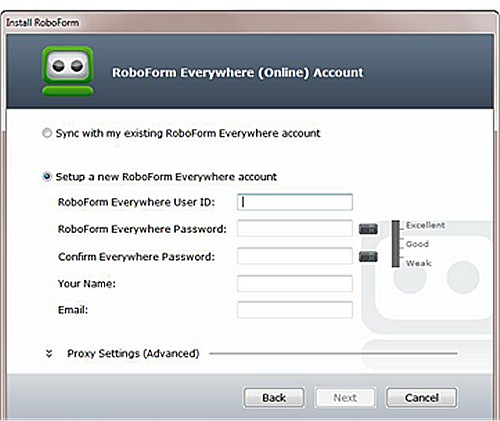
RoboForm Everywhere has recently launched version 9.9.3, compatible with various platforms including Windows, Chrome, Firefox, Edge, and Android. This password manager is renowned for its robust web form-filling capabilities, enhanced by advanced Artificial Intelligence (AI).
Key Features and Security Model
RoboForm operates on a zero-knowledge architecture, utilizing AES-256 encryption to ensure user data remains secure. Core functionalities include a password vault, auto-fill options, a password generator, and secure sharing capabilities. Users benefit from phishing protection, as auto-fill operates only on exact URLs, safeguarding against fraudulent websites.
Why Use RoboForm?
Using RoboForm alleviates the risks associated with password management, such as password reuse and weak passwords, which are common vulnerabilities. It simplifies the login process by allowing users to remember just one master password, eliminating the need for unsafe storage methods like sticky notes. The password manager generates unique and strong passwords for each account, enhancing overall security.
Moreover, RoboForm's ability to detect phishing sites by comparing URLs ensures that users do not inadvertently disclose their credentials on malicious platforms. This dual function of convenience and protection makes RoboForm an essential tool for managing online identities securely.
The Technology Behind RoboForm
RoboForm's zero-knowledge architecture ensures that the master password, which encrypts user data, is never shared with the company's servers. This means that even RoboForm cannot access users' passwords, providing a significant layer of security. Data is encrypted locally before being sent to the server, ensuring high-level protection against data breaches.
Feature Highlights
- One-Click Login: Instantly fill in passwords without manual entry.
- Password Generator: Create strong, random passwords.
- Cross-Platform Sync: Access passwords seamlessly across devices.
- Secure Sharing: Share logins without exposing passwords.
- Sorting Options: Organize passwords for easy access.
- Two-Factor Authentication (2FA): Add an extra security layer.
Pros and Cons
Pros:
- Excellent security with zero-knowledge architecture.
- User-friendly interface suitable for beginners.
- Reliable cross-device syncing and auto-fill.
- Over 20 years of continuous improvement.
Cons:
- Premium features require a subscription.
- Resetting the master password can lead to data loss, emphasizing the importance of remembering it.
Conclusion
For over two decades, RoboForm has established itself as a dependable password manager. Its combination of security, convenience, and a user-friendly experience makes it an invaluable tool for anyone looking to enhance their online security. With its zero-knowledge model, users can have peace of mind knowing that their sensitive information remains private. If you prioritize security and efficiency in managing your passwords, RoboForm is a highly recommended choice.
Extended Note: The Future of Password Management
As cyber threats continue to evolve, the demand for robust password management solutions will only grow. Future iterations of tools like RoboForm may integrate even more advanced AI technologies and adapt to emerging security challenges, potentially incorporating biometric authentication and enhanced user analytics. Continually adapting to user needs while maintaining a focus on security will be essential for password managers to remain relevant and effective in the digital age
Key Features and Security Model
RoboForm operates on a zero-knowledge architecture, utilizing AES-256 encryption to ensure user data remains secure. Core functionalities include a password vault, auto-fill options, a password generator, and secure sharing capabilities. Users benefit from phishing protection, as auto-fill operates only on exact URLs, safeguarding against fraudulent websites.
Why Use RoboForm?
Using RoboForm alleviates the risks associated with password management, such as password reuse and weak passwords, which are common vulnerabilities. It simplifies the login process by allowing users to remember just one master password, eliminating the need for unsafe storage methods like sticky notes. The password manager generates unique and strong passwords for each account, enhancing overall security.
Moreover, RoboForm's ability to detect phishing sites by comparing URLs ensures that users do not inadvertently disclose their credentials on malicious platforms. This dual function of convenience and protection makes RoboForm an essential tool for managing online identities securely.
The Technology Behind RoboForm
RoboForm's zero-knowledge architecture ensures that the master password, which encrypts user data, is never shared with the company's servers. This means that even RoboForm cannot access users' passwords, providing a significant layer of security. Data is encrypted locally before being sent to the server, ensuring high-level protection against data breaches.
Feature Highlights
- One-Click Login: Instantly fill in passwords without manual entry.
- Password Generator: Create strong, random passwords.
- Cross-Platform Sync: Access passwords seamlessly across devices.
- Secure Sharing: Share logins without exposing passwords.
- Sorting Options: Organize passwords for easy access.
- Two-Factor Authentication (2FA): Add an extra security layer.
Pros and Cons
Pros:
- Excellent security with zero-knowledge architecture.
- User-friendly interface suitable for beginners.
- Reliable cross-device syncing and auto-fill.
- Over 20 years of continuous improvement.
Cons:
- Premium features require a subscription.
- Resetting the master password can lead to data loss, emphasizing the importance of remembering it.
Conclusion
For over two decades, RoboForm has established itself as a dependable password manager. Its combination of security, convenience, and a user-friendly experience makes it an invaluable tool for anyone looking to enhance their online security. With its zero-knowledge model, users can have peace of mind knowing that their sensitive information remains private. If you prioritize security and efficiency in managing your passwords, RoboForm is a highly recommended choice.
Extended Note: The Future of Password Management
As cyber threats continue to evolve, the demand for robust password management solutions will only grow. Future iterations of tools like RoboForm may integrate even more advanced AI technologies and adapt to emerging security challenges, potentially incorporating biometric authentication and enhanced user analytics. Continually adapting to user needs while maintaining a focus on security will be essential for password managers to remain relevant and effective in the digital age
Roboform 9.9.3 released
Roboform Everywhere for Windows, Chrome, Firefox, Edge, and Android is a push-button web form filler with some serious Artificial Intelligence (AI) inside.