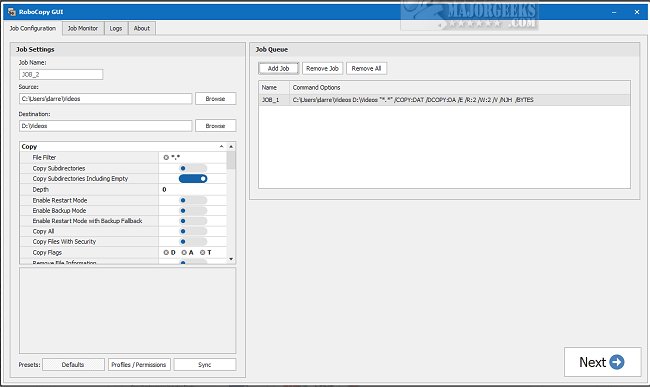
RoboCopy GUI 3.7 has been released, enhancing the functionality of RoboCopy with a user-friendly visual interface. This tool allows users to queue multiple file transfer jobs, monitor their progress, and log activities effectively. With RoboCopy GUI, users can customize settings to suit their needs or select from predefined options. The intuitive design facilitates easy navigation, making it accessible even for those who may not be tech-savvy.
One of the standout features of RoboCopy GUI is its job queuing capability, enabling users to organize and prioritize tasks efficiently. The monitoring functionality keeps users informed about their ongoing tasks, allowing for real-time adjustments as necessary. Additionally, the logging feature provides a comprehensive record of job activities, which is invaluable for tracking progress and pinpointing any issues that may arise.
An exciting new addition in this version is the analysis feature, which helps users identify which files or folders need to be copied, further streamlining the process. Users can also monitor job statuses in real-time through the Job Monitor, ensuring a seamless experience for managing file transfers and backups.
Overall, RoboCopy GUI serves as a powerful and reliable solution for anyone looking to optimize their file-copying tasks with enhanced efficiency and customization options.
Beyond RoboCopy GUI, users may also find interest in related topics such as keyboard shortcuts for file explorers, methods to change default drag-and-drop actions in Windows, resetting folder view settings, and managing hidden files and folders
One of the standout features of RoboCopy GUI is its job queuing capability, enabling users to organize and prioritize tasks efficiently. The monitoring functionality keeps users informed about their ongoing tasks, allowing for real-time adjustments as necessary. Additionally, the logging feature provides a comprehensive record of job activities, which is invaluable for tracking progress and pinpointing any issues that may arise.
An exciting new addition in this version is the analysis feature, which helps users identify which files or folders need to be copied, further streamlining the process. Users can also monitor job statuses in real-time through the Job Monitor, ensuring a seamless experience for managing file transfers and backups.
Overall, RoboCopy GUI serves as a powerful and reliable solution for anyone looking to optimize their file-copying tasks with enhanced efficiency and customization options.
Beyond RoboCopy GUI, users may also find interest in related topics such as keyboard shortcuts for file explorers, methods to change default drag-and-drop actions in Windows, resetting folder view settings, and managing hidden files and folders
RoboCopy GUI 3.7 released
RoboCopy GUI provides a visual interface for RoboCopy featuring job queuing, job monitoring, and logging.