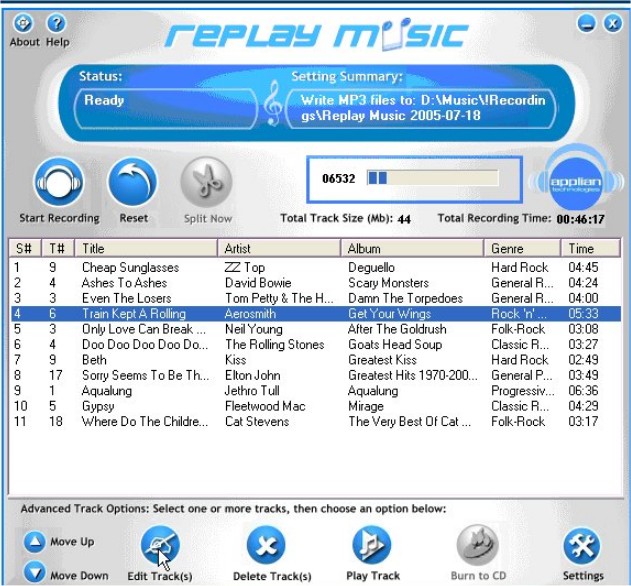
Replay Music version 2026.8.16.36 has been released, showcasing its capabilities as a premier streaming music recorder. This software enables users to capture MP3 files from any streaming source, ensuring that each recorded song is saved in high-quality MP3 format. Utilizing proprietary song recognition technology, Replay Music identifies and tags each track with relevant details, including the artist, song title, album, and genre. This functionality allows users to easily organize their music libraries.
What sets Replay Music apart is its advanced track splitting algorithm, which ensures that entire songs are recorded without cutting off beginnings or endings, a common issue with many other recording programs. After recording, users have the option to burn their MP3 files to CD or DVD or transfer them to any MP3-compatible device, such as smartphones and tablets.
In addition to its recording features, Replay Music also provides helpful tips for managing audio settings in Windows 10 and 11, such as renaming sound devices, adjusting audio balance, changing the default sound output, and troubleshooting sound problems.
Looking ahead, Replay Music may continue to enhance its features by integrating more user-friendly interfaces, expanding compatibility with various streaming platforms, and improving its song recognition technology. This could further solidify its position as a leading choice for music enthusiasts wanting to capture and curate their favorite tracks seamlessly
What sets Replay Music apart is its advanced track splitting algorithm, which ensures that entire songs are recorded without cutting off beginnings or endings, a common issue with many other recording programs. After recording, users have the option to burn their MP3 files to CD or DVD or transfer them to any MP3-compatible device, such as smartphones and tablets.
In addition to its recording features, Replay Music also provides helpful tips for managing audio settings in Windows 10 and 11, such as renaming sound devices, adjusting audio balance, changing the default sound output, and troubleshooting sound problems.
Looking ahead, Replay Music may continue to enhance its features by integrating more user-friendly interfaces, expanding compatibility with various streaming platforms, and improving its song recognition technology. This could further solidify its position as a leading choice for music enthusiasts wanting to capture and curate their favorite tracks seamlessly
Replay Music 2026.8.16.36 released
Replay Music is a unique streaming music recorder that captures MP3 files from any streaming source.