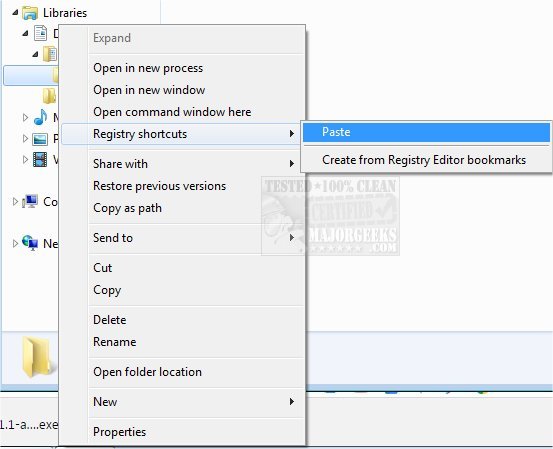
Registry Shortcuts version 1.4.2 has been released, offering users a practical solution for quickly accessing specific registry keys by creating shortcuts that can be organized within folders. Once installed, the application operates discreetly, with its commands accessible only through a shift + right-click action. Users can create shortcuts by first copying the desired registry key paths to their clipboard. Afterward, they can navigate to the desired folder, hold the shift key, right-click, select 'Registry Shortcuts,' and paste the copied paths from the context menu. Each shortcut will display the corresponding key name, enhancing usability.
This tool is especially beneficial for individuals who frequently work with the Windows Registry, as it streamlines the process of accessing specific keys without the need to manually search through the extensive registry tree. Users have the flexibility to create multiple folders containing their shortcuts, allowing for better organization. Clicking on a shortcut directly opens the associated key in the Registry Editor, eliminating the need for manual navigation.
In addition to its core functionality, users might find it useful to explore related topics such as how to add or remove registry favorites, various methods to open the Registry Editor in Windows, and guidance on backing up or restoring the Windows Registry. Furthermore, users can learn how to customize the appearance of the Registry Editor font, enhancing their overall experience while managing the registry.
The continued development of Registry Shortcuts indicates a commitment to improving user efficiency and accessibility within the Windows environment, catering to both novice and advanced users seeking better ways to manage registry settings
This tool is especially beneficial for individuals who frequently work with the Windows Registry, as it streamlines the process of accessing specific keys without the need to manually search through the extensive registry tree. Users have the flexibility to create multiple folders containing their shortcuts, allowing for better organization. Clicking on a shortcut directly opens the associated key in the Registry Editor, eliminating the need for manual navigation.
In addition to its core functionality, users might find it useful to explore related topics such as how to add or remove registry favorites, various methods to open the Registry Editor in Windows, and guidance on backing up or restoring the Windows Registry. Furthermore, users can learn how to customize the appearance of the Registry Editor font, enhancing their overall experience while managing the registry.
The continued development of Registry Shortcuts indicates a commitment to improving user efficiency and accessibility within the Windows environment, catering to both novice and advanced users seeking better ways to manage registry settings
Registry Shortcuts 1.4.2 released
Registry Shortcuts is a handy option for creating shortcuts to specific registry keys that can be placed in a folder for efficient access.