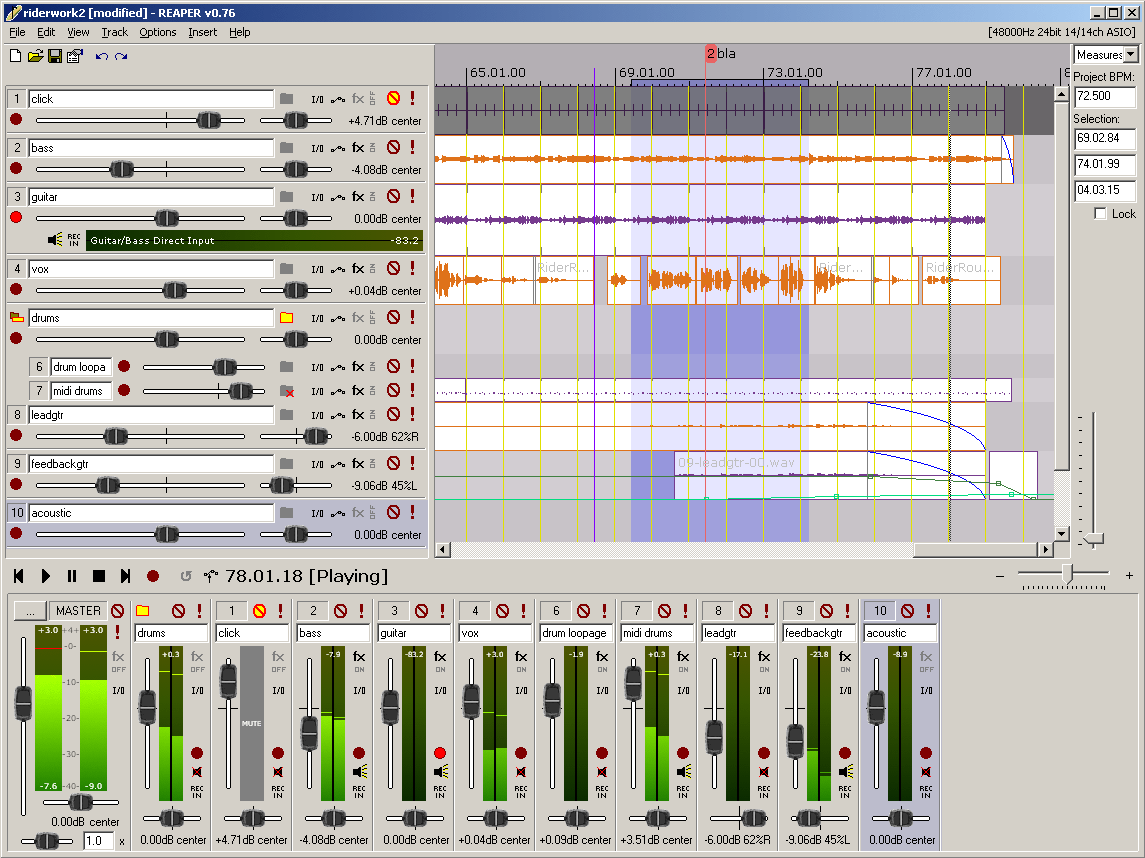
Reaper 7.56 is the latest version of a versatile digital audio workstation (DAW) that allows users to record, arrange, edit, and render multi-track waveform audio. This application is noted for its lightweight nature, speed, and stability, making it a popular choice among audio professionals and enthusiasts alike. Additionally, the last freeware version of Reaper is still available for users who prefer not to invest immediately.
Key Features of Reaper
1. Driver Support and Stability: Reaper supports various audio drivers, including ASIO, Kernel Streaming, WaveOut, and DirectSound. This flexibility ensures that if one driver fails, users can easily switch to another without interrupting their workflow, which is particularly useful during critical mixing sessions.
2. File Compatibility: The software reads common audio formats such as WAV, OGG, MP3, and MIDI, allowing for straightforward recording and editing without unnecessary complexity.
3. Unlimited Tracks: Reaper permits users to arrange an unlimited number of tracks and items, meaning you can stack as many vocal tracks as needed without facing restrictions.
4. Comprehensive Plugin Support: The DAW works with a variety of plugins, including DirectX, VST, and Jesusonic, all of which are automatable. The bundled JSFX tools are also efficient for quick fixes.
5. User-Friendly Automation: Automation features are consistent and reliable, allowing for per-track volume and pan control without the unpredictability found in some other DAWs.
6. Customizable Interface: Users can personalize the color themes of the interface, although the default setup may appear outdated. The Reaper community offers various themes to enhance the visual experience.
Target Audience
Reaper is ideal for users seeking a lightweight and stable audio workstation, particularly those who prefer to customize their software settings. However, it may not suit those who expect a plethora of built-in instruments or polished, out-of-the-box experiences.
Suitability for Beginners
Reaper is surprisingly beginner-friendly. While the interface may seem complex initially, its logical workflow becomes intuitive once users grasp the basics. The software's lightweight design prevents performance issues, making it easier for novices to experiment with multiple plugins without system crashes.
Conclusion
Reaper stands out as a powerful, efficient digital audio workstation that prioritizes speed and stability. Despite its somewhat dated interface and extensive customization options, it remains a favorite among audio professionals. Users looking for support can find assistance in forums like MajorGeeks, where community members share tips and solutions.
Future Prospects
Looking forward, Reaper could benefit from introducing more built-in instruments and loops to attract users looking for a more comprehensive out-of-the-box experience. Additionally, enhancing the user interface to modern standards while maintaining its customizable nature could further broaden its appeal. As the audio production landscape evolves, Reaper's ability to adapt and innovate will be crucial in retaining its loyal user base while attracting new users
Key Features of Reaper
1. Driver Support and Stability: Reaper supports various audio drivers, including ASIO, Kernel Streaming, WaveOut, and DirectSound. This flexibility ensures that if one driver fails, users can easily switch to another without interrupting their workflow, which is particularly useful during critical mixing sessions.
2. File Compatibility: The software reads common audio formats such as WAV, OGG, MP3, and MIDI, allowing for straightforward recording and editing without unnecessary complexity.
3. Unlimited Tracks: Reaper permits users to arrange an unlimited number of tracks and items, meaning you can stack as many vocal tracks as needed without facing restrictions.
4. Comprehensive Plugin Support: The DAW works with a variety of plugins, including DirectX, VST, and Jesusonic, all of which are automatable. The bundled JSFX tools are also efficient for quick fixes.
5. User-Friendly Automation: Automation features are consistent and reliable, allowing for per-track volume and pan control without the unpredictability found in some other DAWs.
6. Customizable Interface: Users can personalize the color themes of the interface, although the default setup may appear outdated. The Reaper community offers various themes to enhance the visual experience.
Target Audience
Reaper is ideal for users seeking a lightweight and stable audio workstation, particularly those who prefer to customize their software settings. However, it may not suit those who expect a plethora of built-in instruments or polished, out-of-the-box experiences.
Suitability for Beginners
Reaper is surprisingly beginner-friendly. While the interface may seem complex initially, its logical workflow becomes intuitive once users grasp the basics. The software's lightweight design prevents performance issues, making it easier for novices to experiment with multiple plugins without system crashes.
Conclusion
Reaper stands out as a powerful, efficient digital audio workstation that prioritizes speed and stability. Despite its somewhat dated interface and extensive customization options, it remains a favorite among audio professionals. Users looking for support can find assistance in forums like MajorGeeks, where community members share tips and solutions.
Future Prospects
Looking forward, Reaper could benefit from introducing more built-in instruments and loops to attract users looking for a more comprehensive out-of-the-box experience. Additionally, enhancing the user interface to modern standards while maintaining its customizable nature could further broaden its appeal. As the audio production landscape evolves, Reaper's ability to adapt and innovate will be crucial in retaining its loyal user base while attracting new users
Reaper 7.56 released
REAPER is an application that lets you record, arrange, edit, and render multi-track waveform audio. The last freeware version also available.