Ram Saver Pro is a RAM optimization tool for Windows, designed to enhance memory management and improve system performance. If your computer experiences slowdowns after opening multiple applications or browser tabs, this software can help reclaim lost speed by efficiently managing memory and freeing up system resources. It's particularly beneficial for older PCs or those heavily utilized, providing a cost-effective alternative to hardware upgrades.
Functionality of Ram Saver Pro
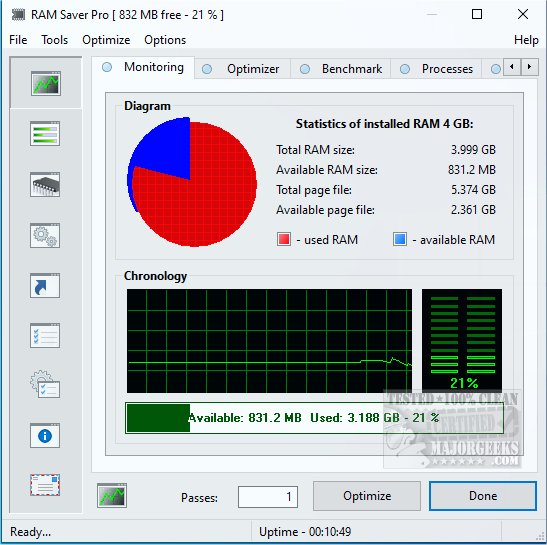
Windows may not always handle memory management effectively, especially when numerous background applications are running. Ram Saver Pro addresses this by continuously monitoring RAM usage and optimizing it in real-time. It clears unused memory, enhancing performance and allowing users to see detailed statistics on memory consumption, including what is free and what is being used excessively. Users can opt for automatic memory optimization on a set schedule or manually initiate it when needed.
Key Features:
- Real-Time RAM Monitoring: Live tracking of memory usage through a user-friendly interface.
- One-Click RAM Optimization: Instant memory clearing to boost performance during resource-intensive tasks such as gaming or video editing.
- System Tray Integration: Quick access to controls without the need to open the full application.
- Memory Benchmarking Tool: Built-in tests to evaluate system performance.
- Startup Manager: The ability to delay or disable applications that slow down boot times.
Target Audience
Ram Saver Pro is ideal for users operating older Windows desktops or budget laptops with limited RAM (around 4–8 GB). It's particularly useful for individuals who frequently juggle numerous browser tabs or run memory-heavy applications like Photoshop, Chrome, or Integrated Development Environments (IDEs). Even casual users will notice fewer slowdowns during standard activities like streaming or document editing.
Pros and Cons
Pros:
- Effective real-time RAM optimization.
- Lightweight and minimal impact on system resources.
- Customizable with scheduling and automatic adjustments.
- Bundles useful system tools in a single application.
Cons:
- The interface may feel outdated compared to newer Windows utilities.
- Some features require a paid version.
- There is no portable version for use on different machines.
Conclusion
Ram Saver Pro stands out as a powerful utility for optimizing RAM, providing users with enhanced control over memory management. Even though Windows has built-in tools for memory management, Ram Saver Pro offers a more granular approach that can significantly improve performance, particularly for systems with limited RAM. Its straightforward functionality makes it an appealing choice for those seeking to enhance their computer's responsiveness without resorting to hardware upgrades. Whether for gaming, editing, or multitasking, Ram Saver Pro can help keep your system running smoothly with just a few clicks.
Further Reading:
- Comparison of Drive Cleaners: CCleaner vs. Wise Disk Cleaner vs. PrivaZer.
- How to Use Storage Sense to Automatically Delete Junk Files in Windows 10 & 11.
- Secure Deletion of Files in Windows 10 & 11 Using PowerShell and Cipher.
- Backing Up or Restoring the Windows Registry
Functionality of Ram Saver Pro
Windows may not always handle memory management effectively, especially when numerous background applications are running. Ram Saver Pro addresses this by continuously monitoring RAM usage and optimizing it in real-time. It clears unused memory, enhancing performance and allowing users to see detailed statistics on memory consumption, including what is free and what is being used excessively. Users can opt for automatic memory optimization on a set schedule or manually initiate it when needed.
Key Features:
- Real-Time RAM Monitoring: Live tracking of memory usage through a user-friendly interface.
- One-Click RAM Optimization: Instant memory clearing to boost performance during resource-intensive tasks such as gaming or video editing.
- System Tray Integration: Quick access to controls without the need to open the full application.
- Memory Benchmarking Tool: Built-in tests to evaluate system performance.
- Startup Manager: The ability to delay or disable applications that slow down boot times.
Target Audience
Ram Saver Pro is ideal for users operating older Windows desktops or budget laptops with limited RAM (around 4–8 GB). It's particularly useful for individuals who frequently juggle numerous browser tabs or run memory-heavy applications like Photoshop, Chrome, or Integrated Development Environments (IDEs). Even casual users will notice fewer slowdowns during standard activities like streaming or document editing.
Pros and Cons
Pros:
- Effective real-time RAM optimization.
- Lightweight and minimal impact on system resources.
- Customizable with scheduling and automatic adjustments.
- Bundles useful system tools in a single application.
Cons:
- The interface may feel outdated compared to newer Windows utilities.
- Some features require a paid version.
- There is no portable version for use on different machines.
Conclusion
Ram Saver Pro stands out as a powerful utility for optimizing RAM, providing users with enhanced control over memory management. Even though Windows has built-in tools for memory management, Ram Saver Pro offers a more granular approach that can significantly improve performance, particularly for systems with limited RAM. Its straightforward functionality makes it an appealing choice for those seeking to enhance their computer's responsiveness without resorting to hardware upgrades. Whether for gaming, editing, or multitasking, Ram Saver Pro can help keep your system running smoothly with just a few clicks.
Further Reading:
- Comparison of Drive Cleaners: CCleaner vs. Wise Disk Cleaner vs. PrivaZer.
- How to Use Storage Sense to Automatically Delete Junk Files in Windows 10 & 11.
- Secure Deletion of Files in Windows 10 & 11 Using PowerShell and Cipher.
- Backing Up or Restoring the Windows Registry
Ram Saver Pro 26.2.1 released
Ram Saver Pro is a RAM optimizer for Windows that gives you direct control over your system's memory management.