RadeonTuner is a new software tool designed as a simplified and user-friendly alternative to the more complex AMD Radeon Adrenalin Edition suite. Its main goal is to equip users with essential tools for easily adjusting display settings, optimizing GPU and fan performance, and managing various gaming graphics options.
User-Friendly Interface
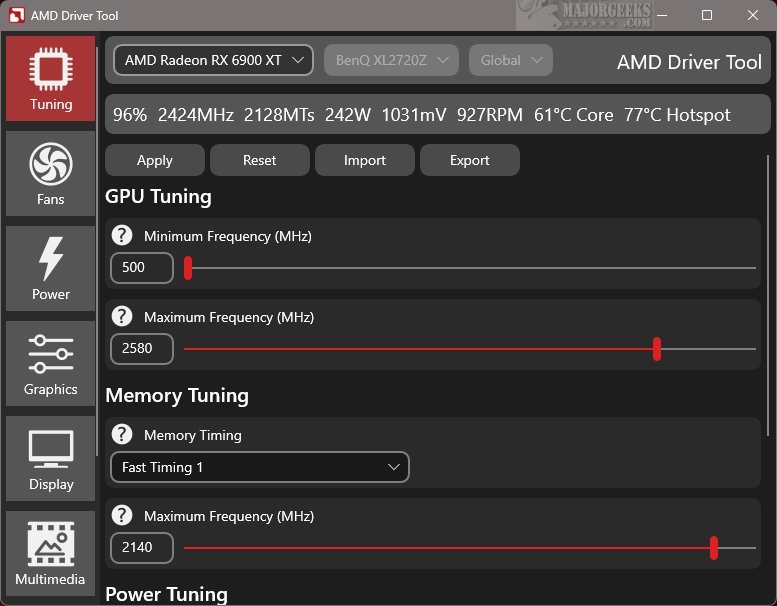
The RadeonTuner interface is intuitive, featuring key functionalities prominently displayed on the left side for quick access. Users can conveniently switch between different settings without navigating through cumbersome menus. The interface also displays the currently selected AMD GPU model at the top, which is especially useful for those who have multiple graphics cards, ensuring that changes are made to the intended device.
Core Features and Capabilities
RadeonTuner allows users to make fundamental adjustments such as modifying clock speeds, fan curves, and power limits, in addition to tweaking graphics settings for individual games and display preferences. A standout feature is its support for importing and exporting settings, making it easy to restore custom configurations after updates or driver installations, thus avoiding a return to default settings.
This tool is particularly advantageous for users who prefer to download and install GPU drivers independently of the full Adrenalin suite. By obtaining the latest drivers directly from the official AMD website, users can install them and then utilize RadeonTuner for precise customization of various settings.
Why Choose RadeonTuner?
RadeonTuner is an essential tool for users who want to take control of their AMD GPU settings without the complexities often found in official software. It offers a lightweight alternative that eliminates unnecessary background processes and rarely used features, resulting in a more straightforward and efficient experience.
Conclusion
In summary, RadeonTuner presents a refreshing approach to managing AMD graphics settings, making it an ideal choice for gamers and enthusiasts who seek simplicity and efficiency. With its user-friendly interface and core functionalities, it enhances the overall gaming and graphics experience, empowering users to optimize their systems seamlessly.
Future Considerations
As RadeonTuner continues to evolve, future updates could introduce additional features such as enhanced support for overclocking, deeper integration with popular gaming platforms, and community-driven profiles for various games. This could further solidify its position as a go-to tool for AMD GPU management, catering to both casual users and hardcore gamers alike
User-Friendly Interface
The RadeonTuner interface is intuitive, featuring key functionalities prominently displayed on the left side for quick access. Users can conveniently switch between different settings without navigating through cumbersome menus. The interface also displays the currently selected AMD GPU model at the top, which is especially useful for those who have multiple graphics cards, ensuring that changes are made to the intended device.
Core Features and Capabilities
RadeonTuner allows users to make fundamental adjustments such as modifying clock speeds, fan curves, and power limits, in addition to tweaking graphics settings for individual games and display preferences. A standout feature is its support for importing and exporting settings, making it easy to restore custom configurations after updates or driver installations, thus avoiding a return to default settings.
This tool is particularly advantageous for users who prefer to download and install GPU drivers independently of the full Adrenalin suite. By obtaining the latest drivers directly from the official AMD website, users can install them and then utilize RadeonTuner for precise customization of various settings.
Why Choose RadeonTuner?
RadeonTuner is an essential tool for users who want to take control of their AMD GPU settings without the complexities often found in official software. It offers a lightweight alternative that eliminates unnecessary background processes and rarely used features, resulting in a more straightforward and efficient experience.
Conclusion
In summary, RadeonTuner presents a refreshing approach to managing AMD graphics settings, making it an ideal choice for gamers and enthusiasts who seek simplicity and efficiency. With its user-friendly interface and core functionalities, it enhances the overall gaming and graphics experience, empowering users to optimize their systems seamlessly.
Future Considerations
As RadeonTuner continues to evolve, future updates could introduce additional features such as enhanced support for overclocking, deeper integration with popular gaming platforms, and community-driven profiles for various games. This could further solidify its position as a go-to tool for AMD GPU management, catering to both casual users and hardcore gamers alike
RadeonTuner 0.7.1.0 released
RadeonTuner serves as a streamlined and user-friendly alternative to the comprehensive AMD Radeon Adrenalin Edition suite. Its primary purpose is to provide essential tools that let users easily adjust display settings, fine-tune GPU and fan performance, and manage various gaming graphics options.